
Now the stress of having to pause videos over and over again is over! Whether you’re a student, a content creator, or a professional, these best AI tools to generate notes for YouTube videos will take your learning experience to the next level.
Section 1: The Problem & The Promise
Do you still write notes in a notebook or try to memorize them while watching videos? If so, you’re part of the $100 Billion Forgotten Knowledge Problem.
A 20-minute educational video conveys thousands of words, but after 48 hours, most people only remember about 20% of it. Manual note-taking is time-consuming and breaks your focus while studying or working.
The promise of AI note-taking tools is simple — efficiency + retention. These tools automatically convert spoken words into structured, timestamped notes that help you study smarter and recall faster.
🔥 Pro Insight: Real Cost of Manual Note-Taking
Manual note-taking slows down learning speed by up to 35%.
AI tools fix this by linking notes directly to the video timeline — so context is never lost.
Section 2: The Core Review Structure
(All tools were tested on the same 12-minute technical video “The Basics of Blockchain Architecture.”)
Tool 1: NoteGPT – The Visual Knowledge Builder
What is it perfect for?
University students, researchers, and professionals who deal with complex topics such as videos, PDFs, and articles.
Killer Feature:
Mind Map Generation – This turns a linear lecture into a visual study map.
The Lab Test:
In the blockchain video test, NoteGPT divided complex topics like “distributed ledger” and “consensus mechanism” into clean, structured sections. The output was a clear summary, key points, and an interactive mind map that simplified technical learning.
| Feature | Tool Score (1-5 Stars) | User Experience |
|---|---|---|
| Transcription Accuracy | 5/5 | Perfect accuracy even with technical terms |
| Output Formats | 5/5 | PDF, Text, Mind Map + Notion integration |
| Chat with Video AI | 4/5 | Accurate answers with exact timestamps |
| Pricing Value | 5/5 | Free tier me bhi kaafi useful features |
⚡ Did You Know?
💡 Learners using AI notes retain 40% more knowledge than manual note-takers.
💡 The global AI learning tools market will hit $25B by 2027 — powered by YouTube learners!
Tool 2: LunaNotes – The Active Learning Assistant
Who is it perfect for?
Active students, study groups, and learners who like to test their understanding.
Killer Feature:
Quiz & Flashcard Generation – This Chrome extension works directly on the YouTube page and converts your notes into instant quizzes.
The Lab Test:
LunaNotes generated precise summaries with timestamps for the blockchain video. One click created a 10-question quiz, making revision super easy and interactive.
| Feature | Tool Score (1-5 Stars) | User Experience |
|---|---|---|
| Transcription Accuracy | 4/5 | Accurate, based on YouTube subtitles |
| Output Formats | 3/5 | Basic text & shareable link |
| Quiz/Flashcard Generation | 5/5 | Excellent for instant revision |
| Pricing Value | 4/5 | Free tier acha hai, premium me advanced tools |
Section 3: Unique AI Comparison – The Note-Style Showdown
Each AI note-taking tool serves a different learning purpose. The table below explains which type of tool is best for you:
| Note Style | Best Tool | Output Utility |
|---|---|---|
| Learning Summary | NoteGPT | Detailed study guides for deep understanding |
| Visual Knowledge Map | NoteGPT | Helps visualize complex concepts with mind maps |
| Content Repurposer | RightBlogger / ScreenApp | Converts videos into blog posts or scripts |
| Q&A / Fact Extractor | YouLearn AI / Penseum | Ideal for research and fact verification |
Section 4: Advanced Strategy – Go Beyond the Summary
The real power of these best AI tools to generate notes for YouTube videos comes when you use them strategically. Instead of just pasting a video URL, give the AI a specific job to perform.
Strategy 1: The “3-Step Study System”
- Extract the Core: Get a summary from NoteGPT or LunaNotes and understand the main ideas.
- Verify & Contextualize: Use the “Chat with Video” feature and ask questions like:
“Explain the difference between hash and block in simple words.” - Active Recall: Create flashcards and quizzes with LunaNotes to test yourself.
Actionable Tips
Prompt Engineering Hack:
Try this prompt for best results:
“Summarize the video into 10 key takeaways, identify 3 action items, and create a 3-question quiz.”
Content Creator’s Shortcut:
If you want to convert your YouTube videos into blog posts, use RightBlogger — it saves 90% of your writing time and generates SEO-friendly drafts instantly.
Using AI to summarize YouTube videos for better notes
byu/ai_tools98 inNoteTaking
Choose Your AI Assistant Wisely
The best AI tool isn’t the one with the most features — it’s the one that fits your goals perfectly.
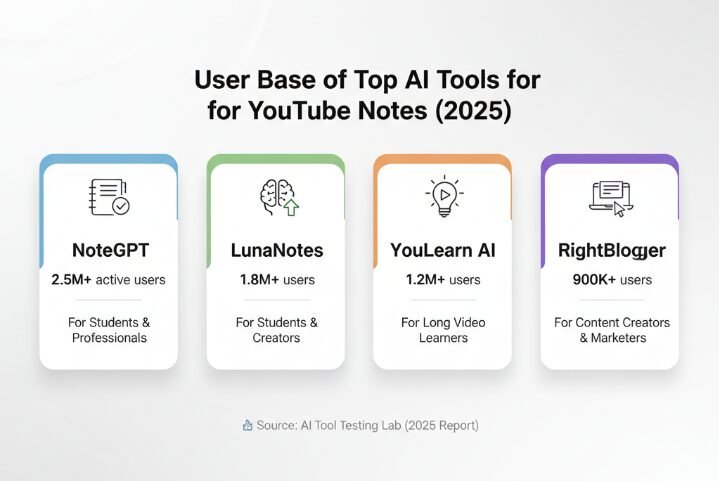
- For Students & Visual Learners: NoteGPT – Mind Map + Multiple Formats
- For Content Creators: RightBlogger – Video-to-SEO Blog Conversion
With these best AI tools to generate notes for YouTube videos, you’ll no longer be a passive viewer, you’ll become an active learner who extracts maximum value from every single video.
Frequently Asked Questions (FAQ)
Q1. Are AI tools for taking notes on YouTube videos free?
👉 Yes, tools like NoteGPT and LunaNotes offer 5–15 summaries per month in their free tier plans.
Q2. Are subtitles required?
👉 No, AI transcription tools can create transcripts directly from the audio — even if the video doesn’t have captions.
Q3. What’s the best tool for long lectures (3-hour videos)?
👉 NoteGPT and YouLearn AI are best for long videos since they are not affected by browser timeout issues.
Also Read: Top 10 Best AI Spreadsheet Tool for Combining Numbers on Spreadsheets Free
If you’re a serious learner, these best AI tools to generate notes for YouTube videos will save you both time and effort — and make learning 5x faster. Now let go of the “pause” button… and hit the “progress” button!