

Your AI agent worked great in the demo. It passed your tests, the stakeholders were impressed, and you shipped it. Three months later, support tickets start mentioning that it quoted a refund policy you retired in the spring.
Nothing “broke.” No error fired and no dashboard turned red. The world moved, and the agent didn’t.
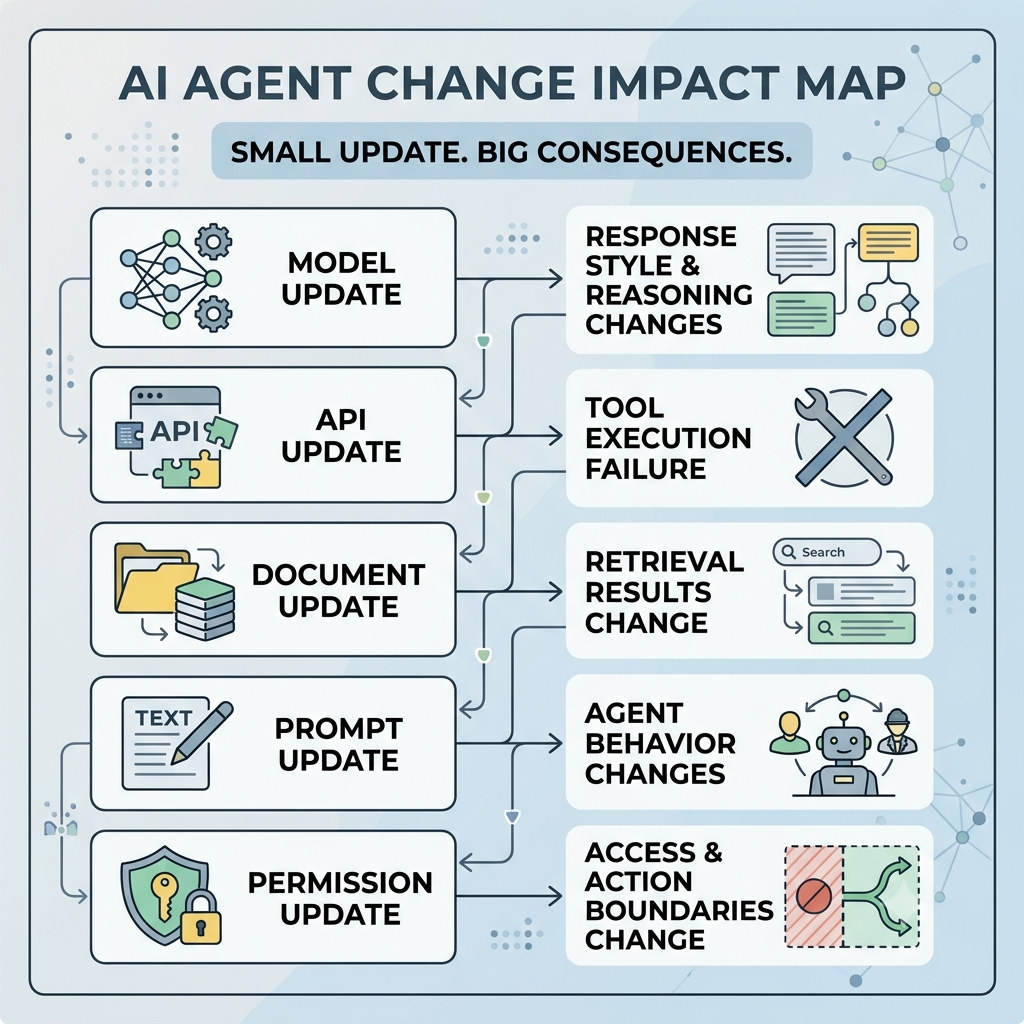
This is the core problem with AI agents in production: they decay quietly. Documents change, APIs get updated, models get swapped, and users start asking questions you never planned for. Reliability isn’t something you test once before launch. It’s something you operate, continuously, like any other critical system.
This guide is the big-picture view for engineering leaders, product managers, and platform owners. It covers what to govern, who owns it, and how to make reliability measurable. For the technical depth, we’ll point you to two companion articles along the way.
What “reliable” actually means
A reliable agent is accurate, current, safe, consistent, available, and useful enough to finish the job it was hired for. Miss any one of those and users notice.
It helps to think about reliability in three layers:
- Upstream data health: the knowledge sources, documents, APIs, and ingestion pipelines your agent depends on.
- Agent behavior: how the agent responds, uses tools, handles uncertainty, and knows when to hand off to a human.
- Governance: the monitoring, ownership, SLAs, and incident response that hold the other two layers together.
This guide lives in the third layer. For the first two, see How to Detect Knowledge Base Drift in RAG Systems (the data side) and AI Agent Calibration: Preventing Hallucinations & Stale Outputs (the behavior side).
The reliability loop
Most teams treat deployment as a finish line. A better mental model is a loop:
- Define the job. What is the agent responsible for, for whom, and at what risk level? What counts as correct, acceptable, and “send this to a human”?
- Set a baseline. Measure task completion, resolution quality, latency, escalation rate, and user feedback over a representative period. You can’t call something a regression until you know what normal looks like.
- Monitor production. Watch infrastructure health, agent behavior (tool choices, retries, handoffs), and real outcomes (did the task actually get done?).
- Detect and classify problems. Is this a data issue, a model or prompt change, a broken integration, or a shift in what users want?
- Contain and fix. Roll back, limit traffic, route to humans, refresh content, or adjust the agent, depending on the cause.
- Learn and re-baseline. Feed confirmed failures into your test sets, and reset your baseline whenever you intentionally change something.
Then you go around again. The loop never ends, and that’s the point.
How a small problem becomes a business problem
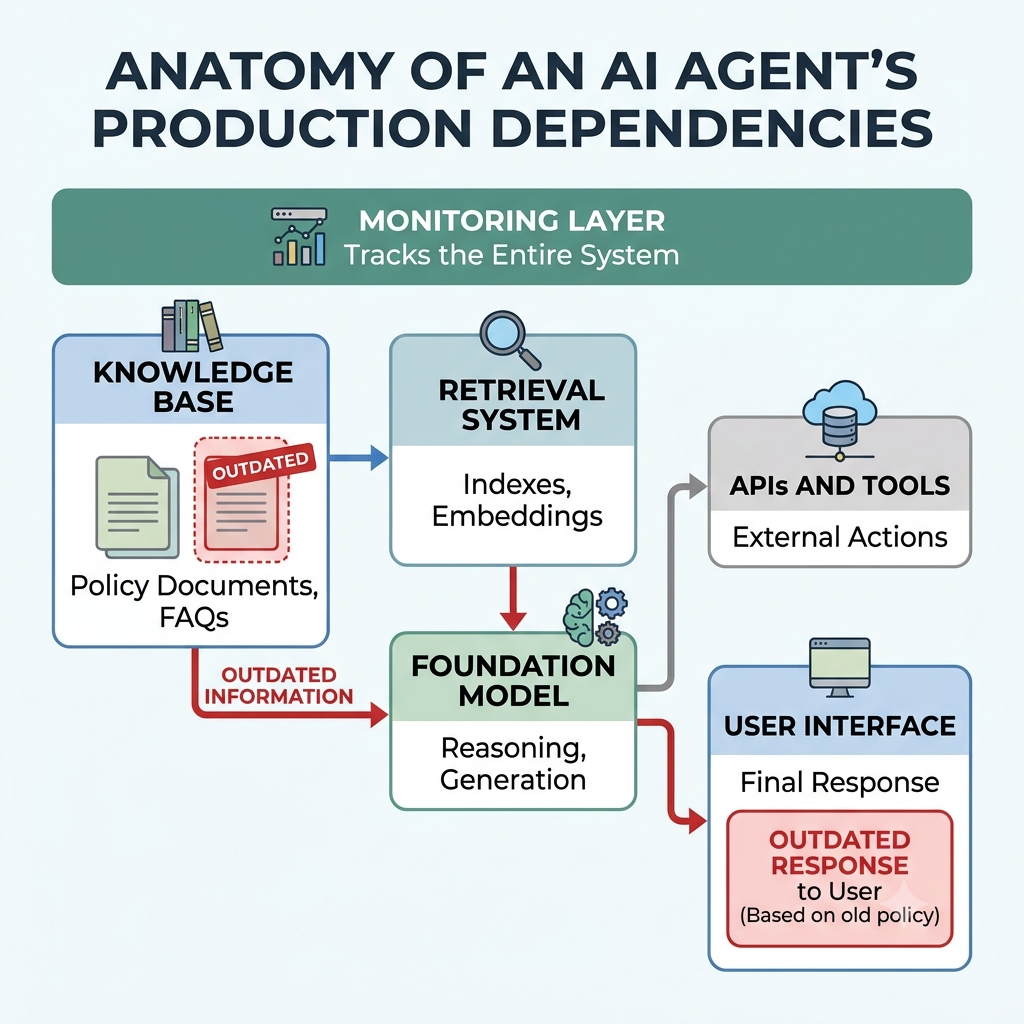
Reliability incidents are rarely “the model’s fault.” They’re usually chains of small failures across teams.
Picture it: a policy document gets updated, but the sync connector quietly stopped working two weeks ago. The index goes stale. The agent retrieves old content and answers confidently anyway. A customer follows the wrong advice, files a complaint, and support spends an hour cleaning it up. Multiply that by a few hundred conversations and you have a trust problem and a cost problem.
Notice how many owners were involved: the content team, the data platform team, the AI team, support, and the business. No single team can see the whole chain, which is exactly why cross-functional monitoring matters.
What to put on the dashboard
Resist the urge to track one “accuracy” number. A useful reliability scorecard covers four areas:
- Availability and performance: success rate, error rate, latency, timeouts, tool-call failures. Is it running?
- Task quality: completion rate, resolution rate, how often users accept or correct answers. Is it doing the job well?
- Behavioral health: escalation rate, retries, refusals, unusual tool selection. Is it behaving as designed?
- Trust and safety: policy violations, unsafe action attempts, flagged hallucinations, complaints. Can we trust it?
A few design rules make these dashboards actually useful:
- Give every team the same definitions and time windows.
- Segment before you average. An overall number can hide one workflow or customer group that’s failing badly.
- Pair leading indicators (like data freshness) with lagging ones (like complaints) so you get warnings, not just post-mortems.
- Assign every metric an owner, a threshold, and a runbook.
- Annotate releases, prompt changes, and knowledge refreshes so a dip isn’t mistaken for drift, or the reverse.
Different audiences need different views. Executives want reliability trend, open incidents, and SLA status. Product wants top failing workflows and feedback themes. Engineering wants pipeline freshness, error rates, and model versions. Risk and compliance want audit completeness and high-risk decision rates.
Setting SLAs that mean something
An AI reliability SLA is a promise about what the agent will deliver and how you’ll know when it doesn’t. The most useful ones cover:
- Availability: the share of sessions or calls that succeed.
- Latency: p50 and p95 response times by workflow.
- Quality: task completion, resolution rate, or human-evaluated accuracy.
- Safety: policy-violation and unsafe-action rates.
- Freshness: the maximum lag between a source update and the agent being able to use it.
- Cost predictability: cost per successful task, token use, tool-call volume.
Base your thresholds on your own production baseline rather than numbers borrowed from someone else’s industry. Define the measurement window and exclusions up front, set an internal target slightly tighter than the promise you make externally, and agree in advance on what happens when the error budget runs out.
Who owns what
Reliability falls apart when everyone assumes someone else is handling it. A simple ownership model helps:
- AI product manager: defines outcomes, quality bar, and risk tolerance.
- Engineering and platform: observability, deployment, rollback, incident tooling.
- Data and knowledge ops: source quality, refresh schedules, ingestion health.
- AI/ML team: evaluation, prompt and model changes, remediation design.
- Support and domain experts: reviewing failures, labeling outcomes, maintaining escalation rules.
- Risk and compliance: approval gates, audit requirements, incident reporting.
- Executive sponsor: funding and resolving cross-team tradeoffs.
Then set a rhythm. Daily automated checks and triage. A weekly reliability review. A monthly look at segment-level quality and test-set refresh. A quarterly check on risk, SLAs, and roadmap.
When things go wrong
Treat AI degradation like any production incident, with severity levels and a clear playbook.
- Sev 1: unsafe actions, data leaks, or broadly harmful answers. Restrict or disable the workflow immediately and preserve evidence.
- Sev 2: major accuracy drops, repeated hallucinations, or an SLA breach. Reduce exposure, route to humans, find the root cause.
- Sev 3: localized quality decline or rising escalations. Investigate and add regression tests.
- Sev 4: minor anomalies with no user impact. Log them and review weekly.
The response flow is the same every time: detect, classify, contain, investigate, fix, verify recovery, and document what you learned. Controlled rollouts and clear rollback paths make the “contain” step far less painful.
Making it get better over time
Monitoring tells you what’s wrong. Improvement loops make it stop happening.
- Capture explicit feedback (ratings, corrections) and implicit signals (retries, abandonment).
- Have experts regularly review high-risk, low-confidence, and escalated cases.
- Maintain a living test set: golden scenarios, edge cases, and every past incident.
- Run regression tests after any meaningful change to the agent, prompts, model, tools, or data pipeline.
- Send stale-content findings to the people who own the content, not just the AI team.
The business case
Unreliable agents cost you in escalations, rework, bad decisions, lost trust, compliance exposure, and engineering hours spent firefighting. Reliable ones pay back in higher automation rates, lower cost per resolved task, faster launches for new workflows, and the confidence to give the agent more responsibility.
Reliability is the difference between an AI demo and an AI system you can trust with real work.
A 90-day starting plan
Days 1 to 30: get visibility. Inventory your agents, data sources, models, tools, and owners. Define priority user journeys and acceptable outcomes. Set up structured logging and a baseline dashboard.
Days 31 to 60: make it operational. Define SLAs, alert thresholds, severity levels, and escalation paths. Start cross-functional reliability reviews. Build evaluation sets for your most critical workflows.
Days 61 to 90: build the improvement loop. Automate safe fixes like re-ingestion and fallback routing. Add canary deployments and rollback procedures. Publish a monthly reliability report to stakeholders.
Also Read: Why Apple Is Rewriting macOS to Contain Defiant AI Agents
Seven ways teams get this wrong
- Silent data decay: sources change and the agent never finds out.
- Metric theater: a healthy-looking accuracy number hides failing workflows.
- Ownership gaps: nobody owns content freshness or escalation quality.
- Alert fatigue: so many low-value alerts that real problems get ignored.
- Unversioned changes: prompts, models, or pipelines change with no baseline to compare against.
- Over-automation: no safe human fallback for ambiguous or high-risk cases.
- Feedback black holes: corrections and reviews that never improve anything.
Where to go next
- To catch stale or misaligned knowledge before it ever reaches your agent, read How to Detect Knowledge Base Drift in RAG Systems.
- To make your agent respond safely when context is weak, ambiguous, or outdated, read AI Agent Calibration: Preventing Hallucinations & Stale Outputs.
Together, these give you the full picture: the operating model here, the data diagnostics in one, and the runtime controls in the other.