
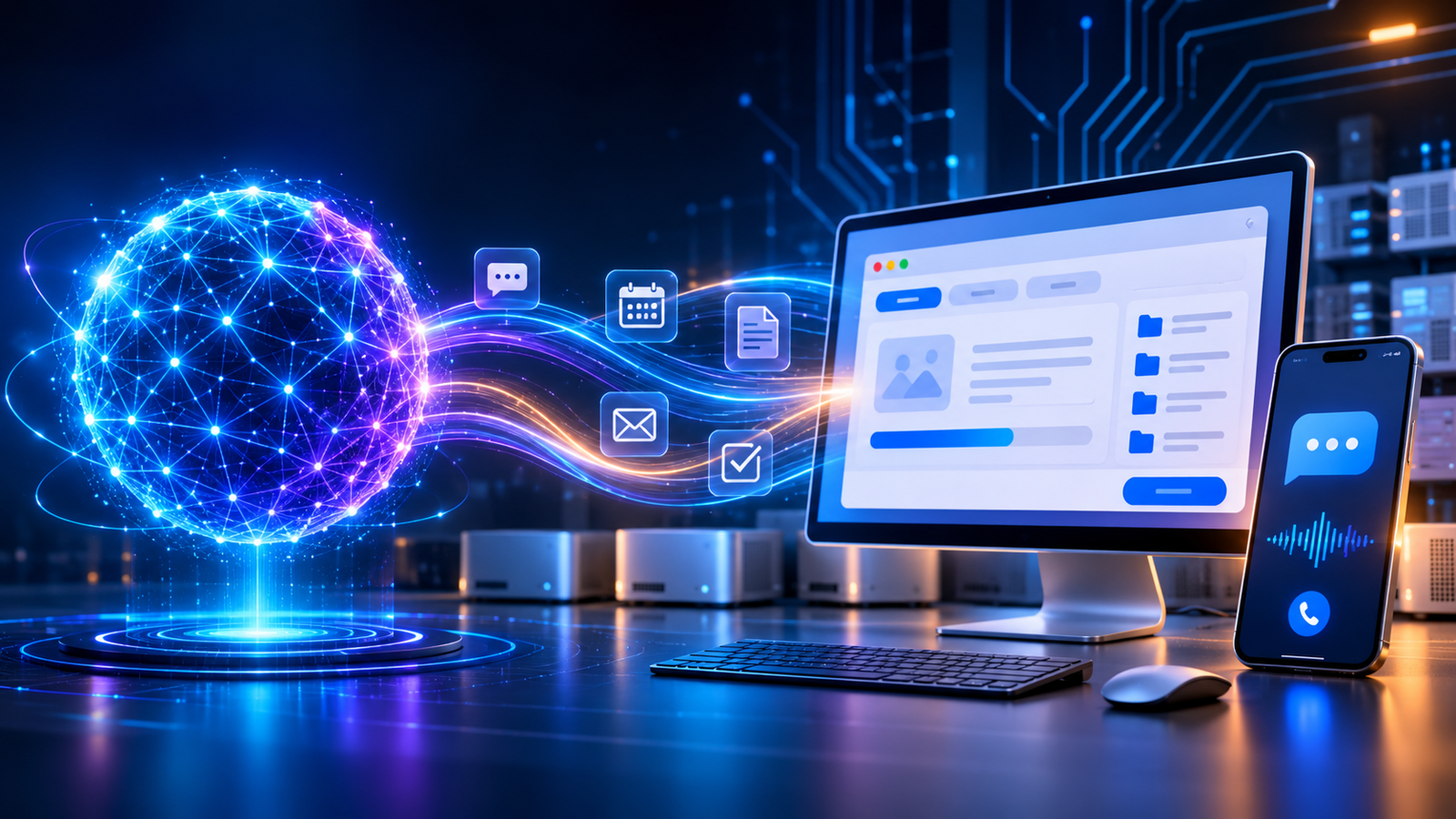
AI agents are now very good at figuring out what people want. They can read a support ticket, summarize a document, draft an email, and hold a decent conversation.
Doing the thing is another story.
An agent might know a customer needs to reschedule an appointment, file an insurance claim, or pull information from a vendor portal. But if that system has no API, or the job needs a browser login, a dropdown, a file upload, or some old desktop app, the agent stops cold.
I call that wall the desktop execution chasm.
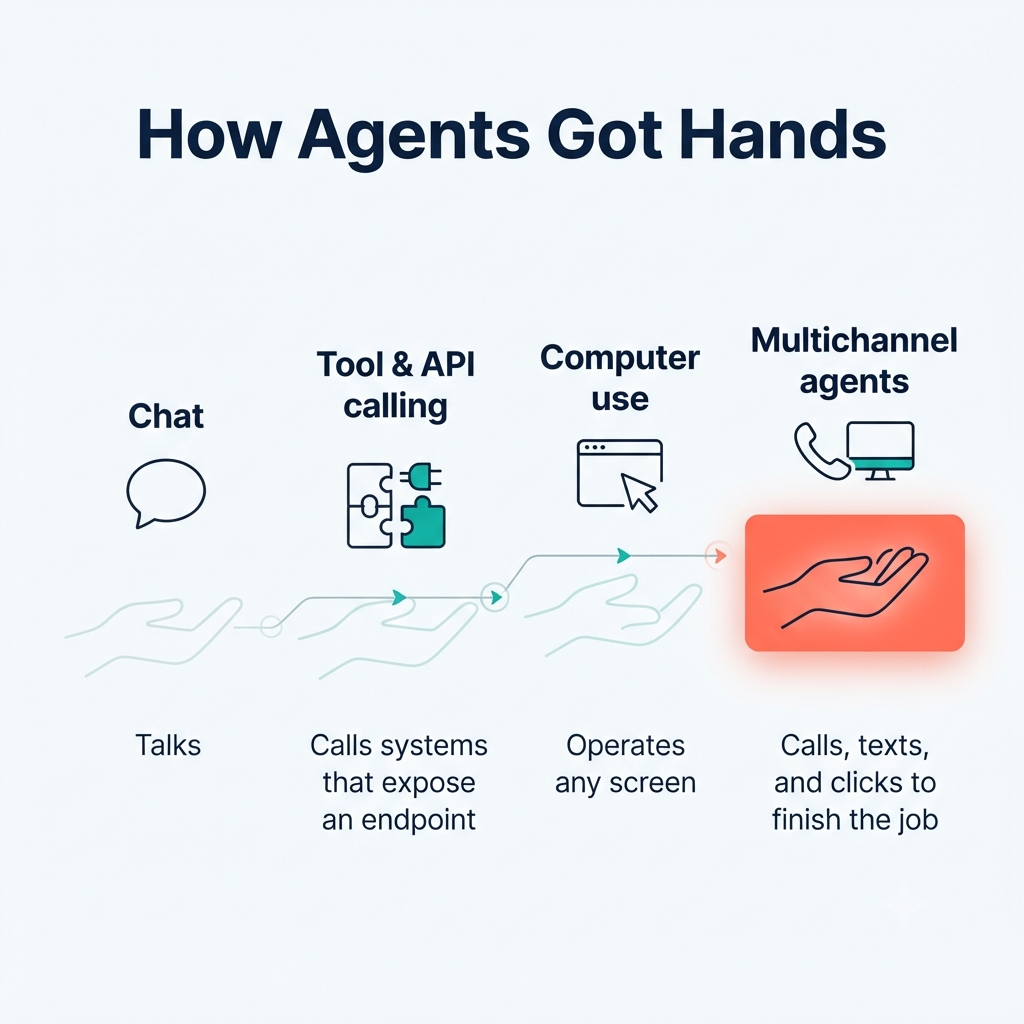
Linq’s move into computer-use infrastructure shows where the market is heading. Agents are no longer being built as chat windows alone. They’re being given the ability to text, call, and actually operate a computer, which closes the gap between talking about work and doing it.
The last mile of autonomy is a GUI
Most enterprise work doesn’t happen inside a tidy, well-documented API. It happens in interfaces built for people.
A support rep navigates a CRM. An ops team updates an internal scheduling tool. Finance downloads a report from a vendor portal. A customer-service flow might mean logging into a legacy app, filling out a form, uploading a document, and confirming it went through.
None of this is exotic. It’s the ordinary last mile of digital work.
The trouble is that an agent can be sharp at reasoning and still have no hands. It can decide what should happen, but it can’t click the button, pick the right option, upload the file, or check that the change saved.
That’s why physical computing access matters. It lets agents use software the same way humans do, through the interfaces already in place.
Linq’s move beyond messaging
Linq started out as infrastructure for AI agents to communicate over messaging. Its new direction builds on that in two ways: HD voice calling and computer-use infrastructure.
The HD Calling product lets an agent make and receive calls on the same mobile number it uses for messaging. Users can ring the agent from their regular phone dialer, and the agent can call out from that same number.
That’s useful because plenty of real situations call for a conversation. Someone has a complicated problem, or needs to confirm details, or has to make a decision that’s easier to talk through than type out.
But a phone call still doesn’t finish most tasks.
Linq’s computer-use offering covers the other half. It gives agents a computing environment where they can operate browsers and desktop software. The company calls this “physical computing infrastructure,” and the idea is that agents can work directly in software and handle administrative tasks.
What stands out to me isn’t that Linq added another feature. It’s that the company treats an agent as something that needs a full operating environment, not just a chat window.
APIs are not the whole enterprise
Enterprise automation usually assumes every system will eventually expose an API. That would be nice. In practice it hasn’t happened.
Plenty of systems were built before API-first design was a thing. Others have APIs, but not for every workflow. Some need costly integration work, custom authentication, partner approvals, or engineering time a business simply doesn’t have.
And a lot of processes cross several systems. A request arrives by message, someone has to be called, a record needs updating in a legacy portal, and a confirmation has to go back out.
| Layer | What it handles | Where it breaks down |
|---|---|---|
| Conversation layer | Chat, messaging, email, voice | Understands intent but may not act |
| Integration layer | APIs, webhooks, connectors | Requires an endpoint, credentials, and engineering |
| Execution layer | Browser, desktop app, legacy UI | Handles work when no clean API exists |
An API is a contract between systems. The desktop interface is often the fallback for every process that never got one.
So computer use isn’t a novelty. It’s an automation strategy for the parts of the enterprise APIs never reached.
What physical computing access actually means
“Physical computing infrastructure” sounds abstract, but the idea is simple: give an agent a controlled computer to work on.
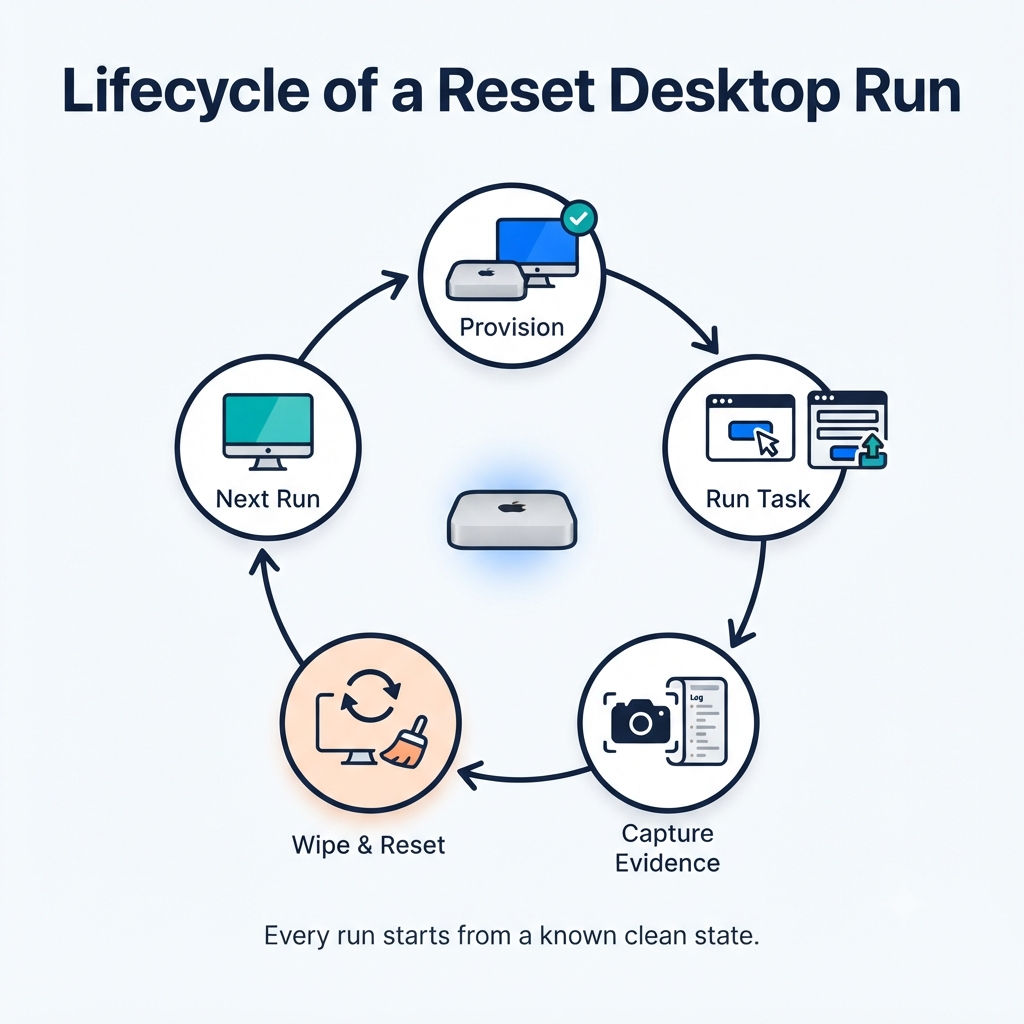
Linq’s compute offering uses dedicated Apple Silicon Mac minis, racked and managed by the company. Customers run browser-use, computer-use, and macOS workloads over SSH. You can start with one machine and grow to a fleet.
For browser tasks, agents can run custom Chromium browsers on macOS to browse, sign in, and complete checkout flows. For computer use, they get a full desktop that can be reset between runs.
That reset detail matters more than it sounds. If an agent hits a surprise pop-up, changes a setting, installs something, or leaves leftover state behind, you can wipe the machine before the next run. That makes behavior far more repeatable, and it’s what turns a fragile experiment into something you can build production workflows on.
So this isn’t just screen scraping. It’s a managed execution environment: a real operating system, a browser, the software you need, network access, and controls for resetting and scaling.
Voice and desktop belong together
The most convincing picture of autonomous work isn’t a chatbot answering questions. It’s an agent that follows a task across channels until it’s done.
Take a travel-support case:
- A customer messages an agent asking to change a flight.
- The agent needs clarification on dates, preferences, or approval.
- The agent calls the customer to talk through the options.
- The agent opens the airline or booking portal and updates the reservation.
- The agent sends the itinerary and confirmation links back by message.
A voice-only agent can talk but may not be able to change the booking. A chat-only agent can message but might get stuck on a portal that needs interactive navigation. An agent with messaging, calling, and computer access has a real shot at finishing the whole loop.
Linq pitches its products around exactly this. Its calling product is meant to let developers build experiences where an agent calls a user to compare options, then texts over the itinerary and booking links.
Not every workflow needs all three channels. The point is that real work crosses channels. A customer might start in chat, escalate to a call, and wrap up in a browser, and the agent has to follow that whole path, not just the easy-to-automate part.
The enterprise unlock: legacy software becomes actionable
For big organizations, the biggest opportunity probably isn’t building shiny new AI-native systems. It’s making the existing ones usable by agents.
Enterprises run on a long tail of software: internal tools, vendor portals, department-specific apps, old desktop programs, and web systems nobody designed for automation.
Rewriting all of it is slow and expensive. Building an integration for every workflow is often impossible. But giving an agent controlled access to the interface that already exists is a practical middle path.
That can open up things like:
- Support cases that need actions in a CRM or ticketing system
- Appointment scheduling across fragmented booking tools
- Claims intake with document uploads and form completion
- Procurement tasks involving supplier portals
- Back-office work across internal desktop applications
- Data retrieval from systems with no modern API
- QA and testing for browser-based products
The value isn’t swapping a human click for an agent click. It’s extending automation into the places where work already happens.
The hard problems: reliability, permissions, and trust
Computer use is powerful, but it isn’t automatically safe or reliable.
Interfaces change. Pages load slowly. A login flow suddenly asks for multi-factor authentication. A pop-up interrupts things. A form has ambiguous fields. A task dies halfway through.
So enterprises need more than an agent that can click. They need an execution layer they can observe, permission, and recover. The main requirements:
- Reliability: Agents must handle shifting interfaces, errors, retries, and unfinished tasks.
- Identity and permissions: Agents should use scoped credentials and clear authority, not broad, unrestricted access.
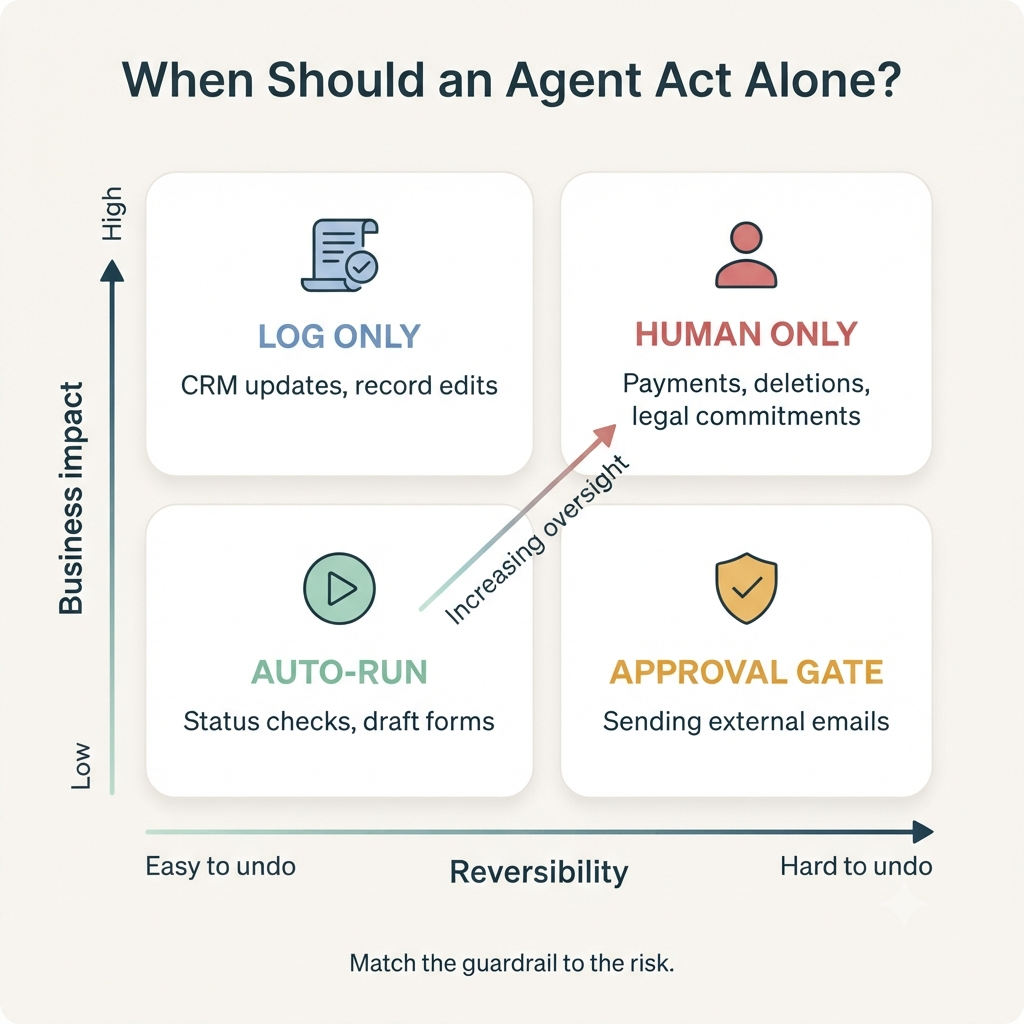
- Safety controls: Risky actions like payments, cancellations, deletions, and outside communications need approval gates.
- Auditability: Teams need logs, screenshots, action histories, and session evidence to see what the agent did.
- Data isolation: Desktops may hold sensitive customer or company data, so isolation and access controls are essential.
- Human handoff: When confidence is low or policy demands review, the agent should pass the task to a person instead of guessing.
The winning infrastructure won’t just let agents click. It will make their clicking trustworthy.
What Linq’s positioning reveals
Linq’s expansion points to a broader shift in the agent market, from caring mostly about the model to caring about the infrastructure.
The model decides what to do. The agent framework plans the steps. But it’s the infrastructure that determines whether the agent can reach the customer, talk to a person, log into a system, and finish the job.
Linq’s compute product is built for that execution layer. It offers dedicated machines, SSH access, customer-controlled software, direct or tunneled network access, and the ability to reset or reassign machines between runs.
So the company isn’t only selling a communication channel. It’s building part of the operational foundation that lets agents act in the world.
The competitive question is moving from “Which model is smartest?” to “Which platform gives an agent secure, reliable access to the systems where work happens?”
What enterprises should do next
Teams exploring autonomous workflows shouldn’t start by asking where they can put a chatbot.
A better question: where does a task begin in conversation but end in software?
A practical way to start:
- Map the execution gap: Find workflows where an agent understands the request but can’t complete the final action.
- Classify systems: Sort them into API-ready, browser-only, desktop-only, and human-in-the-loop.
- Start with reversible tasks: Begin with research, status checks, form prep, and draft submissions before allowing anything irreversible.
- Add approval boundaries: Require a human to confirm payments, cancellations, legal commitments, and sensitive data access.
- Instrument everything: Track task completion, error points, intervention rate, time saved, and auditability.
- Design for handoffs: Make it easy for the agent to pass a task to a person when confidence, policy, or system state calls for it.
The goal isn’t to take humans out of every workflow. It’s to take them out of the repetitive coordination and clicking, so they can spend their time on judgment, exceptions, and relationships.
The agent needs a desk
For years, AI agents got a microphone and a chat window.
Now they’re getting a desk.
A controlled computer environment lets an agent use the software enterprises already run: browsers, internal tools, legacy apps, portals, and desktop interfaces. It turns AI from something that can explain what should happen into something that can help make it happen.
Linq’s push into computer-use infrastructure is a clear example. By combining messaging, HD calling, and dedicated computing environments, the company is working toward agents that can converse, communicate, and execute.
The companies that win the next phase of enterprise AI won’t necessarily have the best chat interface. They’ll be the ones that close the desktop execution chasm, so agents can go from “I understand the request” to “I completed the work.”