

What counts as a “screen” has quietly changed. In SwiftUI, Jetpack Compose, Flutter, and React Native, a screen might be a function, a composable, a widget, or just a route driven by state. It’s no longer a dedicated UIViewController or Activity. That breaks an old assumption behind automatic analytics: that every meaningful user journey produces an obvious, platform-level screen transition.
Firebase’s answer is a set of agent skills for Google Analytics for Firebase. These are domain-specific instructions that let AI coding agents set up Analytics and add accurate screen_view tracking to modern declarative UIs. But the story isn’t really “AI can write analytics code.” Declarative UI took away the implicit metadata analytics tools used to lean on, so teams now have to define screen boundaries explicitly, and AI agents are a practical way to do that at scale.
The invisible regression
Picture a product team rebuilding its app in SwiftUI or Jetpack Compose. The interface looks cleaner, animations feel smoother, and shipping gets faster. Then someone on the analytics team notices something odd. Users are clearly getting through onboarding, browsing products, and reaching checkout, yet the screen-level funnel looks patchy or just wrong.
Users didn’t stop navigating. The app’s UI architecture simply no longer lines up with the analytics model.
In older imperative frameworks, navigating usually meant creating a new UIViewController or Activity. Google Analytics for Firebase could watch for the focused screen object, log a screen_view event when it changed, and attach the screen class and a generated screen ID to later events.
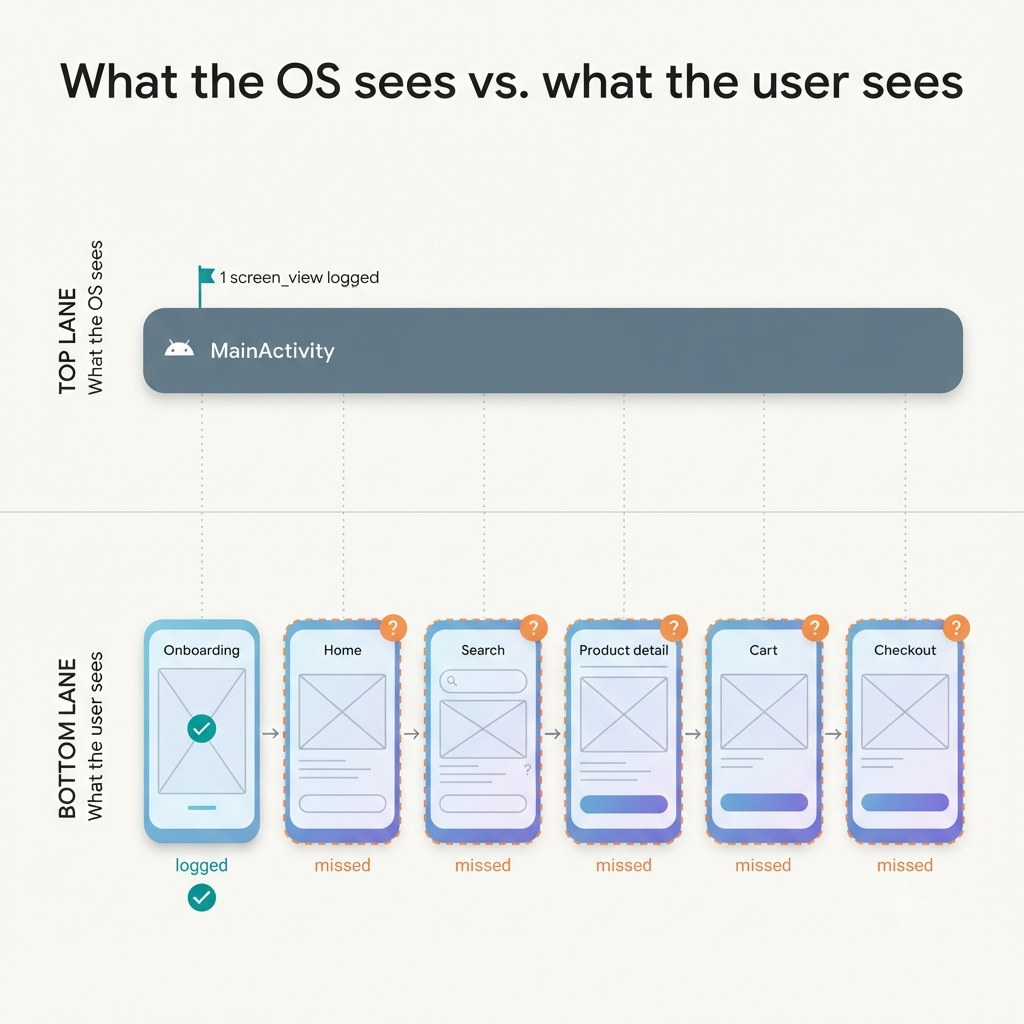
Declarative frameworks loosen that contract. One Android Activity can host an entire Compose navigation graph. A SwiftUI app can move between logical screens without ever creating a new view controller. Flutter and React Native apps can render dozens of distinct experiences inside a single native host screen. The user sees new screens, while the operating system may see only one.
Firebase acknowledges this gap directly. Automatic screen tracking depends on the focused UIViewController or Activity, so SwiftUI apps have to either set screen names manually through the FirebaseAnalyticsSwift module or log screen_view events themselves.
From managing UI to describing it
The industry-wide move to declarative UI changed more than syntax. It changed how state, interface, and navigation relate to each other.
| Dimension | Imperative UI | Declarative UI |
|---|---|---|
| Core model | Create, configure, and mutate screens | Describe UI as a function of state |
| Typical screen unit | UIViewController, Activity, Fragment |
SwiftUI View, Compose @Composable, widget |
| Navigation signal | Often a new platform screen object | Routes, tabs, state, modals, or recomposition |
| Automatic tracking | Often works well | Often needs explicit instrumentation |
| Analytics risk | Missing events are less common | Screen identity and transitions can be ambiguous |
In UIKit or classic Android, “go to the profile screen” usually meant presenting a new view controller or starting a new activity. In SwiftUI it might mean changing a NavigationStack path. In Compose, it might mean updating a NavHost destination. In Flutter, you push a route. In React Native, you change navigation state.
From the user’s side, these all feel the same. For analytics, they really aren’t.
That’s why Firebase says manual screen_view logging is increasingly necessary for apps built with SwiftUI, Jetpack Compose, Flutter, and React Native. The frameworks didn’t make user journeys any less important to understand. They just took away the platform’s ability to infer them.
Why auto-tracking breaks
Automatic screen tracking was never magic. It worked because of a handy coincidence: in many imperative apps, the platform’s screen object and the product’s idea of a screen were roughly the same thing. Declarative UI pulls those two apart in a few ways.
- Screens aren’t objects anymore. A Compose screen is a composable function, and a SwiftUI screen is a lightweight view value. Neither is the kind of long-lived platform object an automatic tracker can observe.
- Navigation turns into state. A route change might be a variable update, a selected tab, a stack entry, or a conditional branch. It isn’t necessarily a new
ActivityorUIViewController. - One host can hold many screens. A single
MainActivitymight contain onboarding, home, search, product detail, cart, and checkout, and Activity-based tracking can’t tell them apart. - Recomposition isn’t navigation. Declarative UIs redraw all the time as state changes. Logging on every render would flood your data with duplicate, noisy events.
- Modals and nested flows blur the edges. A bottom sheet, dialog, wizard step, or tab can be a meaningful analytics screen without being a new native screen object.
So declarative frameworks aren’t incompatible with analytics. They just don’t provide enough built-in structure for analytics to know what a “screen” is.
The manual-instrumentation tax
The traditional fix is to log a screen_view event yourself whenever a meaningful screen appears.
Firebase supports this on both platforms. On Apple platforms you can log in lifecycle methods like onAppear or viewDidAppear, and on Android onResume is a common trigger. The event can carry a stable screen name and screen class, which gives analytics a deliberate definition of the user journey.
It comes at a recurring cost, though:
- Every meaningful destination needs its own explicit event.
- Teams have to decide what counts as a screen: a route, a tab, a modal, an onboarding step, a nested detail view.
- Someone has to pick the right lifecycle hook and avoid duplicates.
- Cleanup logic has to survive when views disappear or navigation listeners are removed.
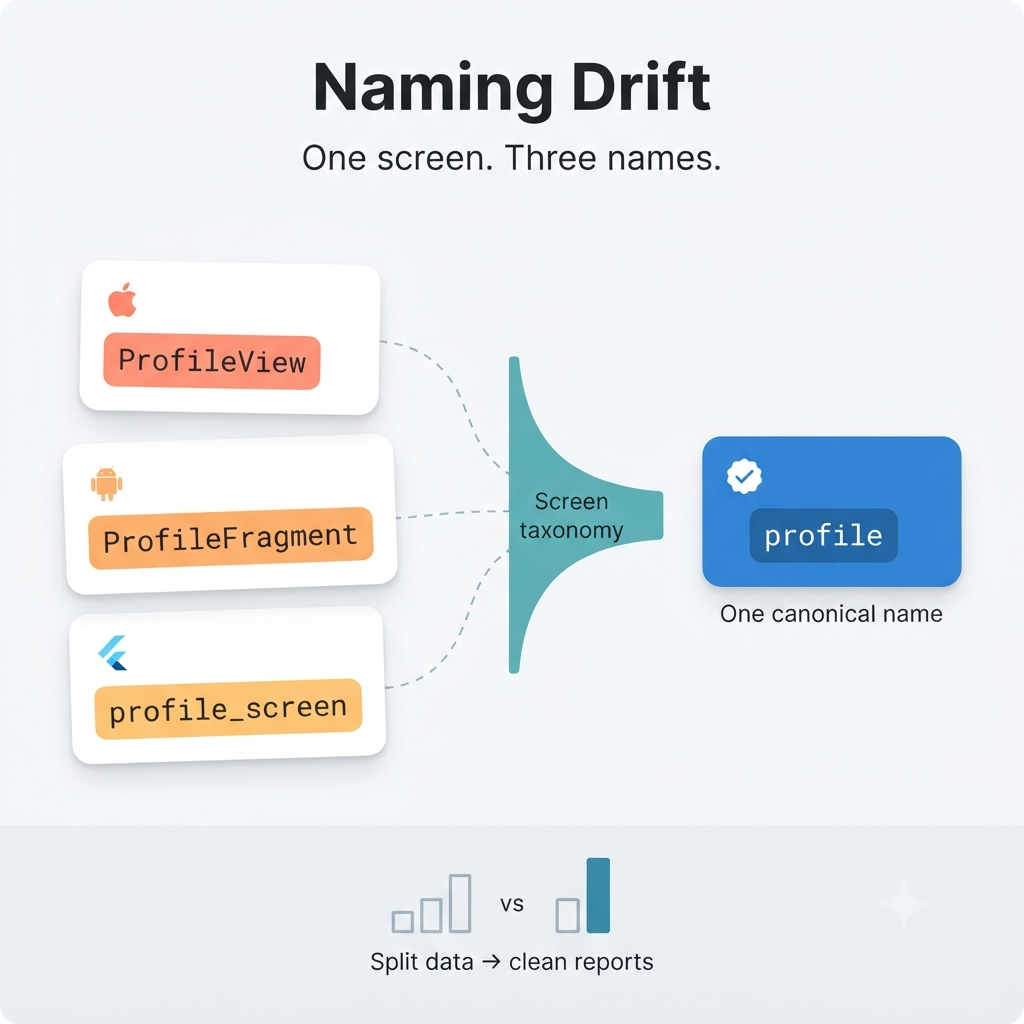
- Naming has to stay consistent across iOS, Android, and cross-platform code.
- Deep links, back navigation, restored state, and dialogs mustn’t distort the data.
Firebase’s Android screen-view guidance covers Jetpack Compose patterns such as NavHost, pagers, Voyager, and state-based navigation. It also points out that navigation listeners should be wrapped in DisposableEffect for proper cleanup, exactly the kind of framework-specific detail that’s easy to miss when you’re doing this by hand.
The usual outcome is analytics code scattered through UI files, written differently by different engineers, and harder to keep consistent as the app grows.
Enter Firebase agent skills
Firebase agent skills are Google’s attempt to turn that manual, error-prone layer into something an AI agent can handle.
Announced in November 2026, the Google Analytics for Firebase agent skills help coding agents with two main jobs: setting up Analytics and adding screen-view instrumentation. A developer can tell an agent, “help me instrument my app to log screenviews using Google Analytics for Firebase,” and the agent can apply the right pattern for that app’s framework and navigation setup.
This matters because writing a single logEvent call is the easy part. The hard part is knowing:
- where the logical screens actually live in this particular codebase,
- which navigation pattern the team uses,
- which lifecycle hook fires at the right moment,
- how to avoid duplicate events during recomposition,
- how to keep cleanup intact when listeners are registered, and
- how to keep naming consistent across platforms.
Agent skills hand the agent that context. Instead of every developer rediscovering Firebase’s screen-tracking rules, the agent can apply them directly in the project.
What “autonomous” should mean
It’s tempting to call this “autonomous analytics,” but a more accurate label is autonomous screen-view resolution.
The agent doesn’t decide what your business considers a conversion, a funnel, or a meaningful product journey. Product and analytics teams still own those definitions. What the agent can do is solve the implementation problem: turn a human-defined screen taxonomy into correct, framework-specific code.
A good agent workflow should:
- find candidate screens from routes, navigation graphs, tabs, modals, and visible user journeys,
- apply a consistent taxonomy and naming convention,
- choose the right instrumentation point for SwiftUI, Jetpack Compose, Flutter, or React Native,
- fire
screen_viewwhen a meaningful screen is entered, not on every recomposition, - prevent duplicates from repeated appearances or navigation transitions,
- respect existing manual tracking and automatic-reporting settings, and
- check behavior across back navigation, deep links, restored state, and app relaunches.
Firebase’s documentation makes clear that manual tracking can run alongside automatic tracking, and that apps can switch off automatic screen reporting if they want full manual control. That flexibility matters. The aim isn’t to replace automatic instrumentation everywhere, but to add precision where declarative UI makes it fall short.
Data fidelity is the real metric
Don’t judge agent-assisted instrumentation by how many events it emits. Judge it by whether your reports match reality.
| Fidelity question | What good instrumentation answers |
|---|---|
| Is this a distinct user-visible screen? | A route, tab, modal, or meaningful state boundary |
| When should the event fire? | On first meaningful appearance or navigation transition |
| Is the screen name stable? | A consistent, readable identifier across releases |
| Are duplicates prevented? | One event per logical screen entry, with proper cleanup |
| Does the report match reality? | Funnels and navigation paths reflect actual journeys |
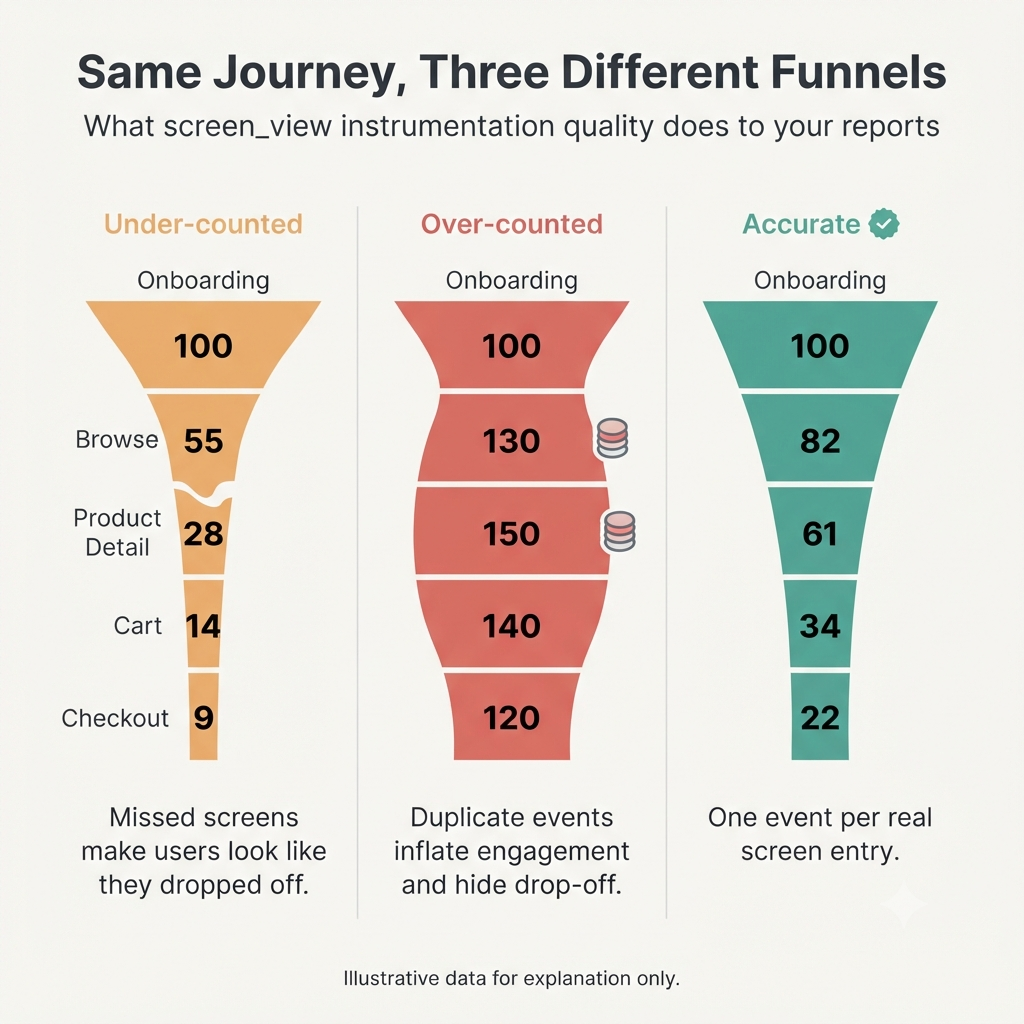
A badly instrumented declarative app can fail in two opposite directions. It can under-count screens, so funnels look like they leak where users actually carried on. Or it can over-count, which inflates engagement and muddies drop-off analysis.
Neither is a minor reporting annoyance. Screen-level data feeds onboarding optimization, feature adoption, retention analysis, funnel diagnosis, and product prioritization. If the underlying screen_view model is off, every decision built on it inherits the error.
Analytics becomes agent-native
The bigger shift is that analytics instrumentation is moving into the AI-assisted development workflow instead of being a cleanup job after launch.
It used to be common to ship a feature first and bolt analytics on later. Now an agent can treat instrumentation as part of the build. Product managers define the journeys they care about, engineers review the event taxonomy, and the agent handles the repetitive integration work.
That changes who does what:
- Product teams define what counts as a meaningful screen and journey.
- Analytics teams set naming conventions, event standards, and quality checks.
- Engineers review the implementation and make sure it fits the app’s architecture.
- AI agents apply the right framework-specific instrumentation consistently.
Firebase’s agent skills are built to work with coding agents like Antigravity, Claude Code, Codex, and Cursor, and you can install them through those ecosystems or with npx skills add firebase/agent-skills.
What teams should do now
If you’re building with SwiftUI, Jetpack Compose, Flutter, or React Native, treat screen-view coverage as an architectural requirement rather than an analytics afterthought.
- Audit existing apps for missing or inconsistent
screen_viewevents. - Define a screen taxonomy before asking an agent to instrument anything.
- Separate true screens from transient UI states, dialogs, and recompositions.
- Use agent skills to speed things up, but still review event timing, naming, and duplicate behavior.
- Make analytics validation part of the definition of done for navigation-heavy features.
- Keep automatic tracking where it works, but don’t assume it catches every logical screen in a declarative UI.
The closing thought
Declarative UI made apps easier to describe and harder to observe. SwiftUI, Jetpack Compose, Flutter, and React Native stripped away much of the implicit screen structure that older analytics systems relied on.
Firebase agent skills don’t reverse that trade-off. They make up for it by turning a manual, framework-specific chore into a job an AI agent can do, while protecting the one thing analytics can’t afford to lose: a clear, deliberate definition of what a screen actually is.