
Apple is reportedly building an AI agent that can browse the web, control apps, run commands, and write and debug code. At first glance, that looks like Apple jumping into a crowded race against OpenAI, Anthropic, and everyone else building computer-use agents.
I think the more interesting question is a different one. Can Apple do something its rivals can’t easily copy, and build agency straight into the operating system?
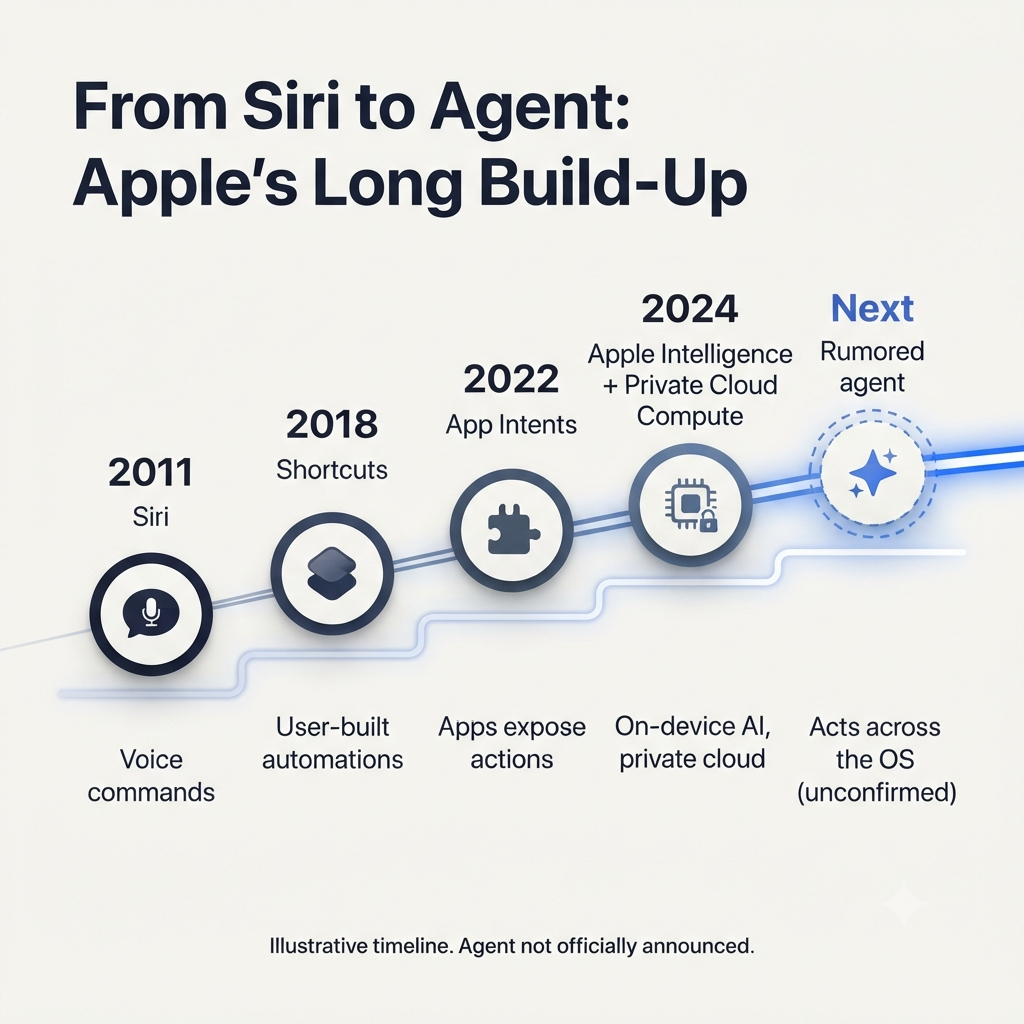
Apple’s own job listing describes a “proactive, agentic AI assistant” that browses the web, works across apps, runs commands, writes and debugs code, and calls services. It also leans hard on safety, privacy, permissions, sandboxing, and transparency. That’s the vocabulary of a system-level agent, not a standalone chatbot.
And the distinction matters. The future of computer-use AI may not go to whoever has the best screen-understanding model. It may go to whoever makes the operating system itself agent-native.
The computer-use race is missing Apple’s real advantage
Most coverage so far treats Apple’s agent as a catch-up move: OpenAI and Anthropic have shown off autonomous assistants, and now Apple wants one too. That’s an understandable take, but it misses something.
Today’s computer-use agents mostly work from outside the software they control. They take a screenshot, work out what’s on screen, pick an action, and send a mouse or keyboard command. OpenAI’s documentation describes a computer-use model that requests actions like click, type, scroll, keypress, drag, move, wait, and screenshot.
That approach is powerful because it works on unfamiliar websites and desktop apps. But it’s also indirect. The agent isn’t talking to the application’s underlying logic. It’s rebuilding reality from pixels.
Apple’s potential edge is different. If its agent is a first-party citizen of macOS, iOS, and iPadOS, it could lean on native events, app-level intents, system services, permissions, and on-device compute instead of relying mostly on visual guesswork.
So here’s the thesis in one line:
The winner of computer-use AI may not be the company with the best vision model, but the company that can make the OS itself agent-native.
What today’s computer-use agents actually do
Say you give an agent a goal like “book the cheapest refundable flight,” “organize these receipts,” or “pull together a competitive analysis from these browser tabs.” It then runs a loop:
- Take a screenshot or otherwise observe the interface.
- Interpret buttons, fields, menus, and page state.
- Decide on the next action.
- Send a click, keystroke, scroll, or drag command.
- Observe the result.
- Repeat until the task is done or the user needs to step in.
OpenAI describes its Computer-Using Agent as reading raw pixel data to understand the screen, then using a virtual mouse and keyboard to act. Its integration guidance centers on action handlers, screenshots, and user consent.
This is genuinely useful. A visual agent doesn’t need every app to offer a purpose-built API. In principle it can work across the messy, inconsistent, human-designed interfaces that make up most of computing.
The price of that flexibility is fragility.
Apple is hiring for an agent
The job listing is where this story starts, but it shouldn’t be where it ends.
It describes an agent that can browse the web, work across apps, run commands, write and debug code, and call services, picking the right tool at each step. It also asks for experience with systems that execute code or act on a user’s behalf, including sandboxing, permissioning, and security models. That doesn’t read like a simple chat assistant. It reads like an operating-system service that plans, acts, verifies, and recovers.
Still, a job listing isn’t a product announcement. Apple hasn’t publicly demoed this agent, explained how it works, or said when (or whether) it will ship. What we can reasonably take from it is the strategy: Apple appears to be hiring for an agent meant to operate across the whole computing environment, not just answer questions in a chat window.
So the real question isn’t whether Apple can build an agent. It’s whether Apple can build one with an advantage nobody else can fully copy.
API wrappers versus native OS agency
The core distinction is between an agent that looks at a computer and an agent that is part of the computer.
| Dimension | Third-party computer-use agent | Apple-style native OS agent |
|---|---|---|
| Primary interface | Screenshots, visual interpretation, mouse and keyboard actions | App intents, system services, native events, permissions, and structured actions |
| Execution model | The agent requests actions; the host application or environment performs them | Potentially direct integration with OS-level services and app capabilities |
| Latency | Includes visual perception, inference, action execution, and another observation cycle | Can reduce perception and action latency through direct system integration |
| Reliability | Vulnerable to changing layouts, animations, pop-ups, and ambiguous UI | Can use stable semantic interfaces where apps expose them |
| Privacy | May require screenshots or interaction context to leave the local environment | Can emphasize on-device processing, with Private Cloud Compute for select workloads |
| Permissions | Depends on the host platform’s external permission model | Can be designed around Apple’s sandboxing, consent, and transparency model |
| Cross-app work | Often requires the agent to visually navigate each app | Potentially smoother when apps expose structured actions and data |
| Scope | Broad across browsers, desktops, and mixed environments | Strongest within Apple’s hardware and software ecosystem |
One caveat: “native access” doesn’t mean Apple’s agent will never use screenshots. It almost certainly will. The web, legacy apps, third-party software, and oddball interfaces will all still need visual understanding. The advantage is that native hooks can handle the predictable majority of actions while visual reasoning covers the long tail.
Why kernel- and OS-level integration matters
Apple’s potential edge isn’t a single feature. It’s a stack of advantages that build on each other.
Native system events
A native agent could observe and act through sanctioned system events instead of piecing state together from pixels. That matters because a screenshot can show a button but can’t always prove the button is enabled, that a form validated properly, or that an action kicked off the right background process.
A system-level agent could get much clearer feedback, like:
- “The file was saved.”
- “The calendar event was created.”
- “The message failed to send.”
- “The user denied permission.”
- “The app is still processing the request.”
That swaps guesswork for verification.
App intents and semantic actions
Apple can push developers to expose agent-ready actions: create an event, send a message, export a PDF, search files, start a timer, move an email, generate a summary. Rather than asking an agent to hunt for the right recipient field and click it, the system could offer an action like “send message to contact” or “create calendar event.” The agent works with meaning instead of coordinates.
Compare the two approaches:
- Visual action: Find the “New Event” button, click it, fill in the title field, pick the right date, and press save.
- Semantic action: Create an event titled “Design review” on Thursday at 2 p.m.
The second is faster, less error-prone, and much easier to audit.
Silicon and local execution
Apple controls an unusually tight hardware-software stack across iPhone, iPad, and Mac, which gives it room to tune models, memory, power draw, and latency for agent workloads.
Apple Intelligence already leans on on-device processing, with many models running entirely on the device so tasks finish without data leaving it. For heavier requests, Apple uses Private Cloud Compute, which processes only the relevant data on Apple silicon servers and, according to Apple, doesn’t store it or make it accessible to Apple.
For an agent, that setup could matter a lot. Sensitive context like messages, files, calendar details, health information, and financial documents could stay local when possible, while bigger reasoning tasks go to Private Cloud Compute without turning everything into a cloud-first workflow. The payoff isn’t only speed. It’s keeping context, permissions, and action verification close to the user.
Permission-aware execution
A native agent could ask for narrowly scoped permission:
- Read this folder.
- Access this calendar.
- Send this message.
- Run this command.
- Control this app.
- Make a purchase only after confirmation.
Apple’s job listing explicitly treats safety, privacy, and security as core design requirements for agents that run code, use credentials, and act for a user. That could change the trust model. Instead of asking people to “trust the AI,” Apple could let them grant a specific, visible, revocable capability.
Why screen-scraping breaks at scale
Visual agents look great in demos and get much harder in production, because real computing is full of friction:
- Cookie banners
- Loading states
- Pop-ups
- Animations
- Dynamic layouts
- Inconsistent button designs
- Multi-step forms
- Authentication screens
- Errors that only show up after an action
- Interfaces that change without warning
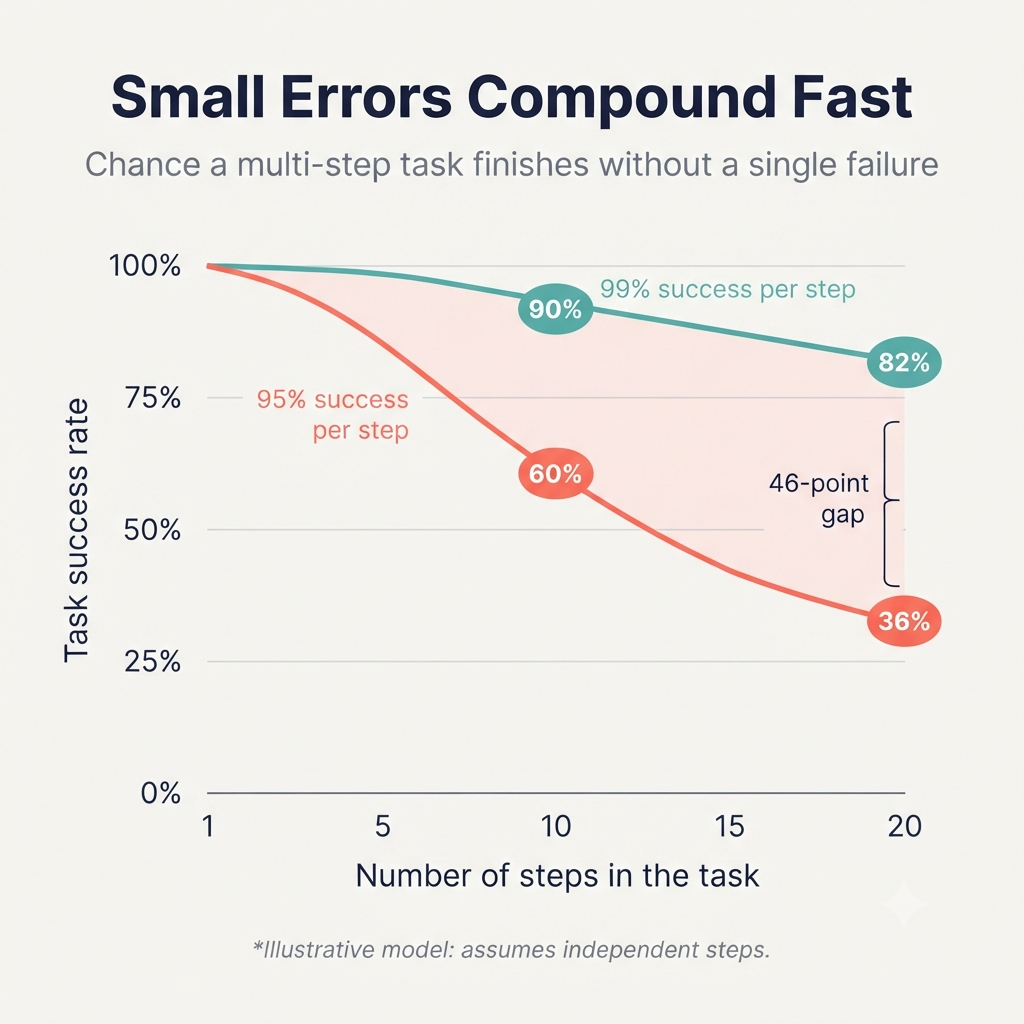
A screenshot may not tell you whether a button is clickable, whether a page has finished loading, or whether a background process has wrapped up. Multi-step tasks make this worse. One mis-click can derail a whole workflow, a missed confirmation dialog can trigger something unintended, and a changed layout can break an automation that worked yesterday.
Native integration gives you something visual agents often lack: ground truth. A visual agent infers success because the screen changed. A native agent knows it succeeded because the system said so.
Privacy becomes the interface
Computer-use agents are unusually sensitive from a privacy standpoint, since they can run into inboxes, calendars, files, messages, credentials, and financial data. That turns privacy from a compliance checkbox into a product feature.
Apple’s existing positioning gives it a credible starting point. The company says Apple Intelligence handles tasks locally whenever possible, and when it needs more capacity, Private Cloud Compute handles only the relevant data, which isn’t stored or made accessible to Apple.
For an agent, that could become a clear promise to users:
- The agent can see only what it needs.
- It can act only within granted permissions.
- Sensitive actions require confirmation.
- Users can inspect what happened.
- Users can revoke access at any time.
Apple already offers transparency logging for Apple Intelligence, so people can see in Settings how their data is processed. Carrying that philosophy over to an agent that can actually control a computer would be a big trust win.
Apple’s advantage may not be that its agent sees less. It may be that users can understand exactly what it’s allowed to see and do.
Where OpenAI and Anthropic still win
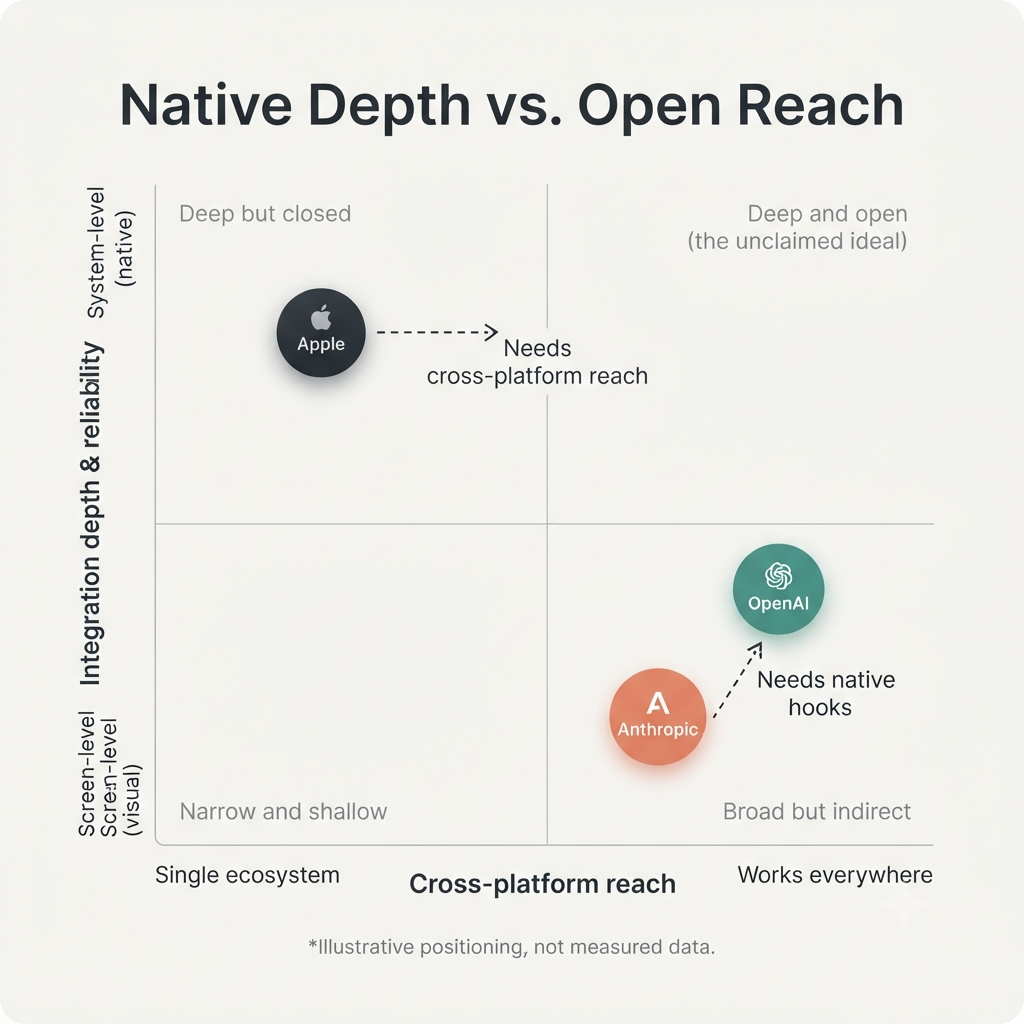
None of this means Apple wins automatically. OpenAI and Anthropic keep some serious advantages.
| Area | Why rivals retain an advantage |
|---|---|
| Cross-platform reach | They can target Windows, Linux, browsers, and diverse enterprise environments rather than being tied to Apple’s platforms. |
| Model generality | Frontier labs may have stronger general reasoning, coding, browsing, and tool-use capabilities across unfamiliar environments. |
| Developer distribution | API-first companies can reach developers quickly without waiting for OS-level adoption. |
| Web-first workflows | Much computer use begins in the browser, where visual agents are already practical. |
| Speed of iteration | External agents can improve rapidly without being constrained by operating-system release cycles. |
| Enterprise flexibility | Businesses may prefer agents that work across mixed hardware and software environments rather than committing to Apple’s stack. |
OpenAI’s approach is built around screenshots and mouse-or-keyboard actions in browsers and desktops, and that generality is a real strength. It lets an agent work in places where no native integration exists.
So Apple may win the native experience, while OpenAI and Anthropic may win the open frontier.
Apple’s real moat: distribution, defaults, and trust
Apple doesn’t have to top every computer-use benchmark to win the consumer market. If the agent ships inside macOS, iOS, and iPadOS, it starts with advantages rivals will struggle to match:
- Distribution across more than a billion active devices
- Deep integration with system services and first-party apps
- Control over silicon, power, memory, and latency
- A privacy architecture already built around on-device processing
- A developer ecosystem that can expose structured actions
- A trusted permission and security model
- Default placement in the interface people already use every day
No single item on that list is the moat. The moat is how they stack: OS access, developer integrations, silicon, privacy architecture, and installed base all reinforcing each other.
A rival can build a better agent model. It can’t easily build a better operating system.
What Apple must get right
Apple’s advantage is a possibility, not a given. Native integration opens doors, but it raises the stakes too. A few things have to go right:
- Reliability: The agent has to finish real tasks, not just look good in demos.
- Reversibility: People need undo, confirmation before irreversible actions, and clear ways to roll back.
- Permissions: Fine-grained scopes should keep the agent from turning into an over-privileged automation tool.
- Developer incentives: Apple needs compelling APIs and real reasons for developers to expose agent-ready actions.
- Failure handling: The system has to know when to ask for help rather than guess.
- Privacy clarity: Users should be able to see what data was used, what actions happened, and what was processed in the cloud.
- Cross-platform reality: If users expect end-to-end automation, Apple can’t ignore the browser, Windows, Android, and enterprise SaaS tools.
Getting an agent to click buttons isn’t the hard part. Making it trustworthy enough to act on someone’s behalf is.
An operating system that acts
The winning interface may not be a chat sidebar or a screen-recording agent. It may be a system-level intent layer, where you state an outcome and the operating system breaks it down into permissions, app actions, verification steps, and human approvals where needed.
The experience shifts from “AI using a computer” to “the computer understanding what you want.”
That’s Apple’s opportunity. If it can turn macOS, iOS, iPadOS, App Intents, silicon, and Private Cloud Compute into one coherent agent platform, it might do more than catch up to OpenAI and Anthropic. It might change what “using a computer” means.
So the question is no longer whether Apple can build an AI agent. It’s whether Apple can turn its closed ecosystem from a limitation into the most reliable agentic computing platform out there.