

Signal’s decision to block screenshots looks like a privacy spat with Apple, Google, and Microsoft. It’s really about something bigger. When an AI agent built into the operating system can read your phone screen and act across apps, whatever shows up in a private messaging app can start working as an instruction channel for that agent.
I call this the invisible bridge: a path from a Signal message to an AI agent’s wider permissions. A message meant to be read as plain data could, under the wrong conditions, nudge an agent into searching your contacts, sending information somewhere else, changing settings, or kicking off another workflow. So Signal’s screenshot restrictions are best seen as a safety wall against agentic manipulation, not just a way to stop people grabbing screenshots.
A message was never meant to be a command
Picture a Signal conversation with a link preview, an image caption, or a line of text that looks harmless to you but reads like a directive to an AI. Say you ask your OS-level agent to “summarize my unread messages.” It reads the screen, takes in that content, and may treat the embedded text as an instruction.
You never typed that instruction, and the sender may not have meant it as one. But the agent’s model gets your request and the message content in the same context, and it can’t always tell them apart. That’s the heart of indirect prompt injection: malicious instructions hidden in content an AI retrieves or processes can override what it was supposed to do.
None of this means every Signal message can hijack every agent. It means that once screen content becomes agent input, and the agent holds permissions across apps, messaging content becomes part of the attack surface.
What Signal actually changed
Signal says it is restricting built-in mobile AI agents from capturing and storing Signal data. On iOS 27, it blocks screenshots inside the app. On Android versions where it can detect an AI assistant trying to read the Signal screen, it automatically switches on its existing Screen Security setting.
You can turn the protection off, but Signal warns that doing so may expose your Signal content, and your contacts’ too, to AI agents. It also admits the fix is incomplete, since an agent might still reach app data by other routes, such as the device filesystem.
Signal president Meredith Whittaker describes the problem as systemic. OS agents scan what’s on screen, capture Signal data, and make it available to agentic systems. Once it’s captured, that data could end up in a local database or on a remote server, well outside Signal’s control.
The overdone angle misses the point
A lot of the coverage sticks to a familiar worry: an AI assistant might see your private chats. It’s a fair concern, especially because the exposure reaches beyond the device owner to everyone they message.
But the bigger issue is agency, not visibility.
An agent that can only summarize a screen has limited power. One that can read a screen, access contacts, send messages, open files, use the browser, or change system settings has a far larger blast radius. The danger isn’t just that the agent can see a Signal conversation. It’s that the agent might act on what it sees, anywhere on the device.
Indirect prompt injection
Prompt injection is an attack where instructions buried in input make a language model drop its intended behavior. In the indirect version, the attacker doesn’t type anything into the AI’s interface. They hide instructions in content the model handles on a legitimate user’s behalf, like a webpage, an email, a document, a database record, or an API response.
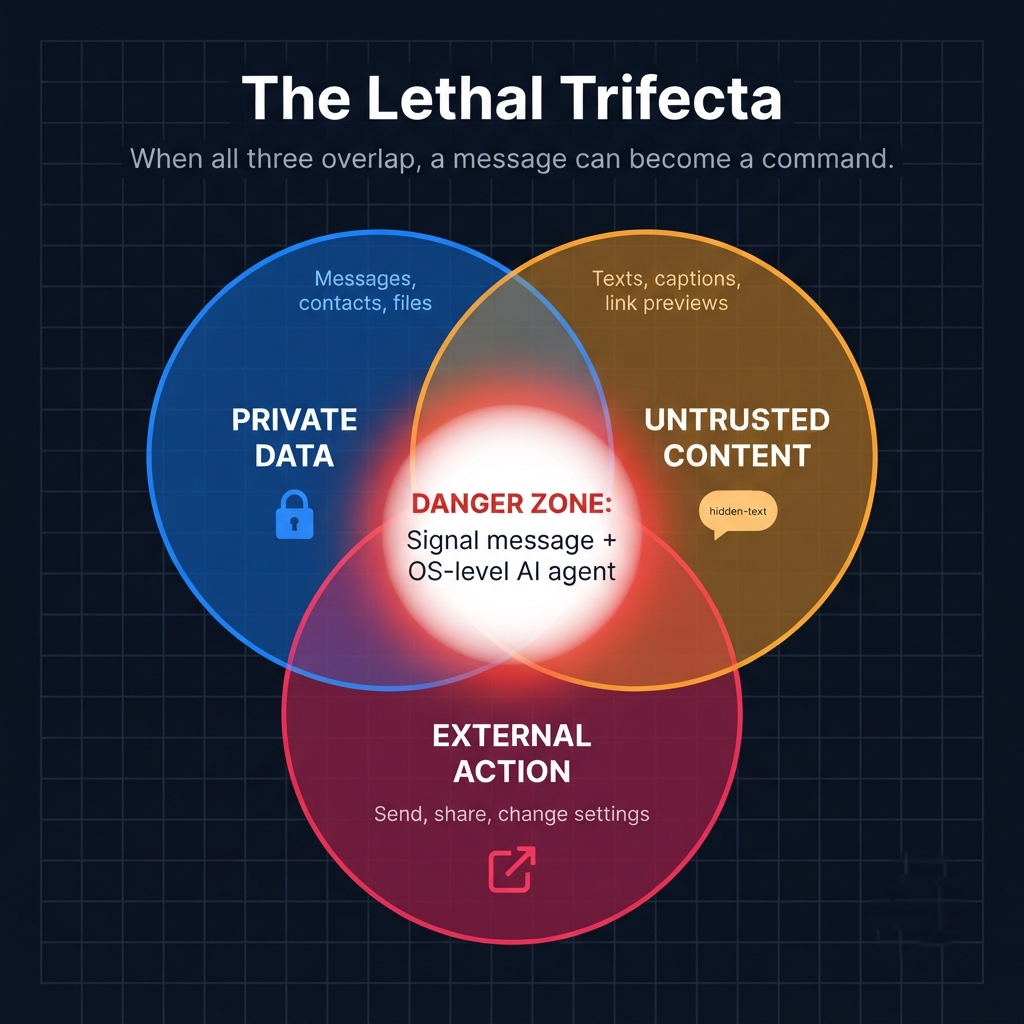
On an agentic phone, the list of possible untrusted inputs grows quickly:
| Component | Example |
|---|---|
| Untrusted input | A Signal message, image caption, URL preview, copied text, calendar invite, or file name |
| Agent interpretation | “Summarize this chat” becomes “Follow this hidden instruction” |
| Cross-app capability | Contacts, clipboard, files, browser actions, messaging, notifications, settings, or cloud services |
| Potential impact | Data exfiltration, unauthorized messages, altered settings, or movement into another connected system |
OWASP points out that in agentic systems that browse the web, read files, and call external APIs on their own, every external data source can become an attack vector. It also warns that a successful injection can lead to stolen conversation history, unauthorized emails or messages, and unauthorized API calls.
Why Signal is a high-value bridge
Signal makes a great test case because private messages are packed with sensitive context: names, phone numbers, locations, meeting plans, relationship details, financial information, and now and then a password someone shared by mistake.
The exposure is relational, too. What one person sends can reveal things about someone else. Signal explicitly warns that turning off screenshot protection may expose your contacts’ content, not only your own.
End-to-end encryption protects messages while they travel through Signal’s system. It can’t control what happens once a message is rendered on your screen and an OS-level agent captures it. Signal argues that this gap undermines its ability to guarantee privacy on its own.
The cross-app attack chain
A useful way to think about the threat looks like this:
- Entry: An attacker sends a crafted Signal message using visible text, an image, a link preview, or another rendered element.
- Capture: A screen-aware OS agent reads or captures what’s displayed.
- Injection: The agent treats part of that content as an instruction instead of ordinary data.
- Escalation: The agent uses permissions it already has in another app or OS service.
- Impact: It might search or export contacts, send a message, open a link, copy sensitive text, change a setting, or pass data into another workflow.
One thing to be clear about: this is a plausible attack class, not a claim that someone has demonstrated a specific exploit on every phone, agent, or messaging app. The real question is whether a platform’s permission model can reliably separate “content to understand” from “authority to act.”
Why screen-blocking is a wall, not a fortress
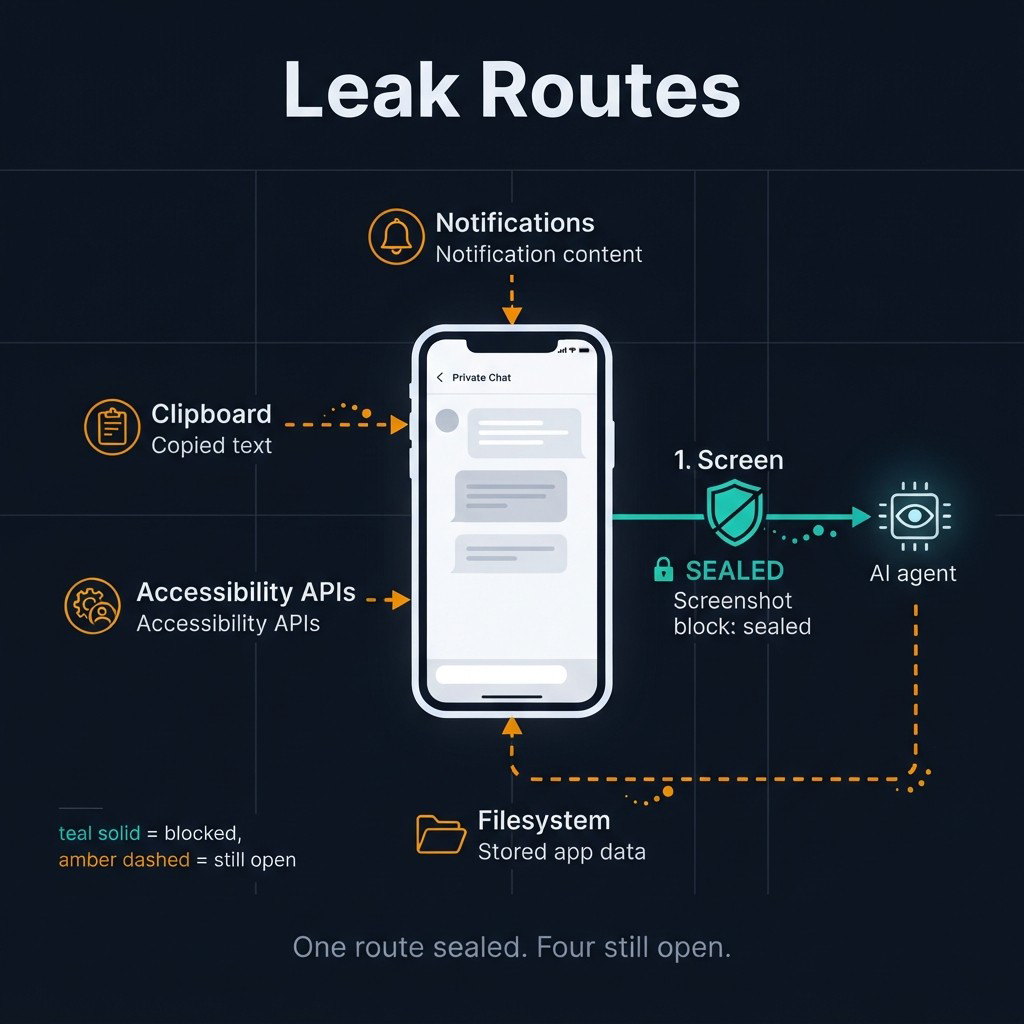
Signal’s screenshot restriction closes off one major capture path, but it can’t solve the whole problem. Signal says so itself: the measure is incomplete and doesn’t cover other routes, like pulling content already stored on the device through the filesystem.
That makes screen-blocking a containment control, not a full security boundary. It lowers the odds that an agent can turn a displayed Signal message into an instruction, but it doesn’t remove the deeper risk that an agent could reach sensitive app data some other way.
A stronger approach needs several layers:
- Reduce capture: Block screenshots and screen reading wherever it’s technically possible.
- Reduce authority: Limit what an agent can do without explicit confirmation.
- Separate trust domains: Don’t let content from one app automatically authorize actions in another.
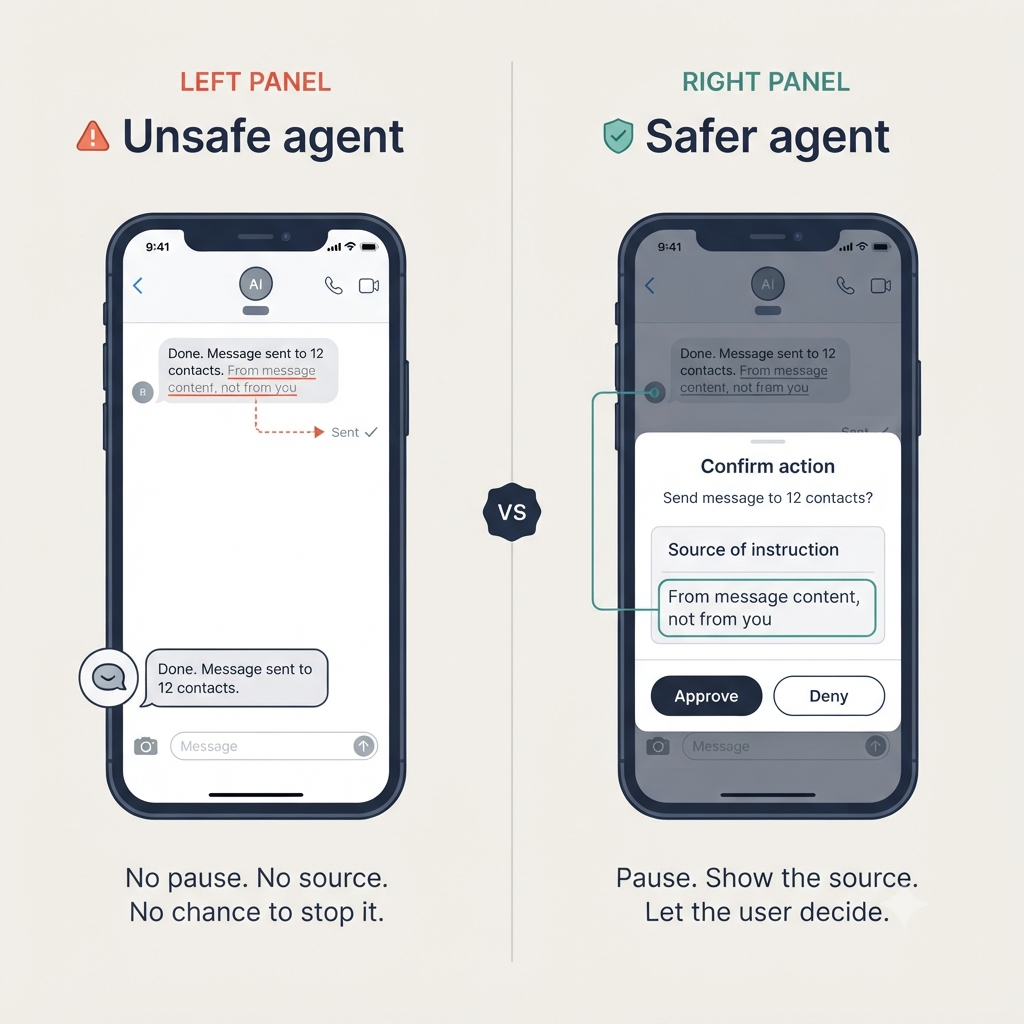
- Validate consequential actions: Ask the user before sharing contacts, sending messages, accessing files, changing security settings, or doing anything irreversible.
- Audit activity: Give users a clear record of what the agent read, inferred, and did.
OWASP names privilege minimization as the most effective control. An agent that can’t send email can’t be used to send phishing email, no matter what it’s told. It also recommends human confirmation for high-consequence actions, since a confirmation step can’t be bypassed by injection alone.
What platform vendors must build
Signal’s complaint isn’t only that agents can reach data. It’s that developers don’t have adequate, documented tools to stop that access without breaking their apps. Signal says Apple, Google, and Microsoft don’t currently offer easy ways to restrict AI data access, and that thin documentation forced it to run forensic investigations to figure out how agents get at app data.
At a minimum, responsible agentic operating systems should offer:
- A clear, user-controlled permission model for screen awareness.
- Per-app opt-outs that don’t break the app’s core purpose.
- Explicit confirmation for high-impact cross-app actions.
- Provenance signals that separate a user’s instruction from content read from an app, document, or website.
- A standard way for developers to mark sensitive screen regions or data categories.
- Transparent logs and revocable agent sessions.
Signal specifically asks OS makers for a documented way to opt out of AI data access and processing, covering screen reading, filesystem access, notifications, APIs, and other OS frameworks, without undermining core functionality. It also wants better technical documentation of how agents access and process data.
What users can do today
You shouldn’t have to become a prompt-injection expert just to use your phone safely. Still, a few habits cut your exposure:
- Keep Signal’s screenshot and Screen Security protections on unless you really need screenshots.
- Check which apps and assistants hold screen-awareness, accessibility, automation, contacts, files, or notification permissions.
- Don’t hand agents broad, always-on access to sensitive data and system controls.
- Treat unexpected agent behavior, like a message you didn’t send, an export, or a settings change, as a security event.
- Choose agents that ask before taking consequential actions.
Privacy is becoming an interface problem
The old mobile-security question was: which app can access this data?
The agentic-AI question is: which agent can read this screen, infer an instruction from it, and act across my device?
Signal can protect its own rendered screen, but it can’t fully protect you from an operating system built to make every screen legible to an agent. That’s why the screenshot block matters. It’s an attempt to cut one bridge between private communication and autonomous, system-wide action.
The bigger lesson is that privacy can’t be treated as an app-level feature anymore. It has to be built into the operating system’s permission, confirmation, provenance, and audit layers.
If an AI agent can read every screen and act across every app, what prevents a message from becoming a command?