

You don’t fix unpredictable AI agents by making every decision predictable. You fix them by spelling out what the agent is allowed to do, and by enforcing the line between a recommendation and a production action. Digital.ai Release 26.3 points in this direction by placing agent participation inside governed delivery workflows.
Picture an agent looking into a failed deployment. It reads the logs, spots a likely configuration problem, and suggests retrying with a modified setting. The suggestion sounds sensible, and the explanation is convincing.
But who signed off on the change? Does the new setting match the approved configuration? Can the agent retry against production without anyone else looking at it?
These questions get at the core conflict in agent-enabled DevOps: figuring out what should happen is not the same as having permission to make it happen.
Rules Meet Probabilistic Reasoning
Think about two ways of expressing a release decision.
A traditional pipeline rule might read: “Proceed only when the security scan passes and the production approval is complete.”
An agent instruction might read: “Review the available evidence and decide whether this release is ready.”
The first spells out a condition. The second hands over the interpretation. Both have their place, but they shouldn’t carry the same authority.
Here, non-deterministic drift means the gap between what an agent was asked to do and the operational actions it ends up proposing or attempting. It doesn’t have to be dramatic. It can start with a small assumption, like treating a missing scan result as an acceptable exception, or reading permission to investigate as permission to fix.
So the goal is bounded autonomy: let the agent analyze freely, but keep consequential actions behind controls that are enforced independently of it.
| Dimension | Rule-based pipeline | Agent-enabled reasoning |
|---|---|---|
| Decision basis | Explicit conditions | Interpretation of context |
| Useful role | Enforcing known requirements | Investigating ambiguous situations |
| Main design question | Are the conditions correct? | What authority follows the recommendation? |
| Production boundary | Required checks and approvals | The same checks, without agent-controlled exceptions |
To be clear, this is a design distinction. It doesn’t claim that conventional pipelines never fail, or that agents will always misbehave.
Approval Alone Is Not Governance
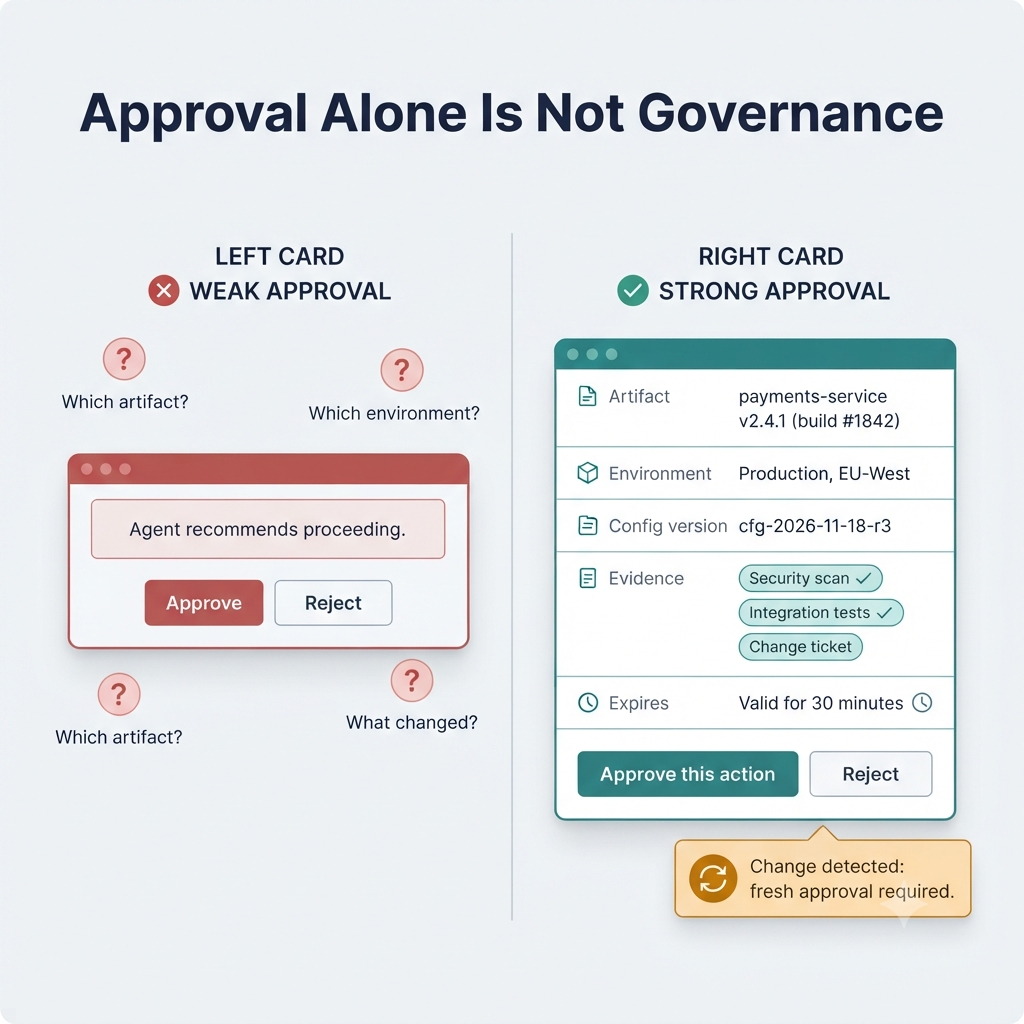
Imagine you’re a release manager and the approval request just says: “The agent recommends proceeding.”
Proceeding with what? Which artifact? Which environment? What changed since the original validation?
A human click is a weak control if the reviewer can’t tell exactly what they’re authorizing. A stronger design ties approval to a specific deployment target, artifact, configuration, and set of evidence. If any of those change in a meaningful way, the workflow should ask for a fresh decision.
Digital.ai’s governance guidance keeps agent authority inside existing permissions and approval structures instead of treating agents as a special case.
In practice, this means you shouldn’t ask a person to approve the agent’s confidence. Ask them to approve a clearly defined operational action.
Agents Within Release Orchestration
Release 26.3 ships with Agent Orchestration tasks and a bundled MCP server, which give you integration points for bringing AI into delivery workflows.
The real opportunity is separating the reasoning participant from the execution authority. An agent can investigate a failure or propose a next step, but the release workflow should still decide whether that step is allowed.
A good implementation sets four boundaries:
- Identity: Give each agent or integration its own identity, so its actions can be attributed.
- Scope: Limit the systems, environments, and tools that identity can reach.
- Workflow: Put agent activity at deliberate points rather than allowing unrestricted transitions.
- Evidence: Keep enough information to reconstruct the proposal, the authorization, and what actually happened.
Digital.ai describes its governed orchestration approach as keeping permissions, policies, approvals, and traceability around AI activity.
One caution, though: governed doesn’t automatically mean immutable. The documentation doesn’t establish that every policy is tamper-proof, or that every production action always requires a human approval. Treat immutability and mandatory approval as requirements you verify in your own setup, not as blanket product guarantees.
Human Review Where Risk Demands
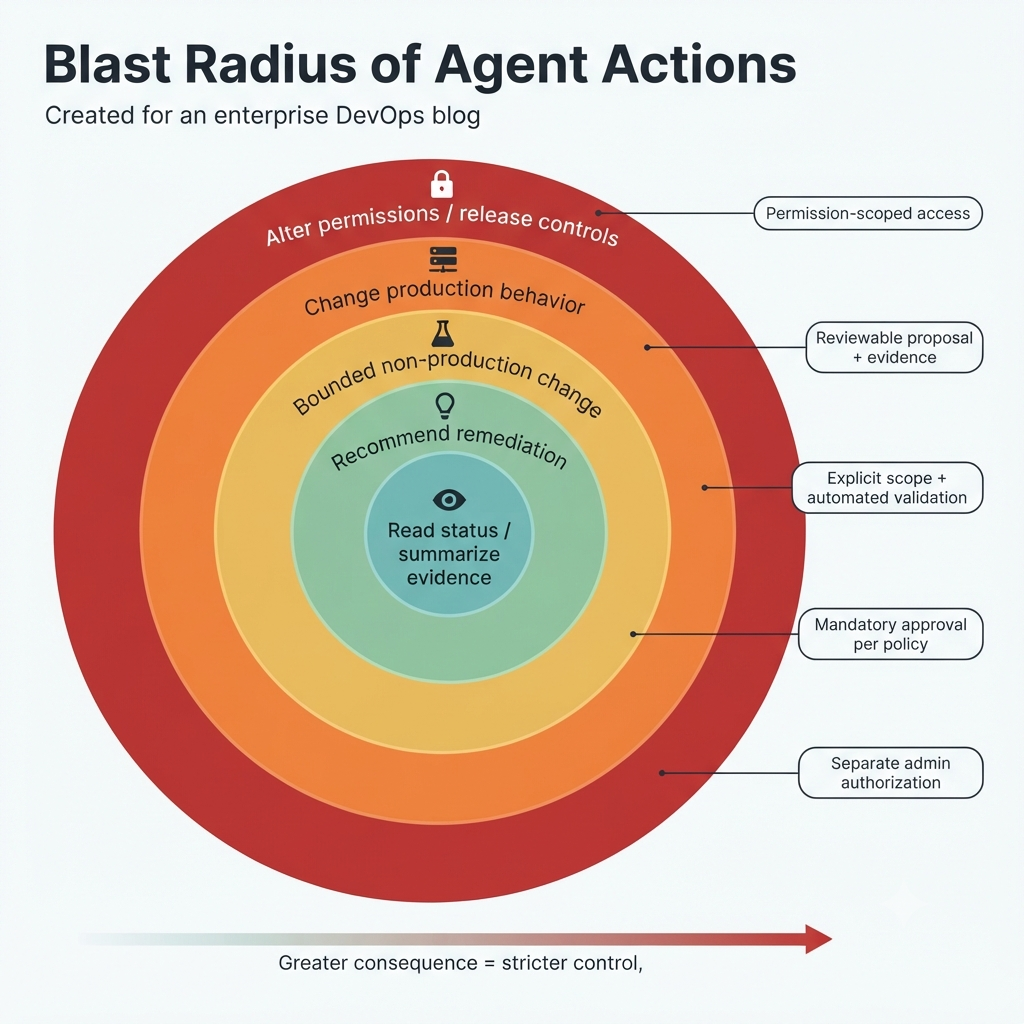
Not every agent action needs the same level of oversight. Reading a task status and changing production configuration shouldn’t go through the same approval model.
A practical way to start is sorting actions by consequence:
| Action category | Recommended control |
|---|---|
| Read status or summarize evidence | Permission-scoped access |
| Recommend remediation | Reviewable proposal linked to evidence |
| Make a bounded non-production change | Explicit scope and automated validation |
| Change production behavior | Mandatory approval under the organization’s policy |
| Alter permissions or release controls | Separate administrative authorization |
These are recommended controls, not default settings that Release 26.3 claims to ship with.
There’s also a product distinction worth noting. The release notes describe the AI Assistant as read-only and permission-scoped, and they document Agent Orchestration separately. A conversational assistant shouldn’t be confused with an agent that can actually execute things.
For production workflows, the safest question isn’t “How capable is this model?” It’s “What can this identity actually do?”
Propose, Validate, Approve, Execute
Take a hypothetical release that’s blocked by an integration-test failure. An agent suspects a temporary dependency outage and recommends rerunning the tests.
A controlled workflow could handle that recommendation in five stages.
- Propose. Require a structured recommendation: the affected task, the proposed action, the target environment, the supporting evidence, and any uncertainties.
- Validate. Independently check that the action is permitted, that the inputs are still current, and that the tests can be rerun safely.
- Approve. Send the exact action to the right reviewer whenever policy calls for human authorization.
- Execute. Run the approved operation through a sanctioned integration using narrowly scoped credentials.
- Record. Keep the recommendation, the validation results, the approval, the tool inputs, and the outcome.
In this setup, the agent can recommend a retry. It can’t relabel a failed test as passing, quietly change the deployment target, or treat its own explanation as authorization.
This pattern is an implementation suggestion, not a named Digital.ai feature. Its purpose is to turn a broad governance goal into a workflow you can actually test.
Controls Outside the Agent
A good stress test is to ask: what happens if the agent ignores its instructions?
If your only protection is a prompt saying “never deploy without approval,” then the boundary depends on the very component you’re trying to constrain. Prefer controls the agent can’t waive:
- Keep production credentials out of the agent’s direct reach.
- Stop its identity from editing mandatory gates.
- Validate tool arguments before anything runs.
- Reject approval evidence that’s missing, stale, or mismatched.
- Halt execution when required validation isn’t available.
- Limit retries and escalation paths.
Treat these as acceptance criteria for an agent-enabled release pilot. An architecture review should show the failure path, not just a successful demo.
What Engineering Leaders Should Measure
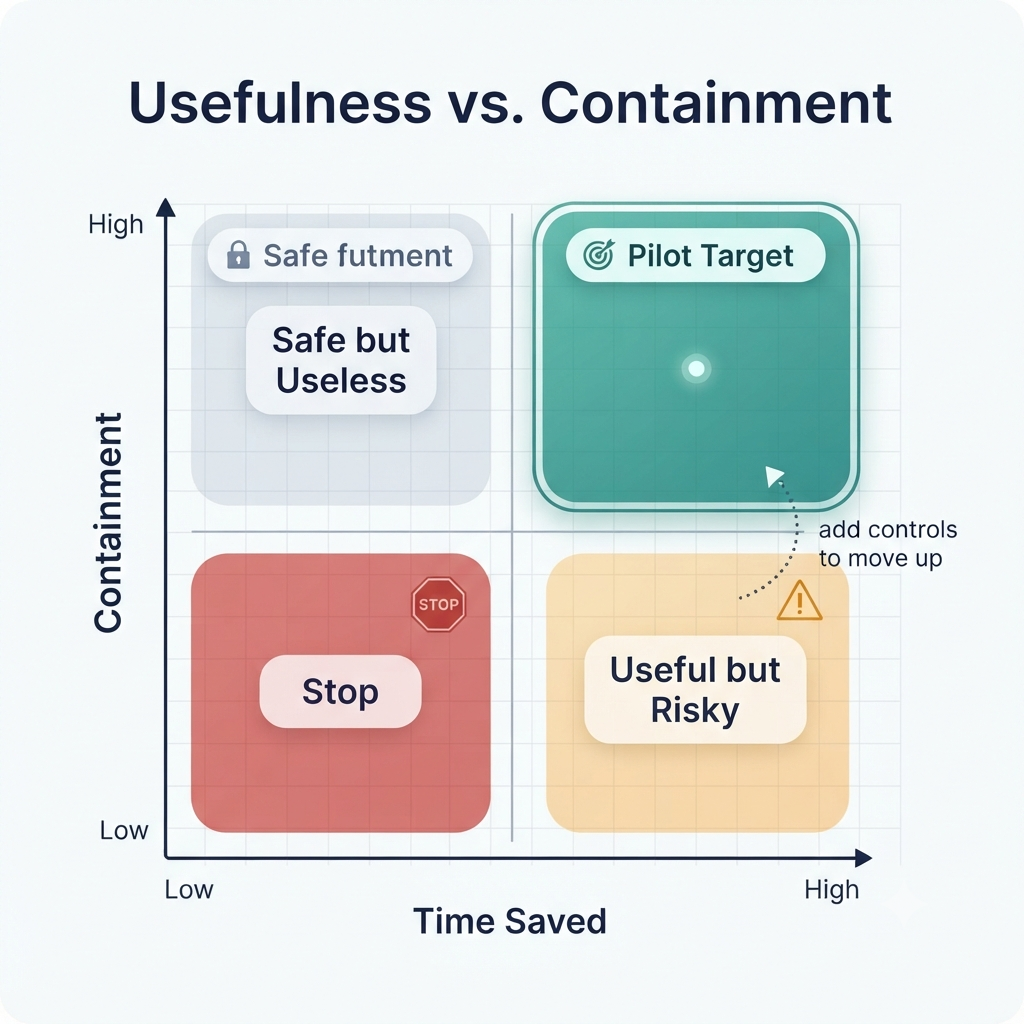
Start with one bounded workflow, such as failed-task triage, release-status analysis, or evidence preparation. Decide which actions are allowed before deciding how much autonomy to grant.
Then evaluate both usefulness and containment:
- How much coordination time did the agent save?
- How often did reviewers have to correct its recommendations?
- Could it attempt an out-of-scope action?
- Did the workflow block that attempt?
- Could an independent reviewer reconstruct what happened?
Digital.ai recommends judging agent work against required controls and against how well you can reconstruct events afterward.
Resist the most tempting shortcut: granting broad access so the pilot works, then promising to tighten things before production. Make restricted operation part of how you define a successful pilot.
Your next step is a boundary review of one existing release workflow. Work out where an agent may advise, where it may act, and where it has to stop.
The agent can reason. The release system has to control when that reasoning becomes an action.