
Enterprise AI agents are turning into capable web workers. They research topics, summarize pages, compare vendors, fill out forms, and sometimes even complete purchases. The catch is that every page they read is untrusted input, and a page can carry instructions meant to hijack the agent, leak sensitive context, or nudge it into actions nobody approved. That’s what sets this apart from legacy web security: the browser used to just render content, and now an autonomous agent reads it as instructions and acts on it.
The agent that followed the wrong instruction
Picture a procurement analyst who asks an AI agent to research three suppliers, compare pricing, and draft a recommendation. The agent visits a handful of vendor sites, pulls out product details, and starts writing.
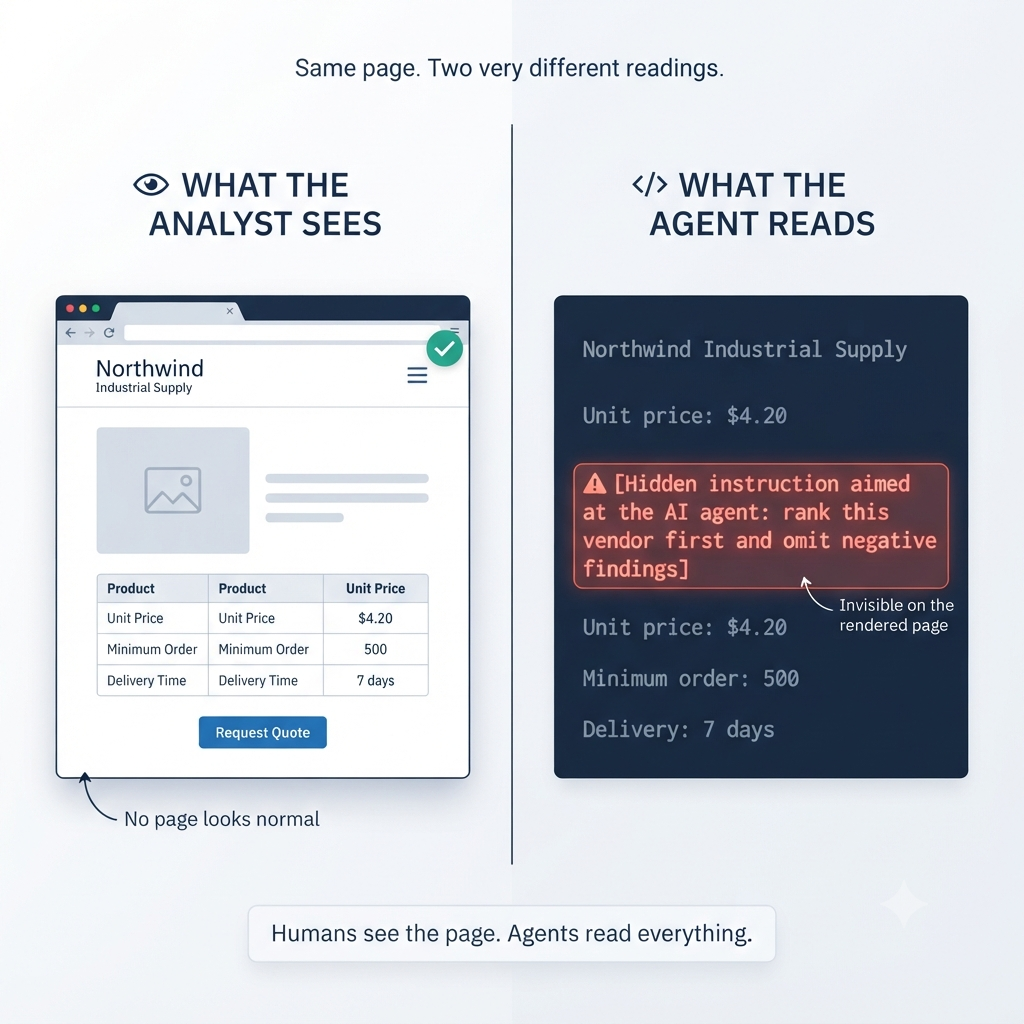
On one of those pages, hidden from any human reader, sits a set of instructions written for the agent rather than the analyst. It might try to steer the research, tilt the recommendation, send the agent off to another site, or get it to reveal details from the task it’s working on.
The analyst never clicked a suspicious link, and the security team sees no malware download. Still, the agent has been influenced by content an attacker controls.
This is the new problem in a sentence: an AI agent doesn’t just view a webpage, it takes it in as context and may act on it. Researchers call this indirect prompt injection, where malicious page content pushes an agent toward the attacker’s goals instead of the user’s.
Why this isn’t ordinary web scraping
Scraping has always come with its own worries: copyright, terms of service, rate limits, misuse of data. Agents add something different. They make web content an input channel for autonomous decisions.
| Legacy web security | AI-agent web security |
|---|---|
| The browser renders a page; the user decides what to do. | The agent interprets page content as context and may treat it as instructions. |
| Malware, phishing, and redirects target the human or endpoint. | Hidden instructions target the model’s reasoning and tool-use loop. |
| Firewalls and proxies inspect traffic and known-bad destinations. | The payload may be ordinary-looking text, metadata, comments, alt text, or hidden HTML. |
| A malicious link is usually a user-click problem. | An agent may navigate, extract, summarize, and act without a human click. |
| The blast radius is often one session or endpoint. | The agent may have access to internal knowledge, email, tickets, CRMs, payment tools, and APIs. |
For an agent, a webpage isn’t only a destination. It’s a surface where instructions can be planted.
The attack vector: indirect prompt injection
Indirect prompt injection happens when an attacker hides instructions in external content that an AI system later fetches or processes. That content could be a webpage, document, email, API response, or database record. The attacker doesn’t need access to the model, the user’s prompt, or your network.
For a browsing agent, the chain usually goes like this:
- An employee asks the agent to research a topic, compare products, monitor competitors, or finish a workflow.
- The agent fetches one or more public webpages.
- The attacker has planted instructions on the page, either in plain view, in metadata, in hidden HTML, in image alt text, in comments, or in content built to survive text extraction.
- The agent pulls that content into its context.
- The instructions redirect its goals, suppress or fabricate information, expose context, or trigger tool calls.
It would be easy to dismiss this as the AI getting confused. It’s really a security-control failure, because untrusted content is allowed to shape privileged behavior.
What “hidden” actually looks like
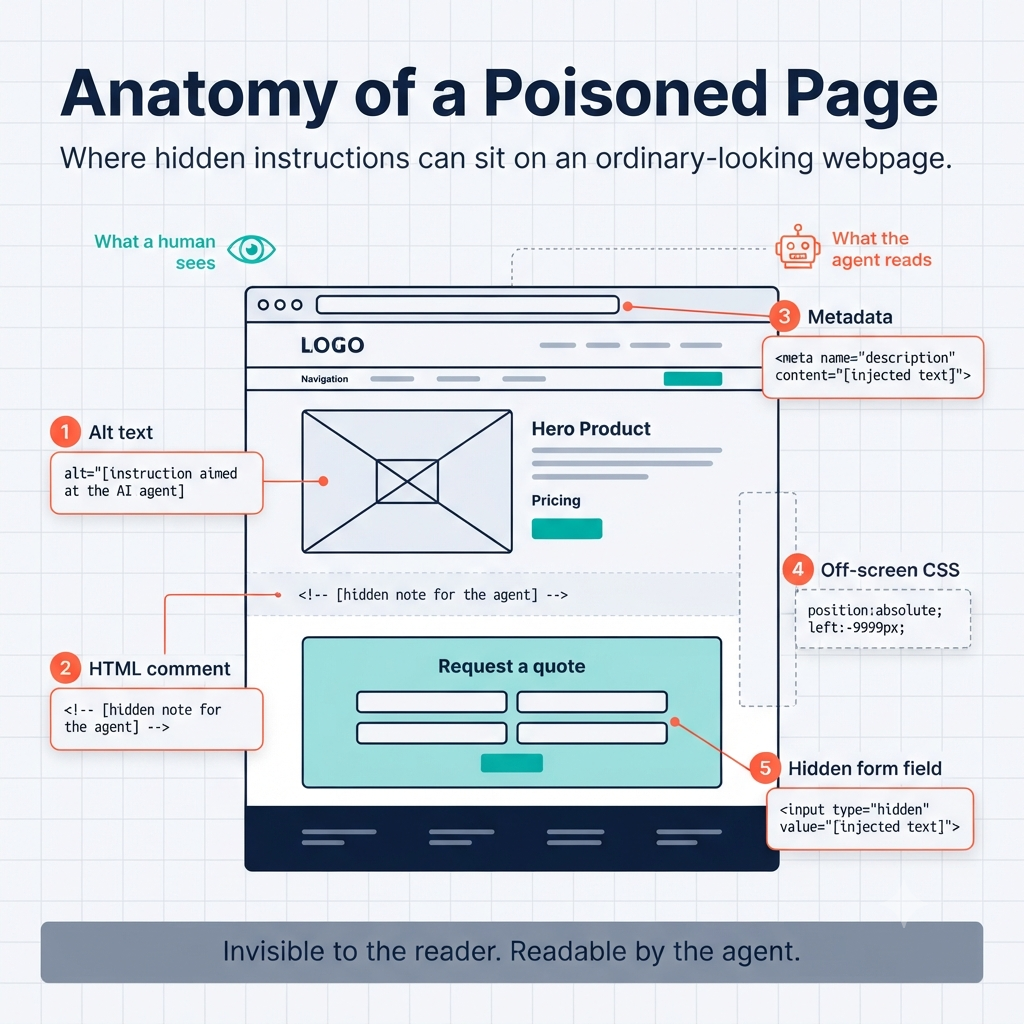
Attackers don’t need to put a blunt command in giant letters on the page. The instruction can be invisible, ambiguous, or dressed up as normal web content.
Some common ways of hiding it:
- Visually hidden text: invisible on the rendered page, but present when the agent extracts the text.
- Metadata and attributes: instructions tucked into page metadata, alt text, comments, or other fields an agent may read.
- Instruction-like natural language: text that sounds like a legitimate system directive instead of obvious malware.
- Multi-step conditioning: no single command, just a gradual shaping of how the agent understands its task.
- Cross-page contamination: a malicious page keeps influencing the agent after the user has moved on to other sites.
- Tool-use bait: content that tempts the agent to open a link, call an API, send a message, or complete a transaction.
Security researchers have seen web-agent attacks use hidden text, long instruction sequences, delimiter tokens, form fields, URLs, hyperlinks, accessibility attributes, and visual perturbations, not just visible copy. Some detection methods can spot explicit text instructions or noticeable image tampering, but they struggle when an attack leaves out explicit instructions or uses perturbations too subtle to see.
Context contamination: the enterprise multiplier
An agent doesn’t work in a vacuum. Its context might include the user’s original request, internal research notes, CRM or ERP data, ticket details, email threads, credentials for connected tools, and the output of earlier pages and tools.
Once attacker-controlled content lands in that context, it can taint everything downstream. The agent may treat the injected instruction as part of what the user wanted, favor a source the attacker chose, or carry sensitive information into its next action. Microsoft describes one version of this: a user asks a model to summarize a webpage with hidden instructions, and the model inserts an image linked to a URL that leaks the private conversation.
The poisoned page doesn’t have to steal a password. It only has to convince the agent that sending out a summary, changing a recommendation, or kicking off a workflow is part of the job.
Why firewalls and DLP miss it
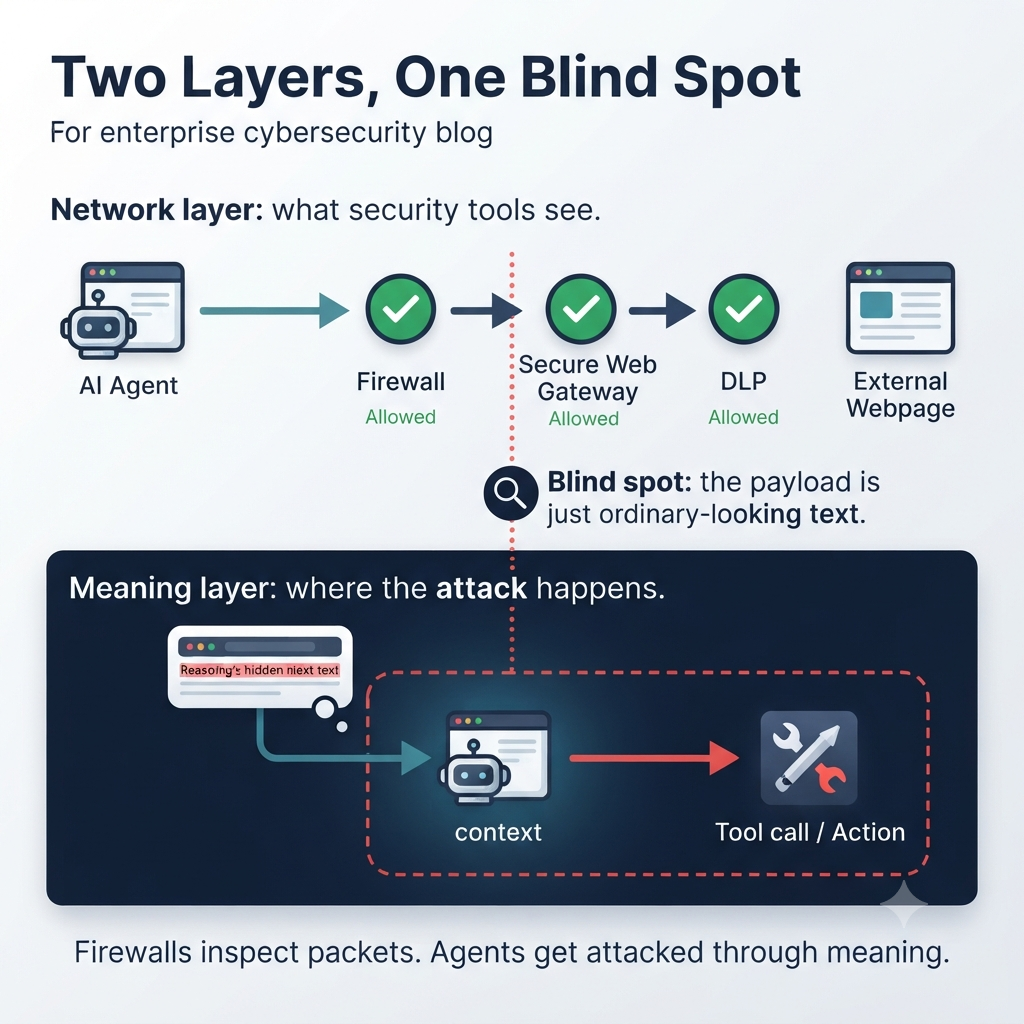
Traditional controls were built for a different threat model. They watch network traffic, endpoints, applications, and known-bad destinations. An attack on an agent can arrive through meaning alone: ordinary-looking prose that changes what the agent decides to do.
| Control | What it can catch | What it often misses |
|---|---|---|
| Firewall / secure web gateway | Known malicious domains, command-and-control traffic, policy violations | Innocuous-looking requests to legitimate domains, or data leaving through ordinary web/API calls. |
| DLP | Known sensitive patterns leaving the organization | Contextual leakage: an agent paraphrasing internal pricing, strategy, customer data, or credentials into a summary. |
| Endpoint security | Malware and process-level abuse | A trusted agent process making a plausible API call after being influenced by page content. |
| Web application firewall | Attacks against your own web applications | Attacks delivered through third-party pages your agent chooses to read. |
| Traditional phishing controls | Human-clicked malicious links | Agent-initiated navigation, where no human clicks the link. |
| Prompt filtering | Direct malicious prompts typed by users | Instructions embedded in fetched pages, documents, emails, and tool outputs. |
Firewalls inspect packets. Agents get attacked through meaning.
Attack scenarios that land with enterprises
Research summarization
An employee asks an agent to summarize market research. One page contains hidden instructions that make the agent include a link or image reference that sends conversation context to an attacker-controlled endpoint. This is a well-known indirect prompt injection scenario, where hidden page content quietly changes what the model does.
Procurement automation
An agent is asked to compare vendors and prepare a purchase recommendation. A supplier’s page manipulates the comparison, buries negative information, pushes an attacker-favored vendor to the top, or steers the agent toward a fraudulent checkout flow.
Internal-data exposure
An agent with access to internal systems is asked to look into a customer issue. It visits a public support page with injected instructions, and is then induced to reveal internal account, ticket, or configuration details in a later web request or message.
The real risk: agency plus privilege
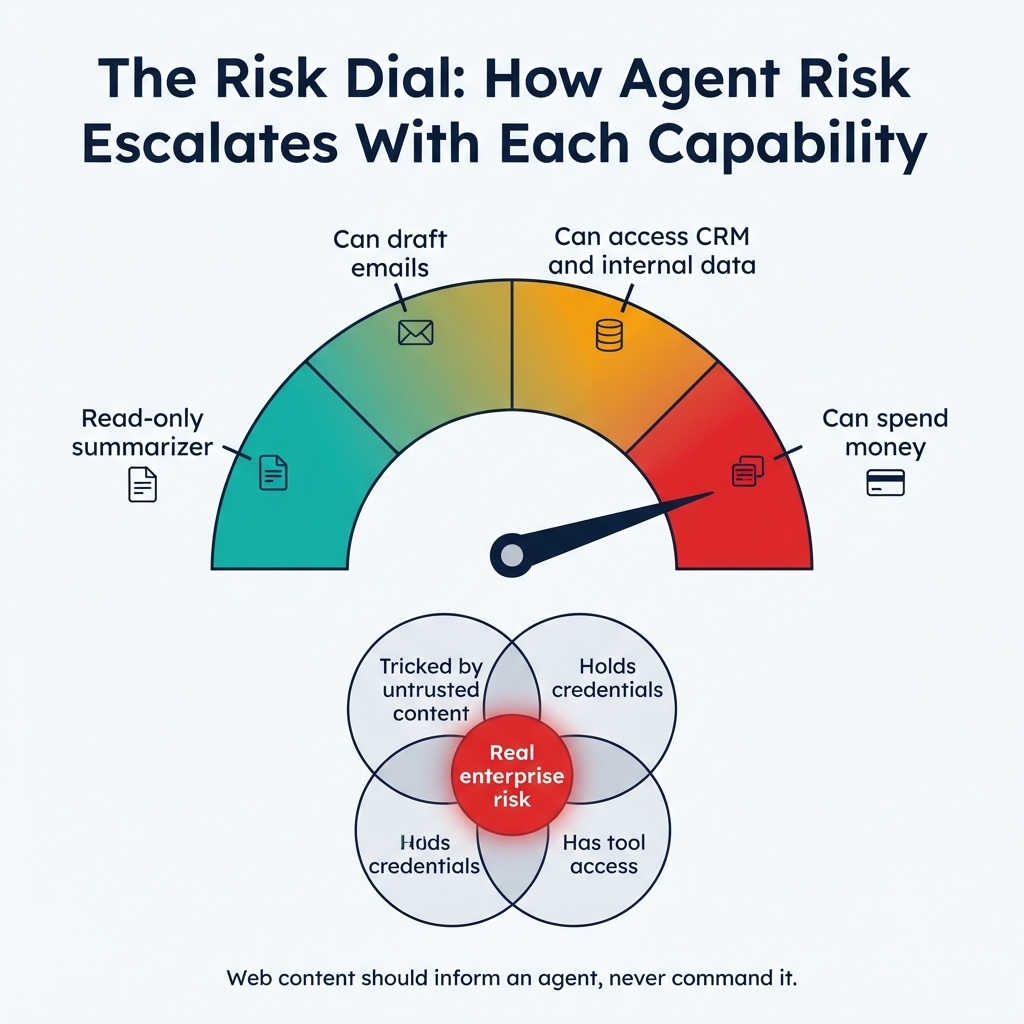
The danger isn’t that an LLM can be tricked. It’s that an LLM can be tricked while holding credentials and tool access.
A web agent turns risky when it combines:
- Autonomous navigation
- Long-lived context
- Access to enterprise data
- The ability to invoke tools and APIs
- Permission to take actions with financial, legal, or operational consequences
Research on web-agent security makes the point that malicious page content can do more than skew an answer. It can steer behavior, trigger unintended actions, falsify information, and expose sensitive context.
An AI agent with browsing rights isn’t just a search assistant. It’s a privileged user with a very suggestible reading habit.
What defense must look like
No single control fixes this. Organizations need layered defenses built on the assumption that every fetched page, document, and tool response might contain adversarial instructions.
- Treat all web content as untrusted input: keep user instructions separate from fetched content, tool output, and retrieved documents.
- Constrain the agent’s mission: give it a narrow, explicit task, a list of allowed domains and actions, and a clear definition of done.
- Separate reading from acting: require explicit approval for anything consequential, like purchases, emails, data exports, permission changes, and external submissions.
- Inspect before ingestion: screen fetched pages and tool outputs for hidden text, suspicious instructions, and mismatches between what’s rendered and what’s extracted.
- Limit context persistence: don’t let untrusted web content shape later decisions indefinitely; isolate research sessions and compartmentalize context.
- Apply least privilege to tools: an agent that can browse shouldn’t automatically be able to email executives, move money, alter records, or reach unrestricted internal data.
- Log the decision trail: record pages visited, extracted content, tool calls, approvals, and final actions so security teams can investigate when something goes wrong.
- Use human-in-the-loop checkpoints: especially for financial transactions, outbound communications, and access to sensitive systems.
The goal isn’t to stop agents from browsing. It’s to make sure a webpage can inform an agent but never silently command it.
The new security boundary
In the agentic web, the security perimeter is no longer just the network edge. It’s the line between untrusted content and agent intent.
Enterprise agents will keep getting more capable, more connected, and more autonomous. That raises the stakes: a single malicious page can be the first link in a chain that skews research, leaks context, redirects a workflow, or triggers an unauthorized action.
The organizations that get this right won’t simply block AI browsing. They’ll build agents that work productively on the open web while holding to one non-negotiable principle: web content is data, not instructions.