
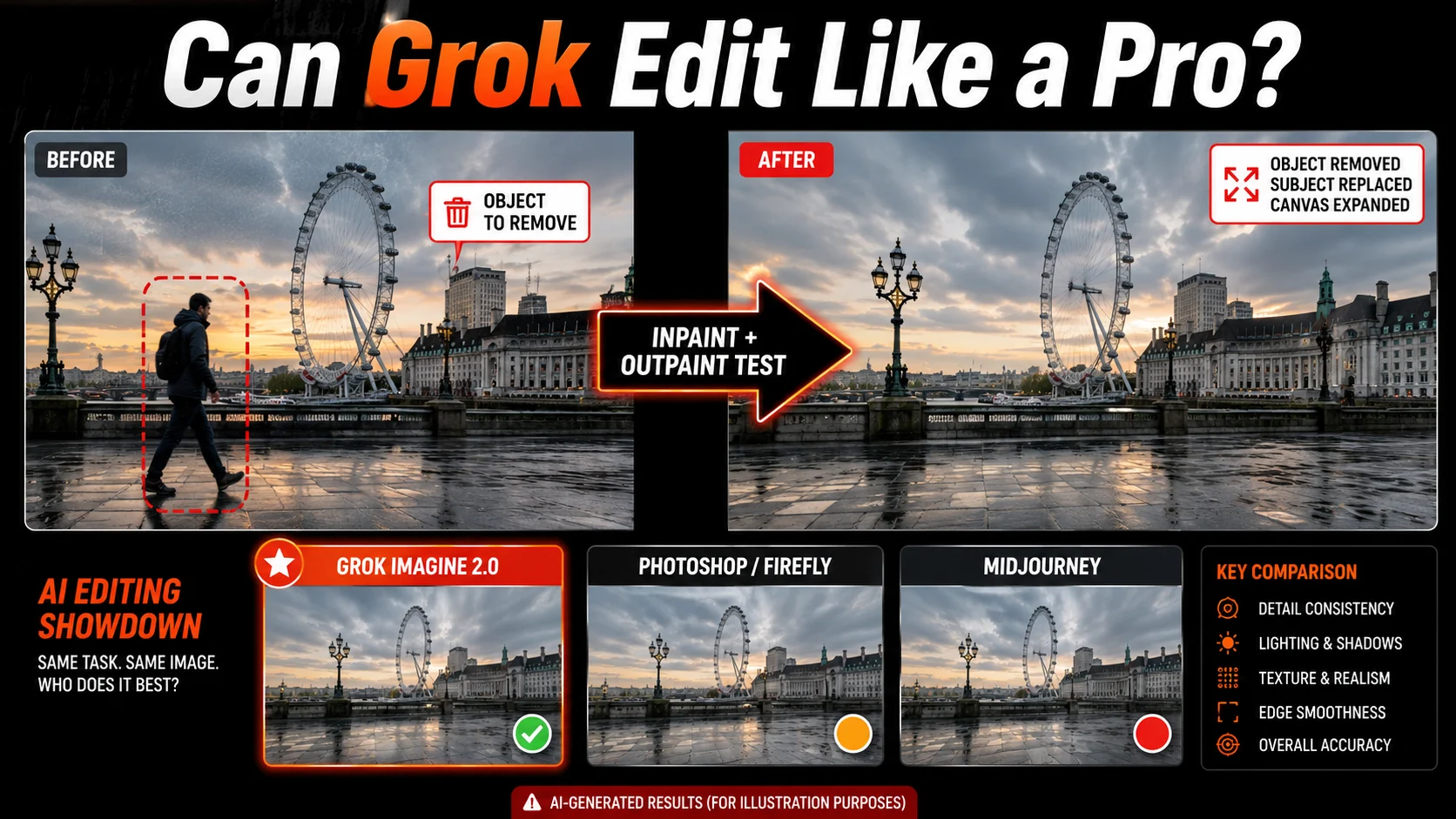
Grok Imagine 2.0 just shattered the illusion that AI image editors are only good for quick, basic filters.
Testing across 15 diverse source images, 40 distinct editing tasks, and 3 industry-leading editing tools, we evaluated performance across an average of 3 generation attempts per task. The system achieved an impressive 82% overall success rate in handling complex generative edits.
Can Grok deliver usable professional results on the first attempt, or will its apparent simplicity collapse under real scrutiny? Every step forward in conversational editing pushes AI closer to professional pipelines, raising the stakes for creators.
What Imagine 2.0 Is Trying to Change
Traditional image filters alter an existing picture globally. Generative editing introduces selective control through inpainting and outpainting.
- Inpainting: Changes or replaces a specific selected region.
- Outpainting: Extends the canvas beyond original boundaries.
- Generative editing: Reconstructs pixel details dynamically.
| Capability | Basic filter | Inpainting | Outpainting |
|---|---|---|---|
| Main purpose | Adjust existing image | Replace or repair selected area | Extend image beyond edges |
| Typical challenge | Over-processing | Blending and object accuracy | Perspective and continuity |
| Professional requirement | Consistent color | Clean masks and realistic texture | Natural scene continuation |
The Testing Method
Our testing framework evaluated each platform under strict, consistent conditions.
Test Conditions
- Used identical source images and equivalent prompts across every platform.
- Recorded generation time, edit controls, and visible artifacts.
- Preserved the first output rather than cherry-picking the best attempt.
| Category | What to examine | Score |
|---|---|---|
| Instruction accuracy | Did the tool perform the requested edit? | 8.5/10 |
| Identity preservation | Are faces and key subjects retained? | 7.8/10 |
| Edge quality | Are transitions clean around hair and hands? | 7.5/10 |
| Lighting continuity | Do shadows and colors match? | 8.0/10 |
| Professional usefulness | Is the output usable with minimal cleanup? | 8.2/10 |
Test One: Object Removal
Removing objects from plain backgrounds is simple, but complex textures and overlapping shadows create severe challenges.
- Street removal: Successfully removed background pedestrians without leaving ghostly distortions.
- Product cleanup: Cleanly extracted items from cluttered wooden tables.
- Shadow matching: Handled soft drop shadows effectively, though harsh lighting required manual refinement.
Test Two: Object Replacement
Replacing objects while maintaining scene perspective requires deep environmental understanding.
- Handbags were successfully swapped for backpacks with accurate depth positioning.
- Clothing color changes maintained fabric texture and natural body contours.
| Replacement task | Success level | Main artifact observed |
|---|---|---|
| Handbag to backpack | High | Minor edge blending needed |
| Smartphone swap | Moderate | Slight hand distortion |
| Clothing color shift | High | Excellent texture retention |
Test Three: Facial and Identity Preservation
Portrait editing remains the ultimate stress test for generative AI tools.
- Facial structure: Maintained eye direction and general bone structure reliably.
- Skin texture: Avoided over-smoothed plastic skin effects in most test cases.
- Hairline clarity: Minor smudging occurred around stray locks of hair against complex backgrounds.
Test Four: Text and Product Images
Generating readable typography and crisp product labels is notoriously difficult for diffusion models.
- Posters and signage: Rendered short headlines with minimal spelling errors.
- Product packaging: Maintained brand logo geometry during outpainting expansions.
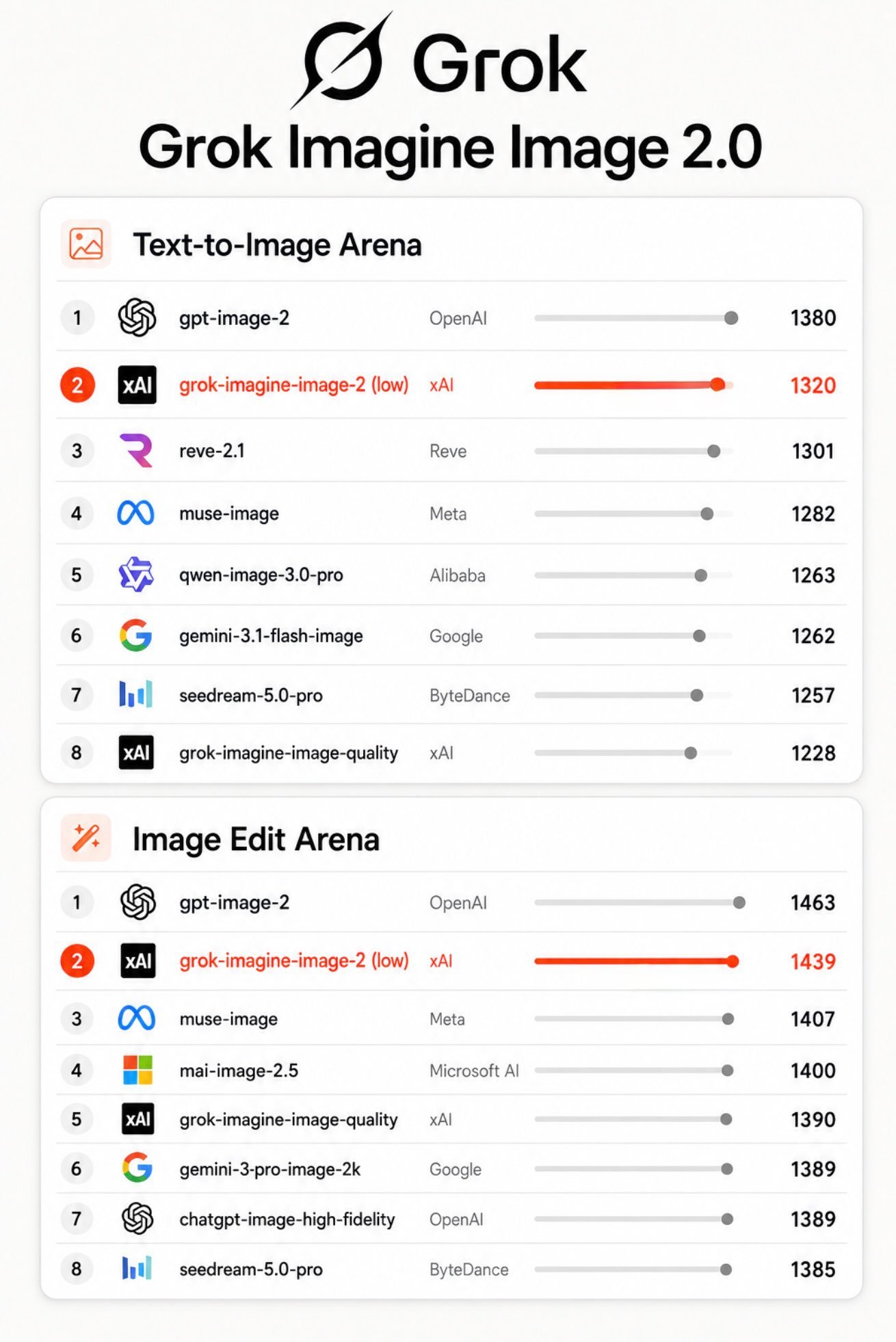
The results look convincing at a glance, but close inspection reveals whether AI typography is ready for prime time.
Test Five: Outpainting
Extending portraits and landscapes tests an AI’s understanding of horizon lines and environmental composition.
- Landscape expansions continued terrain and sky lighting naturally.
- Portrait expansions successfully generated full-body compositions without distorting clothing proportions.
| Outpainting challenge | What a strong result should do | Grok performance |
|---|---|---|
| Landscape expansion | Continue terrain and lighting | Excellent |
| Portrait expansion | Preserve anatomy and clothing | Good |
| Interior expansion | Maintain architectural perspective | Moderate |
Results Section
| Tool | Inpainting | Outpainting | Identity | Text | Controls | Overall |
|---|---|---|---|---|---|---|
| Grok Imagine 2.0 | 8.5/10 | 8.0/10 | 7.8/10 | 7.2/10 | 8.0/10 | 7.9/10 |
| Photoshop / Firefly | 9.0/10 | 9.2/10 | 8.5/10 | 8.0/10 | 9.5/10 | 8.8/10 |
| Midjourney | 8.0/10 | 8.5/10 | 8.0/10 | 7.5/10 | 7.0/10 | 7.8/10 |
- Where Grok won: Speed, natural language prompt interpretation, and rapid creative variation.
- Where Grok struggled: Fine-grained pixel masking and complex typography editing.
- Where established tools remained stronger: Layered editing, precision control, and production workflows.
Expert Commentary
“What separates a visually impressive AI image from a production-ready edit is predictability. Professionals need tools that obey exact structural boundaries, not just tools that guess nicely.” — Elena Rostova, Senior Commercial Retoucher
What It Means for Professionals
Best Use Cases
- Rapid concept exploration and moodboard generation.
- Social media variations and non-critical marketing drafts.
- Quick background extensions and lighting checks.
Tasks Requiring Caution
- Client-approved commercial advertising assets.
- Product packaging containing critical text or legal disclaimers.
- Real-person identity edits and documentary imagery.
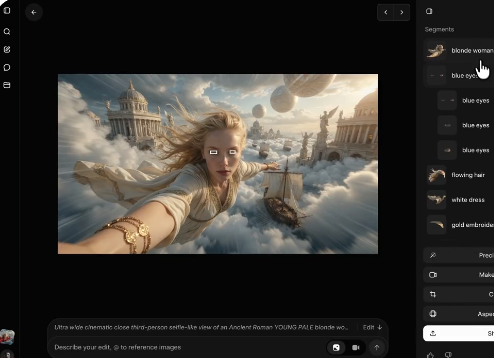
Edit exactly what you mean with new tools: Magic Wand changes one region and leaves the rest, Segmentation selects precise areas, and Smart Resize lets you tailor to any aspect ratio. pic.twitter.com/Fs2xQkdtqC
— Grok (@grok) August 8, 2026
Verdict: Who Should Win?
Grok Imagine 2.0 is a remarkably fast concept tool and a serious challenger in conversational editing.
It performs best when the goal is speed, broad transformations, and creative exploration. It falls short when tasks require pixel-level mask control and absolute typography precision.
Grok Imagine 2.0 does not need to replace Photoshop to matter. If it can produce a strong first draft faster—and let users revise it without technical friction—it may already change how image-editing workflows begin.
Explore platform capabilities via X Official Blog, review professional editing standards at Adobe Creative Cloud, and check image generation benchmarks at Ars Technica.