

For most of the generative AI era, using AI has gone the same way. You notice something, open a chat window, type a prompt, and wait. The AI is smart, but it only speaks when spoken to.
Perplexity’s new Teammates try something different. Instead of sitting idle until you prompt them, they watch ongoing work, spot changes, dig into what happened, and follow up. It’s less like a search box and more like a colleague who’s already on it.
That could change when enterprise AI starts working. Not when you ask a question, but when something changes.
From Prompt to Responsibility
Traditional AI is built around a single exchange. You give it context, it gives you an answer, and that’s the end of it. You’re still the one who has to notice the problem, frame it, gather the details, and decide what happens next.
That’s fine for drafting, summarizing, and research. But there’s a gap between the moment something goes wrong and the moment someone thinks to ask AI about it.
Proactive AI is built to close that gap. It starts with a responsibility instead of a prompt: keep a key customer happy, keep a service healthy, stop a deal from stalling. Perplexity describes Teammates as agents that own ongoing work, watch connected tools, and follow up as things shift.
Here’s the contrast in short. Reactive AI waits for a user prompt, only knows the current conversation, and produces an answer. Proactive AI runs on schedules, thresholds, or events, watches your connected tools, remembers across tasks, and detects, investigates, acts, and follows up. You go from prompting and reviewing to setting goals, guardrails, and approval points.
The point isn’t that the agent can do more. It’s that it has a standing goal and can tell when that goal is in trouble.
How a Proactive Agent Spots Trouble
It takes three things:
- A responsibility, like “protect revenue from high-value account churn.”
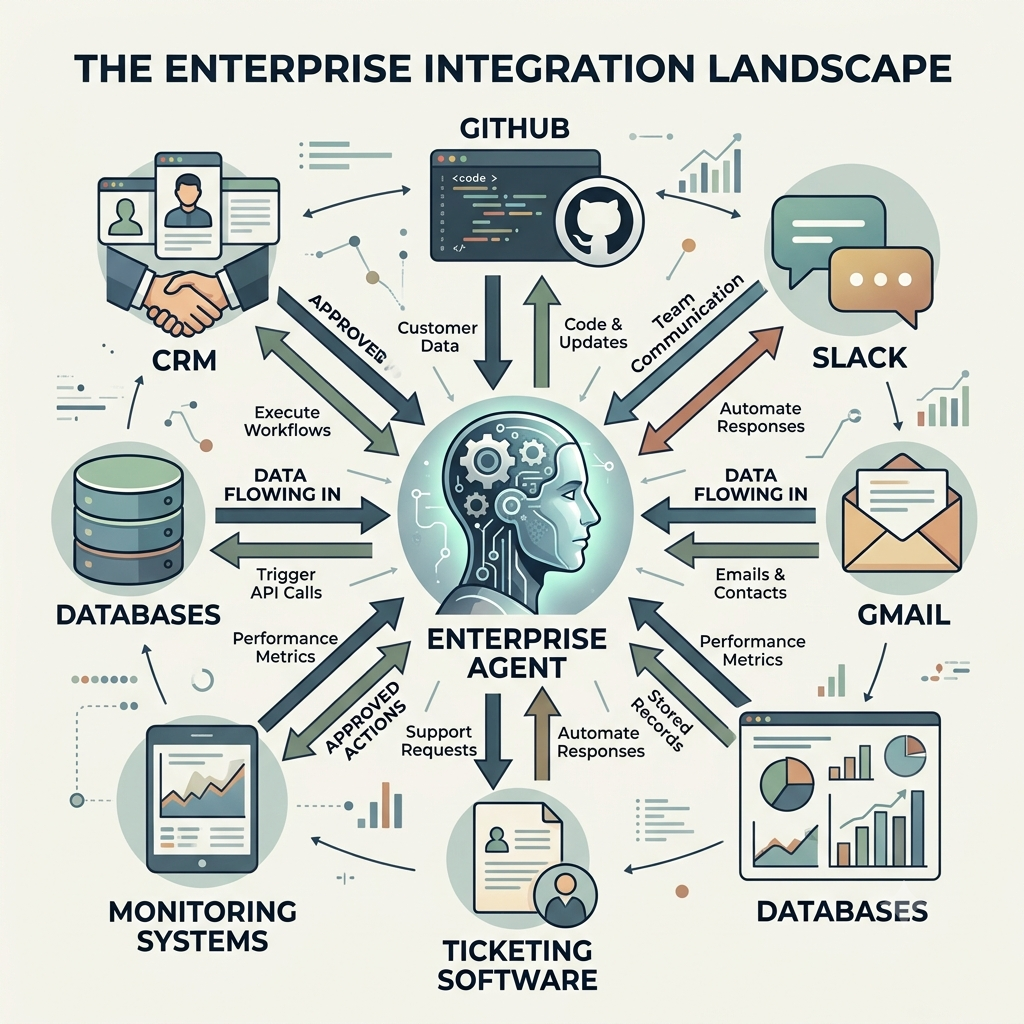
- Connected signals, such as CRM records, support tickets, server logs, Slack, GitHub, and dashboards.
- Trigger conditions, like a regular customer going quiet, an error rate climbing, or a priority ticket aging.
Say a customer-success team is responsible for keeping its biggest accounts. With a normal assistant, nothing happens until a manager asks, “Why did this account go quiet?” A proactive agent flips that. It sees the customer stopped ordering, checks order and support history, figures out what changed, and has a next step ready before anyone asks. Perplexity points to exactly this kind of scenario.
The agent isn’t waiting for a human to catch the anomaly. It’s watching for it.
From Alert to Root Cause
An alert on its own isn’t much help. “Churn detected” or “errors are up” just tells you something’s wrong. A useful agent works out the story behind the signal:
- Detect the deviation, like no orders from a repeat customer in 30 days.
- Contextualize by pulling account history, recent tickets, and past conversations.
- Investigate possible causes: a failed payment, an unresolved issue, a competitor, seasonality.
- Hypothesize and rank the likely explanations by evidence.
- Recommend or act by drafting outreach, opening a ticket, or escalating.
- Follow through and check whether it worked.
That’s the difference between an alerting system and an agent. One flags a signal. The other keeps working until the issue is resolved or handed to a person. Perplexity says its Automations feature supports both scheduled and event-triggered work, with each run building on the last.
AI on Call
Incident response is probably the clearest example. It’s 2 a.m., and error rates spike in a payment service. Normally, an on-call engineer gets paged, opens dashboards, digs through logs, checks recent deployments, and starts piecing it together by hand.
With a proactive agent, most of that happens first. It catches the anomaly, pulls logs and traces, checks recent deployments and config changes, and looks for a likely cause, like a bad release or a dependency timeout. It can draft a fix, prepare a rollback plan, and open a pull request. The engineer only gets paged if approval is needed or the cause can’t be pinned down in time. Perplexity’s own “On-call Engineer” example works this way.
The agent isn’t replacing the engineer. It’s taking over the grind of triage and evidence-gathering, while the human keeps the judgment and the final say.
Why Event-Driven AI Changes the Math
In a reactive setup, the cost of not paying attention is delay. Someone has to notice the churn risk, the failed deploy, or the stalled deal before AI can help.
When the system watches for itself, a few things change:
- Problems get handled closer to when they start.
- People spend less time scanning dashboards and more time making calls.
- Agents that remember past work can tell a one-off from a pattern.
- Long projects don’t depend on someone remembering to check in.
- One person can oversee more areas at once.
It’s the difference between a chatbot and a junior colleague with an always-on brief.
Proactive Doesn’t Mean Unsupervised
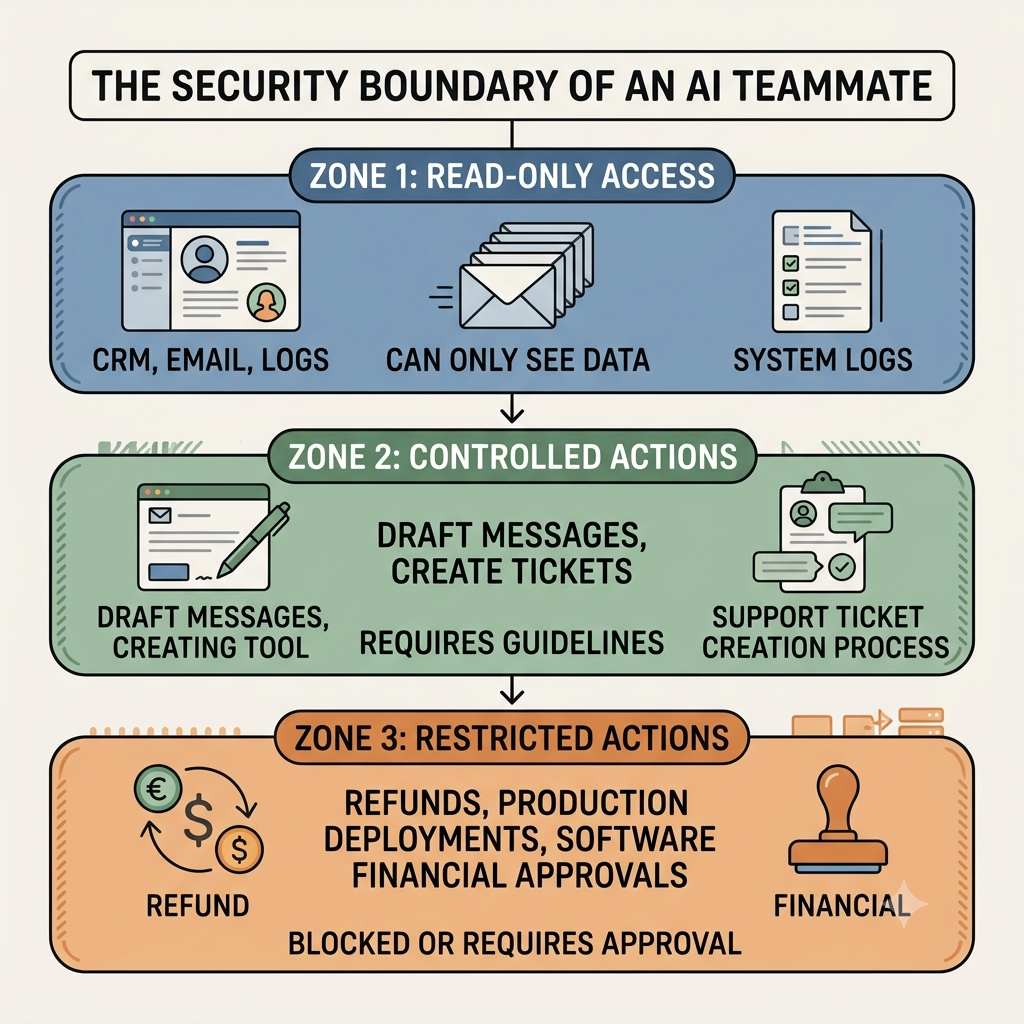
The strongest designs draw a clear line between what an agent can do alone and what needs a human.
- On its own: monitoring, investigating, drafting, classifying, summarizing, preparing.
- With approval: customer outreach, pricing changes, production deployments, refunds, security responses, anything irreversible.
- Always: a clear record of what the agent saw, concluded, and did, plus explicit rules for when it must stop and ask.
Perplexity’s model includes progress updates, approval requests, reviewable threads, and the ability to take over or redirect an agent. You can trust an agent to notice a customer went quiet. You probably shouldn’t let it send a discount or push to production unchecked.
Where This Fits
Any work with a recurring goal and observable signals is a candidate:
- Revenue protection: spot dormant high-value accounts and prepare retention plans.
- Customer support: catch escalating tickets and draft resolutions.
- Engineering: link incidents to deployments and prepare fixes.
- Finance and ops: flag overdue approvals, policy exceptions, or odd transactions.
- Marketing: watch campaign performance and suggest adjustments.
- Security: correlate events and build an incident timeline for review.
The common thread isn’t the industry. It’s the pattern: a standing goal, a stream of signals, a threshold for action, and a human checkpoint where the stakes are high.
When Proactive Goes Too Far
An agent that acts too often, too broadly, or on a wrong read of the situation is its own problem. Watch for:
- False positives that cause alert fatigue.
- Missing context, like mistaking seasonality for churn.
- Over-broad access that exposes sensitive data.
- Automation bias, where teams accept a diagnosis without checking it.
- Unclear ownership when an agent acts and something goes wrong.
- Cost and complexity from always-on agents and their integrations.
The fix is simple, if not easy: narrow responsibilities, observable triggers, clear approval gates, and measurable success criteria. A good agent isn’t the one that does the most. It’s the one that does the right thing at the right time.
What to Do Now
The edge won’t come from simply having AI. It’ll come from designing responsibilities AI can own safely.
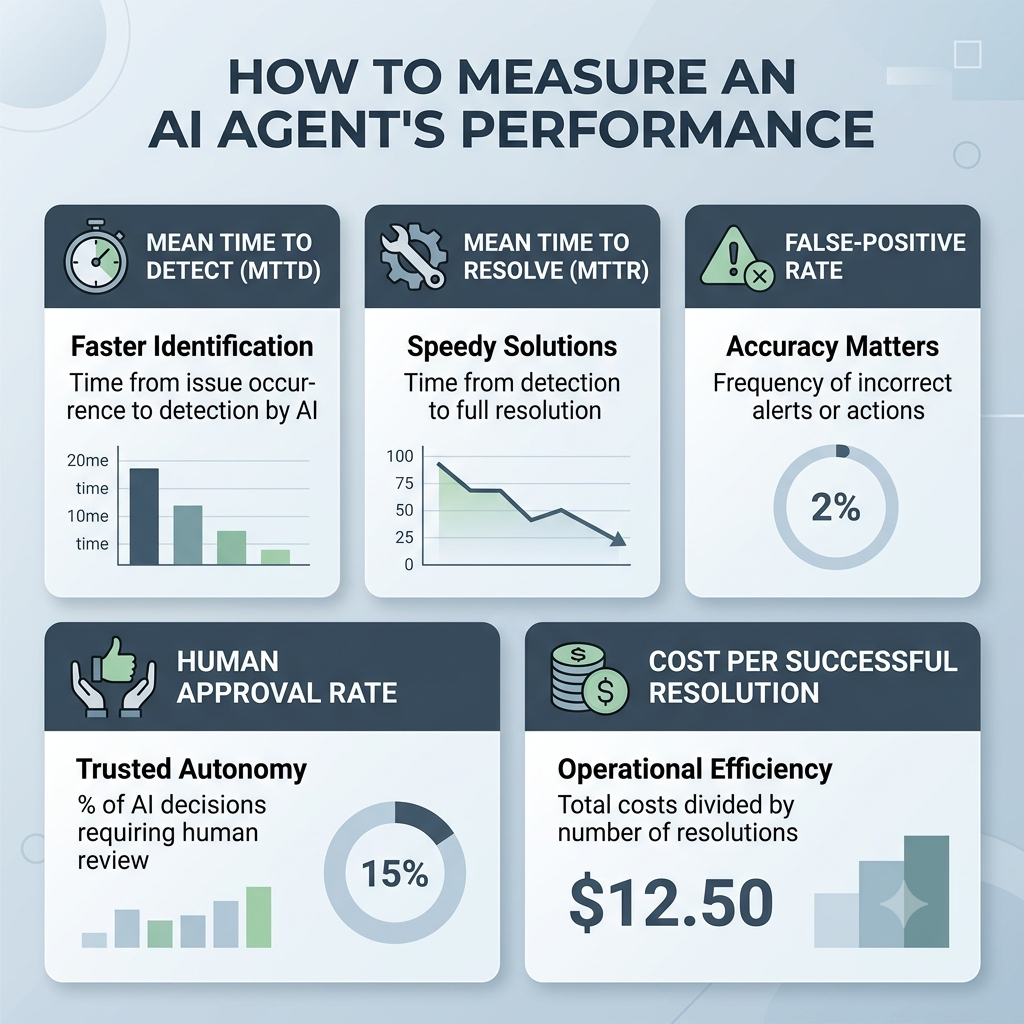
Start small with high-signal, low-risk monitoring. Define what should trigger action and what evidence the agent must gather first. Keep humans in charge of anything consequential. Then measure: time to detection, time to resolution, false-positive rate, and business impact.
Treat these agents as governed systems with clear goals, permissions, and accountability, not magic employees.
From Tools to Teammates
The real shift isn’t that AI writes better answers. It’s that AI can hold a responsibility over time: notice the exception, investigate, prepare a response, and ask for help only when judgment is needed.
The next generation of enterprise AI won’t wait to be asked. It’ll already be watching.