

Picture a customer who explains a billing problem in chat. The next day they phone support, and the agent asks for their account number, their name, and what the problem is. So they send an email, hoping that finally gets it written down somewhere. It doesn’t. The reply opens with the same three questions.
Nobody would call that a model problem. The AI was fine, and so were the humans. What failed was memory.
Most support stacks are multichannel. They offer chat, email, voice, and ticketing, but each channel keeps its own records, and the customer’s context stays behind in whichever one they used last. Long-term agent memory fixes this by letting an AI support agent hold on to the right customer, case, and resolution details across sessions, so people stop starting over every time they get in touch.
Why traditional support automation forgets
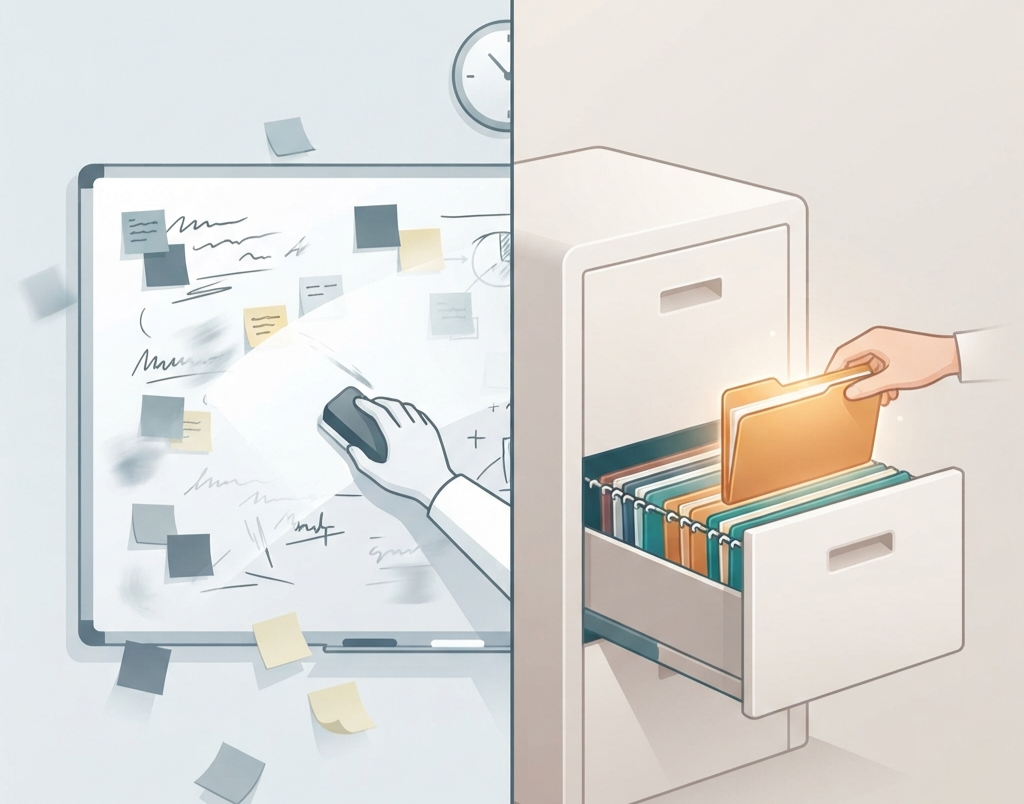
An AI agent’s context window works like short-term memory. It holds what’s happening in the current conversation, and when the session ends, it’s gone unless your application deliberately saves it and brings it back later. Persistent memory is the opposite: durable state that an agent can write to, retrieve, and update across sessions.
If you’ve worked in or near a contact center, these failure points will sound familiar:
- Chat, email, phone, and ticketing each keep their own interaction history.
- Agents can pull up account data but not what the customer already went through last month.
- Cases get closed before the customer’s real goal has been met.
- Escalations drop the reasoning behind earlier decisions.
- Customers keep repeating preferences, device details, plan limits, and troubleshooting steps.
The multichannel versus omnichannel distinction is worth getting right. Multichannel means you offer several ways to reach you. Omnichannel means the context follows the customer from one channel to the next. When voice and digital channels share a customer identifier, someone can start a conversation in one place and pick it up in another without losing the thread.
The three memory layers
It’s tempting to treat memory as one big bucket. In support, that goes wrong quickly. A more useful approach is to separate memory by how long it lives and what it’s for.
| Memory layer | Time horizon | What it remembers | Support example |
|---|---|---|---|
| Session memory | Minutes to hours | Current conversation, immediate intent, live troubleshooting state | “The customer said they already restarted the router.” |
| Case memory | Days to weeks | Ticket history, attempted fixes, escalations, promises, and pending actions | “A replacement was promised on Monday; delivery is still pending.” |
| Customer memory | Months to years | Stable preferences, entitlements, prior incidents, communication preferences, and successful resolutions | “This customer prefers email updates and has an enterprise plan with priority support.” |
Session memory keeps a single conversation coherent. Case memory carries continuity through the life of a support issue. Customer memory covers the whole relationship.
Here’s how that plays out. A customer starts in chat, gets escalated to a phone call, and sends a follow-up email afterward. Each of those touchpoints should read from the same governed customer and case context and add to it, instead of creating yet another separate history.
What a memory-enabled agent should know
A good memory schema is selective. The goal isn’t to remember everything. It’s to keep the facts that make the next interaction better without creating privacy, accuracy, or governance problems.
- Identity and entitlement: Verified customer identity, account tier, product access, permissions, and service constraints.
- Open case state: The current issue, severity, owner, promised follow-up, refund or credit status, and escalation path.
- Resolution history: What was tried, what failed, what worked, and which knowledge-base articles actually helped.
- Preferences: Preferred channel, language, contact windows, accessibility needs, and tone.
- Environment facts: Device, browser, integration, plan configuration, or deployment details, where relevant and consented to.
- Commitments: What the company promised, who promised it, and whether it was delivered.
- Outcome signals: Customer confirmation, CSAT or NPS feedback, reopened tickets, and behavior after resolution.
One thing to build in from the start is the difference between what a customer says and what the system confirms. “The customer wants a refund” is a request. “The refund was processed” is a verified state, and it should come from your billing or order-management system, not from the agent’s recollection.
Cross-channel memory architecture
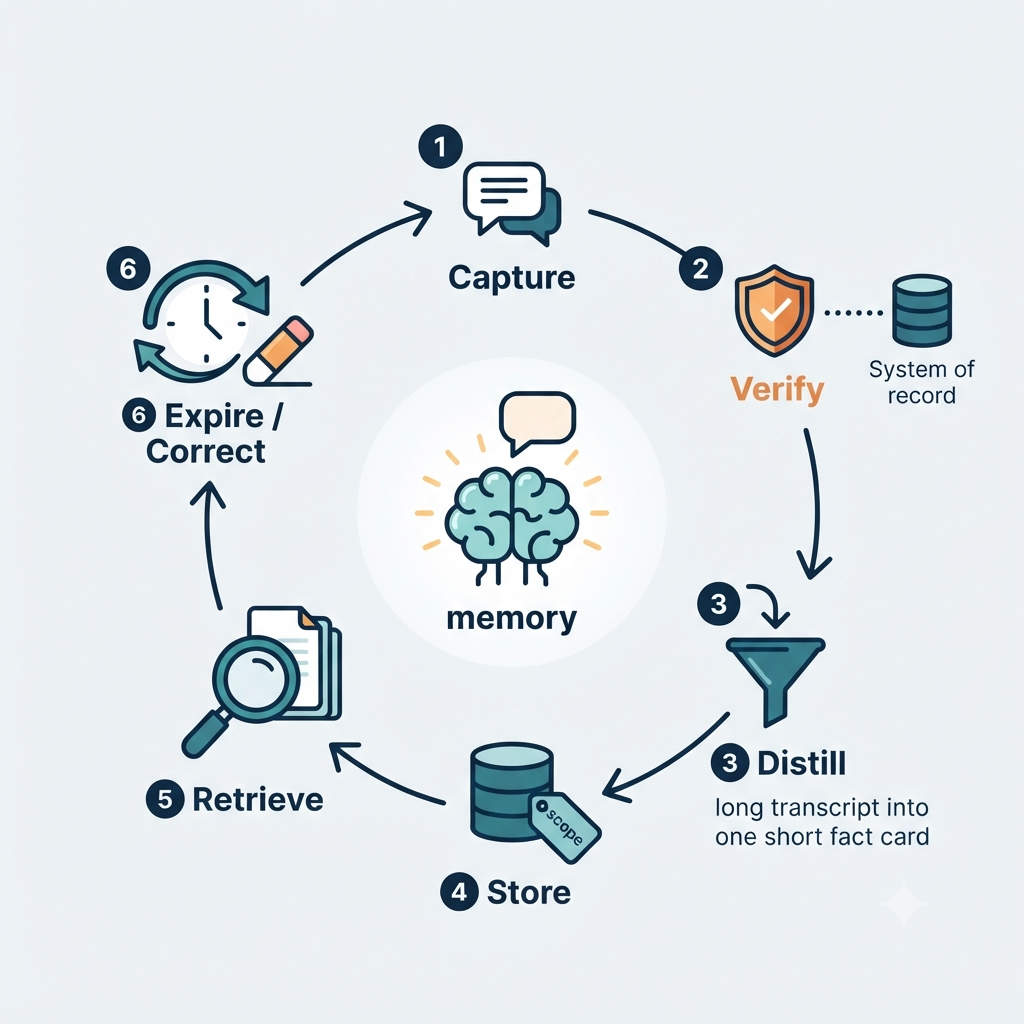
A support agent with real memory needs more than a vector database. It needs a setup that can work out who the customer is, retrieve only what’s relevant, and leave your operational systems in charge of the facts.
- Channel layer: Chat, email, voice and transcription, SMS, in-app messaging, social channels, and ticketing.
- Identity resolution layer: A stable customer key, such as a normalized account ID or verified email, ties interactions together across systems.
- Memory layer: Holds distilled customer facts, case state, preferences, and outcomes, each with scope, ownership, and retention metadata.
- Retrieval layer: Pulls only the memory slices that matter for the current interaction instead of loading a customer’s entire history into the model.
- Action and system-of-record layer: CRM, ticketing, billing, order management, and fulfillment remain the authority on transactions and status.
- Governance layer: Consent, retention, redaction, access controls, audit logs, and expiry rules.
If you take one rule from this section, make it this: memory improves context, but systems of record establish truth. An agent can remember that a customer asked for a replacement. It should still check shipment or refund status in the system that actually knows.
From memory to intent prediction
Once an agent has governed access to past interactions, it can stop only reacting and start anticipating what the customer is likely to need.
- Someone with repeated connectivity problems might benefit from proactive outage or device-health guidance.
- Someone who keeps asking about billing might want a billing summary sent before they ask again.
- Someone who abandons a troubleshooting flow halfway may need a human to step in or a callback scheduled.
- Someone with an unresolved delivery issue may want a status update before they feel the need to contact you.
Treat “next-best action” as a recommendation, not a decision the agent makes alone. The agent suggests an action, checks policy and entitlement, and acts only within boundaries you’ve approved.
There’s a catch. Preferences that are stale or wrongly inferred lead to clumsy personalization, like congratulating someone on a plan they canceled six months ago. Memory needs freshness controls, a way to resolve conflicting facts, and the ability to update or forget what’s no longer true.
Human handoffs without context loss
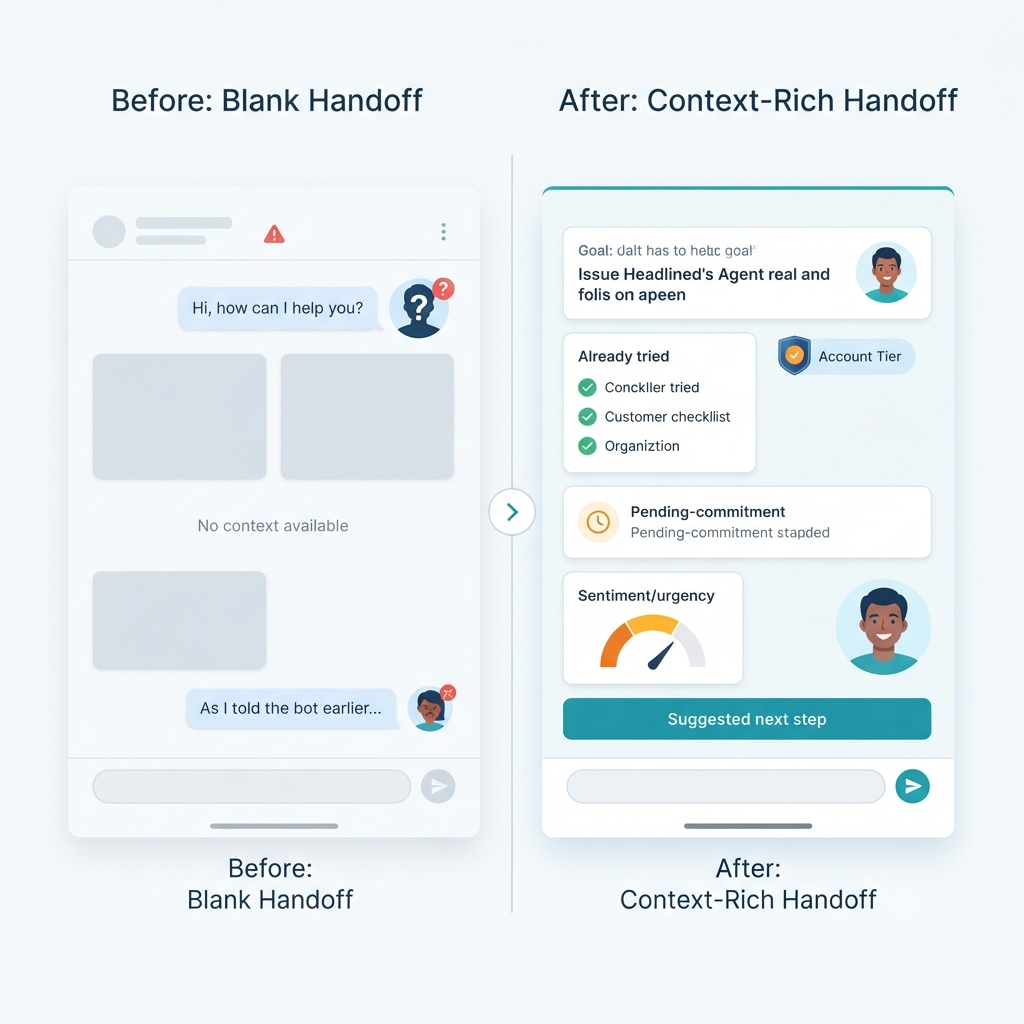
The handoff from AI to a human agent is where memory pays off most visibly. The person picking up the conversation should arrive knowing enough that the customer never has to say “as I told the bot earlier.”
A good handoff summary covers:
- The customer’s goal and the current issue
- Steps already attempted
- Relevant account and entitlement context
- Open commitments and deadlines
- Sentiment and urgency signals
- Recommended next actions, with the reasoning behind them
Human agents should also be able to review, correct, or override what the system remembers. Memory is there to support your team, and it doesn’t replace their judgment.
Governance: memory without becoming a liability
Support memory is full of customer data, so governance can’t be something you bolt on later. The aim is to keep enough context to serve people well while limiting how much sensitive information you expose and making sure one customer’s data never shows up in another’s session.
- Data minimization: By default, store distilled facts tied to a purpose rather than full raw transcripts.
- Consent and preference management: Honor channel, marketing, and personalization choices.
- Tenant and customer isolation: Make sure one customer’s context can’t be retrieved during someone else’s session.
- Retention and expiry: Give session, case, and customer memory separate lifetimes, and expire volatile facts like device state or temporary access details.
- Redaction and access control: Mask sensitive identifiers and limit access by role, region, product line, and case ownership.
- Auditability: Log what memory was retrieved, which agent used it, what action followed, and what happened next.
- Memory integrity: Guard against memory poisoning, unauthorized edits, and wrong facts being treated as verified truth.
On that last point, OWASP’s guidance on AI agent security is a good reference. It recommends validating and sanitizing data before it goes into memory, isolating memory between users and sessions, setting expiration and size limits, checking for sensitive data before anything is persisted, and using cryptographic integrity checks on long-term memory.
Implementation roadmap
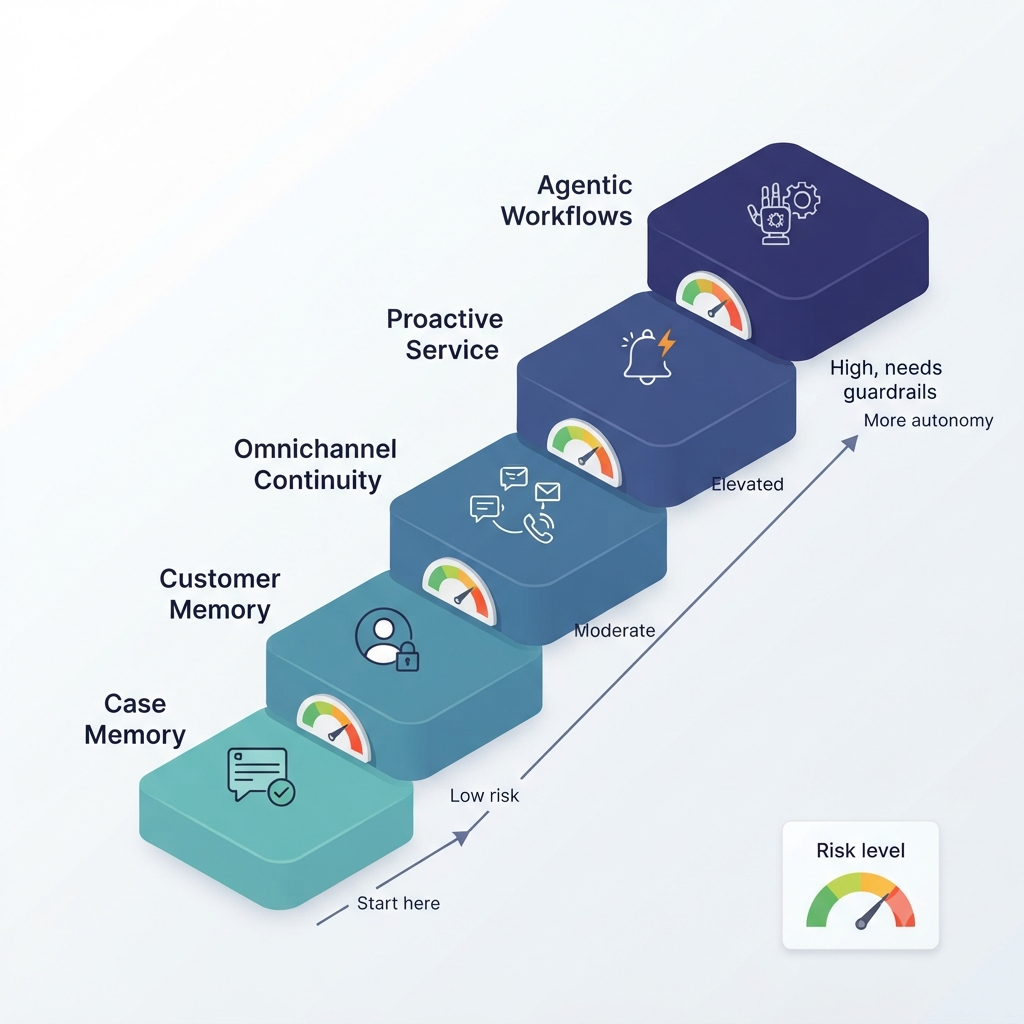
Roll this out in phases. Trying to give an agent full autonomy on day one is how projects stall or go wrong.
- Phase 1, case memory: Link conversations to tickets and capture attempted fixes, escalations, promises, and outcomes.
- Phase 2, customer memory with guardrails: Add stable preferences, entitlements, and prior-resolution context, along with retention and access rules.
- Phase 3, omnichannel continuity: Connect chat, email, voice, and ticketing to a shared identity and memory layer.
- Phase 4, intent prediction and proactive service: Use approved signals to recommend next-best actions and reach out proactively.
- Phase 5, agentic workflows: Let the agent carry out bounded actions, such as scheduling a callback, updating a ticket, or starting an approved refund workflow, only after validation and policy checks.
The order matters. Get reliable case context working first, then add durable customer context, and only then move into proactive and action-taking workflows.
Metrics that prove memory is working
Judge memory by what it does for customers, not just by how many conversations the bot deflects.
- Repeat-question rate per customer or per case
- First-contact resolution and case reopen rate
- Average handle time and time to resolution
- Channel-switch continuity rate: the share of interactions where prior context was successfully retrieved
- Escalation rate and handoff quality
- Customer satisfaction, CSAT, NPS, and customer-effort score
- Memory precision and recall: how often retrieved memories are relevant and correct
- Governance metrics: retention compliance, access violations, redaction coverage, and memory-correction rate
A handy day-to-day signal is whether the agent can recognize an open issue and resume where the last interaction stopped. That’s the behavior customers actually notice, and it’s what Microsoft describes when it talks about agents recalling earlier discussions and picking up where they left off.
Common pitfalls
- Treating a vector database as a complete memory strategy.
- Keeping every transcript forever instead of distilling durable, governed facts.
- Letting inferred preferences override verified account or order data.
- Skipping the stable customer identity that links channels together.
- Giving agents broad write access to memory with no human review or record of where a fact came from.
- Tracking only deflection while ignoring customer effort, repeat contacts, and resolution quality.
One more thing worth remembering: a long context window isn’t persistence. Real persistence takes durable storage, selective retrieval, careful assembly of context, and deliberate updates to what’s stored.
The takeaway
The advantage here isn’t having an AI agent that answers questions. Plenty of companies have that. The advantage is an agent that keeps continuity across channels safely and accurately, so customers spend less time repeating themselves and your team spends less time piecing context back together.
Your support stack may be multichannel, but your customer experience isn’t omnichannel until memory travels with the customer.