
What parents, teachers, and districts should know about content filters, privacy, and classroom use.
Schools are racing — and worrying — as AI barges into classrooms. A recent set of surveys shows a huge jump in student AI use: up to 85% in some studies, while 70% of teachers report seeing AI in homework. Are schools ready to protect teens without blocking learning? Parents and educators must act now as OpenAI’s teen-focused ChatGPT rolls out built-in content filters and age-aware safeguards designed to reduce harm while keeping the tool useful for study.
With youth AI safety taking center stage, policymakers and school districts are scrambling to establish workable guidelines. How can educational institutions keep pace with rapidly evolving technology while keeping kids safe from inappropriate material? The arrival of specialized student platforms marks a major shift in how digital tools enter classrooms.
Quick Snapshot
- Developer: OpenAI
- Key safeguards: Built-in content filters, parental controls, moderation API
- Primary benefits: Homework help, writing guidance, tutoring, digital literacy
- Main concerns: Privacy, over-reliance, circumvention attempts

How the Safeguards Work
Modern youth-focused language models rely on multi-layered security measures to block mature content before it reaches the user. These safety boundaries use real-time prompt analysis and contextual awareness to ensure interactions remain educational and constructive. When a query strays into restricted territory, the system triggers automated interventions rather than generating harmful outputs.
- Content blocking: Instantly stops queries involving explicit material, violence, or dangerous activities.
- Safe-answer framing: Rewrites complex or sensitive topics into age-appropriate, objective educational explanations.
- Escalation alerts: Flags repetitive problematic queries for potential review by designated guardians or administrators.
- Student enters a query into the chat interface.
- The moderation API scans the prompt for restricted keywords and intent.
- If safe, the model generates an age-appropriate response; if flagged, a safety block is deployed.
What This Means for Parents
Navigating home technology use requires clear boundaries and open communication with your teen. Parents should actively enable built-in content filters, review conversation history summaries, and establish healthy screen-time limits. Guiding your teenager toward productive academic habits ensures AI acts as a study assistant rather than a shortcut.
What This Means for Teachers and Schools
Educators are rethinking assignment design to embrace classroom AI tools while deterring academic dishonesty. Designing project-based assessments that require personal reflection and in-class presentations helps ensure students engage deeply with the material. Teachers can also leverage AI as a formative assessment partner to generate quizzes and study guides.
- Require students to submit revision logs or prompt history alongside final drafts.
- Integrate AI literacy lessons into standard curriculum to teach critical source evaluation.
- Establish clear classroom policies defining acceptable and unacceptable AI assistance.
Legal & Privacy Snapshot
Protecting student data is a critical requirement under regulations like COPPA, FERPA, and international data privacy frameworks. Schools must ensure that software vendors do not harvest minor data for targeted advertising or unauthorized model training. District administrators need to audit vendor privacy policies thoroughly before signing software agreements.
- Verify that the platform complies with student data privacy laws.
- Confirm whether chat logs are retained for training purposes or deleted automatically.
- Ensure parents retain the right to review or delete their child’s account data.
Student Experience and Learning Value
When used responsibly, AI for students offers powerful personalized tutoring that adapts to individual learning paces. High schoolers can break down difficult chemistry problems, practice foreign languages, or outline essays with constructive AI feedback. However, educators warn against crutch behavior that stunts independent problem-solving skills and critical thinking.
Real-World Use Cases
- Math Tutor: Acting as a patient guide to walk students through algebraic proofs step-by-step.
- Writing Peer-Review: Offering constructive suggestions on essay structure, thesis clarity, and grammar.
- Study-Plan Generator: Creating customized review schedules leading up to final exams.
Limitations and Open Questions
Despite advanced safeguards, students constantly find clever ways to bypass prompt filters using slang, fictional framing, or encoded language. Furthermore, algorithmic hallucinations still occur, meaning AI can occasionally present incorrect facts with absolute confidence. Ensuring equitable access across diverse school districts remains another major hurdle for widespread adoption.
Expert Voices & Quotes
Industry analysts emphasize that technology companies and educators must collaborate closely to build trust in digital learning environments. According to recent EdTech research, structured safety guidelines are essential for preventing student harm without stifling digital innovation.
“Safety and accessibility must go hand-in-hand if we want technology to genuinely empower the next generation of learners.” — EdTech Policy Researcher
Action Checklist for Parents and Schools
- Review and enable all available parental controls on your teen’s device accounts.
- Read the platform’s privacy policy to understand data retention and sharing rules.
- Discuss academic integrity expectations and school honor codes regarding AI use.
- Encourage teens to cross-check AI-generated facts with reliable textbooks or databases.
- Set clear time boundaries for daily chat usage outside of homework hours.
- Ask teachers about their specific classroom policies on AI assistance.
- Monitor your teen for signs of over-reliance on automated problem-solving.
- Report any inappropriate or harmful outputs immediately through app feedback channels.
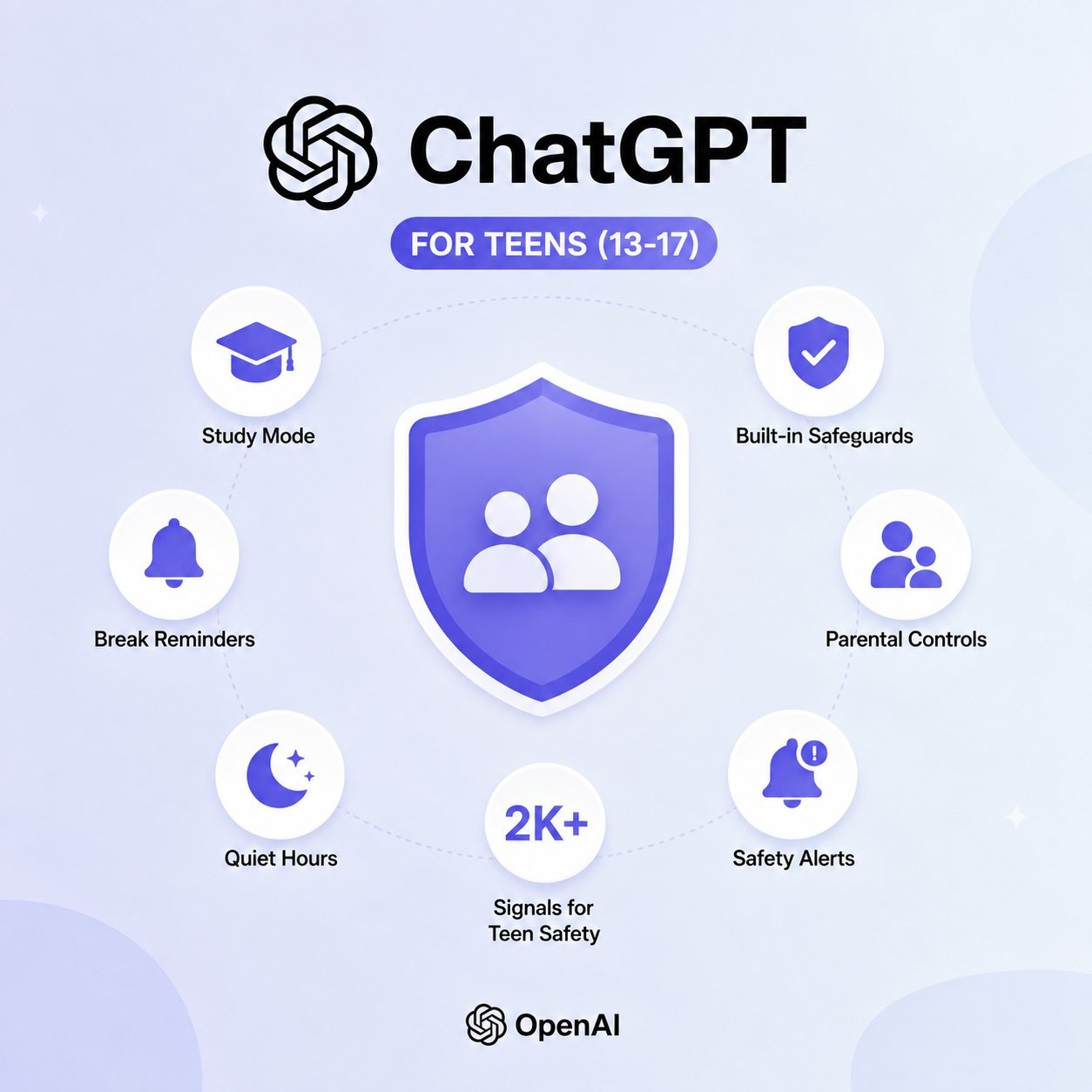
🚨 EXCLUSIVE: OpenAI is launching ChatGPT for Teens — a dedicated, learning-focused experience with enhanced safeguards. Key details announced on Fox & Friends: Study Mode: Instead of giving away direct answers, ChatGPT asks follow-up questions to help students learn. Parental… pic.twitter.com/L504FwbS5H
— FOX & Friends (@foxandfriends) August 18, 2026
FAQs
Is ChatGPT safe for my teen?
While teen-focused versions include robust safety filters and age-appropriate guardrails, parental guidance and monitoring are still essential for ensuring safe usage.
Can schools ban AI entirely?
Some districts attempt to restrict access on school networks, but students can easily access mobile apps at home, making education and policy integration more effective than outright bans.
How can teachers spot AI-generated work?
Educators look for sudden shifts in writing style, lack of personal voice, unverified citations, and overly generic arguments. Requiring process drafts helps mitigate misuse.
Do parental controls block all inappropriate content?
Filters catch the vast majority of explicit or dangerous queries, but no automated system is 100% foolproof against clever workarounds.
Does ChatGPT store student data?
Student data handling depends on the specific enterprise or educational tier agreement, which generally offers stricter privacy protections than standard consumer accounts.
How does teen ChatGPT differ from the standard version?
It features stricter guardrails, automatic content filtering, simplified explanations, and blocked access to sensitive or mature topics.