

Most AI agent demos look great. The agent answers a question, calls a tool, and wraps up a task in under a minute. Then you put it into production, and things get awkward. It asks a customer for the same account number twice. It forgets a decision made yesterday. It hands off to another agent with no idea what already happened.
The problem isn’t intelligence. It’s memory. An agent that can’t carry context across sessions, systems, and workflows is a stateless assistant, not a digital worker. Enterprises need agents that remember customer history, business rules, past decisions, tool outputs, and the ever-changing context of the organization.
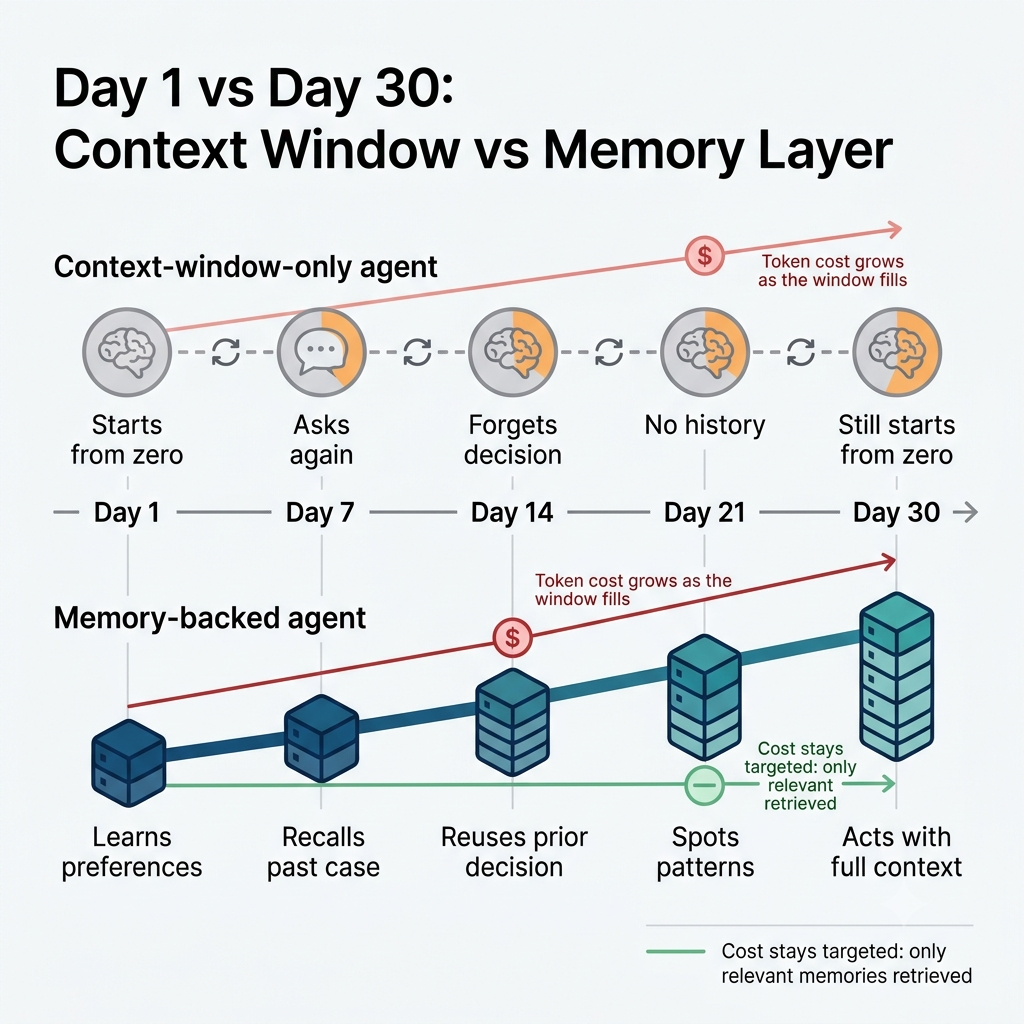
Some teams assume a bigger context window fixes this. It doesn’t. A large window is still temporary working space. It disappears when the session ends, it costs more the fuller it gets, and it has no concept of permissions, retention, or audit. Durable enterprise memory is a different thing entirely.
This guide is for CTOs, Heads of AI, and lead architects. It covers what agent memory is, the main memory types, a reference architecture, the security and governance requirements, and a framework for choosing your approach. It also gives a high-level look at how memory plays out across four major industries, with links to deeper articles on each.
What is enterprise AI agent memory?
Enterprise AI agent memory is the system that captures, stores, governs, retrieves, updates, and expires the information an agent needs beyond its current prompt or session.
The key distinction is between the model’s context window and an external memory layer. The context window is transient working state: what the model can see right now. The memory layer persists, and it supplies relevant pieces back to the model when they’re needed.
It also helps to separate three things people often lump together:
- Remembering a conversation: the record of what was said
- Retaining a fact: a distilled piece of knowledge, like “this client prefers email”
- Maintaining workflow state: where a multi-step task currently stands
Each needs different storage and different rules. And in an enterprise, all of it has to be shared appropriately, governed, and access-controlled. Memory that any agent can read or write freely is a liability, not a feature.
Short-term memory: The context window
Short-term memory is the active working context the model has during a task. It typically includes system instructions, the conversation so far, retrieved documents, tool results, and intermediate reasoning.
Context windows are finite. Even when they’re large, stuffing them full gets expensive and can hurt quality, because the model has more noise to sift through. Teams usually manage this with sliding windows (dropping the oldest content), summarization, and context compression.
For simple, single-session tasks, a context-window-only agent is often enough. A one-off question, a quick document summary, a short drafting job: none of these need long-term storage.
The failure shows up the moment continuity matters. When the session ends or older content gets truncated, the agent loses everything. Nothing carries over to tomorrow.
Long-term memory: Vector, graph, and stateful stores
Long-term memory is where things get interesting. There are several storage approaches, and mature enterprise systems usually combine them instead of picking one.
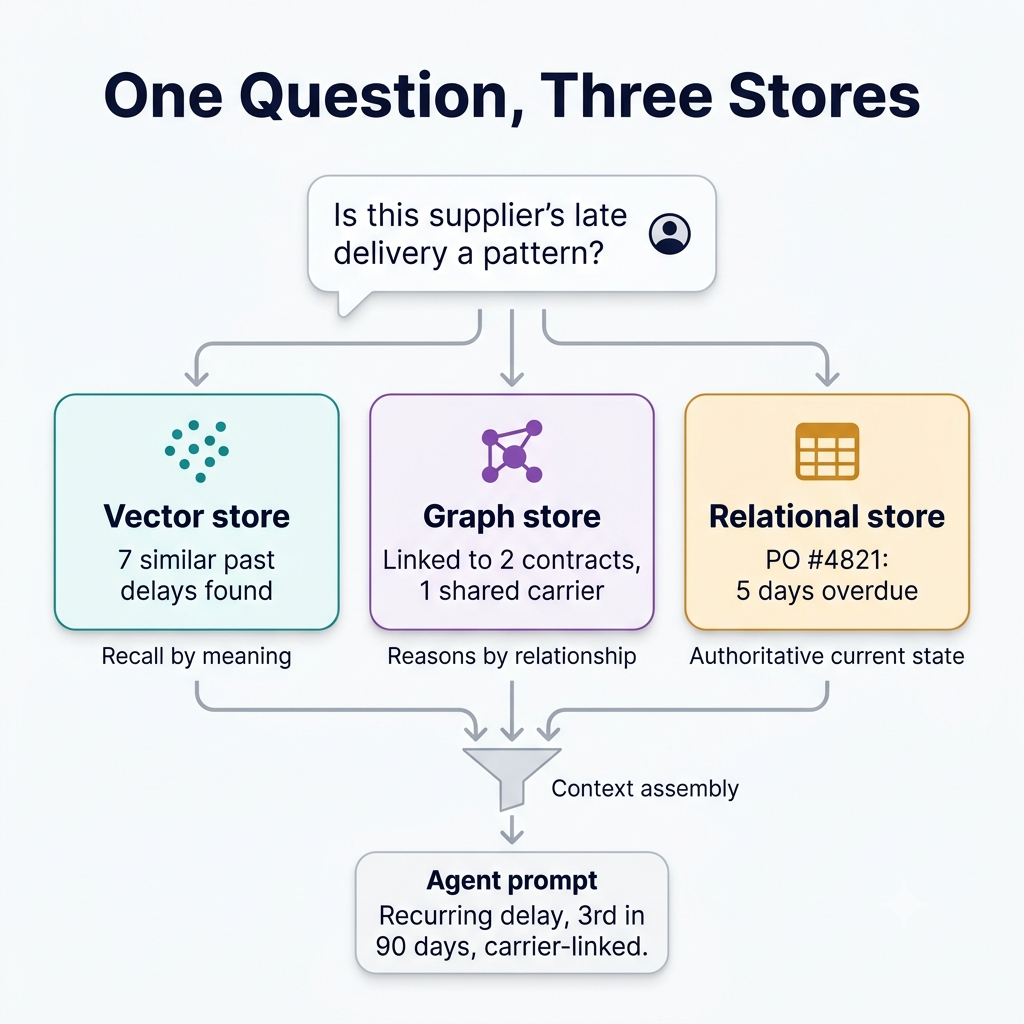
- Vector databases support semantic recall. They find content that’s similar in meaning, even when the wording differs.
- Graph databases store entities and the relationships between them, which makes multi-hop reasoning possible (“who approved the contract that this supplier’s invoice refers to?”).
- Structured or relational stores hold authoritative records: profiles, entitlements, orders, and operational state.
Here’s how the layers map out:
| Memory layer | What it stores | Best for | Typical technology |
|---|---|---|---|
| Working memory | Current task context and recent interactions | Active reasoning | Context window, session buffer |
| Episodic memory | Past events, interactions, task outcomes | “What happened before?” | Vector database, event store |
| Semantic memory | Facts, policies, domain knowledge, entity attributes | “What do we know?” | Vector database, knowledge graph |
| Relational/stateful memory | Entities, relationships, workflow state, versions | “How do things connect and change?” | Graph database, relational store |
| Organizational context | Governed definitions, lineage, policies, permissions | “What is authoritative?” | Metadata graph, governed context layer |
A quick way to think about episodic versus semantic memory: episodic memory is the diary (“on Tuesday, the user reported a billing error and we resolved it”), and semantic memory is the encyclopedia (“this customer is on the enterprise plan”). Agents need both.
Vector search is great for fuzzy recall but weak at precise relationships and current state. Graphs are great at connections but heavier to build. Relational stores are authoritative but rigid. That’s why production agents tend to run a hybrid: vector retrieval for recall, graph reasoning for relationships, and structured state for the facts that must be exactly right.
The enterprise agent memory architecture
Here’s a vendor-neutral reference architecture you can adapt. A workable memory layer has seven parts:
- Capture: what the agent observes, including user messages, tool calls, system events, documents, and approvals
- Extraction: turning raw interactions into durable facts, preferences, entities, and workflow state
- Storage: the vector, graph, relational, cache, and object-storage components
- Retrieval: choosing the right memories based on user, tenant, task, permissions, recency, and relevance
- Context assembly: injecting only the necessary memory into the prompt
- Update and lifecycle: creating, revising, superseding, and deleting memories
- Observability: tracing what the agent remembered, retrieved, and actually used
The overall flow looks like this:
Enterprise systems → Capture → Extraction → Governed memory stores → Retrieval → Context assembly → Agent → Actions → Feedback
The most important design message: don’t build one giant memory store. Build purpose-specific layers, each with clear ownership and access rules. A single shared pool becomes impossible to secure, hard to audit, and noisy to retrieve from.
Why stateless agents fail in the enterprise
When agents have no persistent memory, the failures are predictable and expensive:
- Repeated questions. Users and customers have to re-explain themselves every time.
- Lost progress. Multi-step tasks fall apart across sessions and channels.
- No historical reasoning. The agent can’t connect today’s event to last month’s.
- Broken handoffs. Context disappears when work moves between agents or to a human.
- Contradictory advice. Without access to prior decisions, the agent says one thing today and another tomorrow.
- Higher costs. Reloading all context on every call burns tokens and integration effort.
- No traceability. When an agent makes a consequential recommendation, nobody can explain what it based it on.
These problems show up in every industry, and each one looks different in practice. We cover the vertical-specific versions in the industry articles linked below.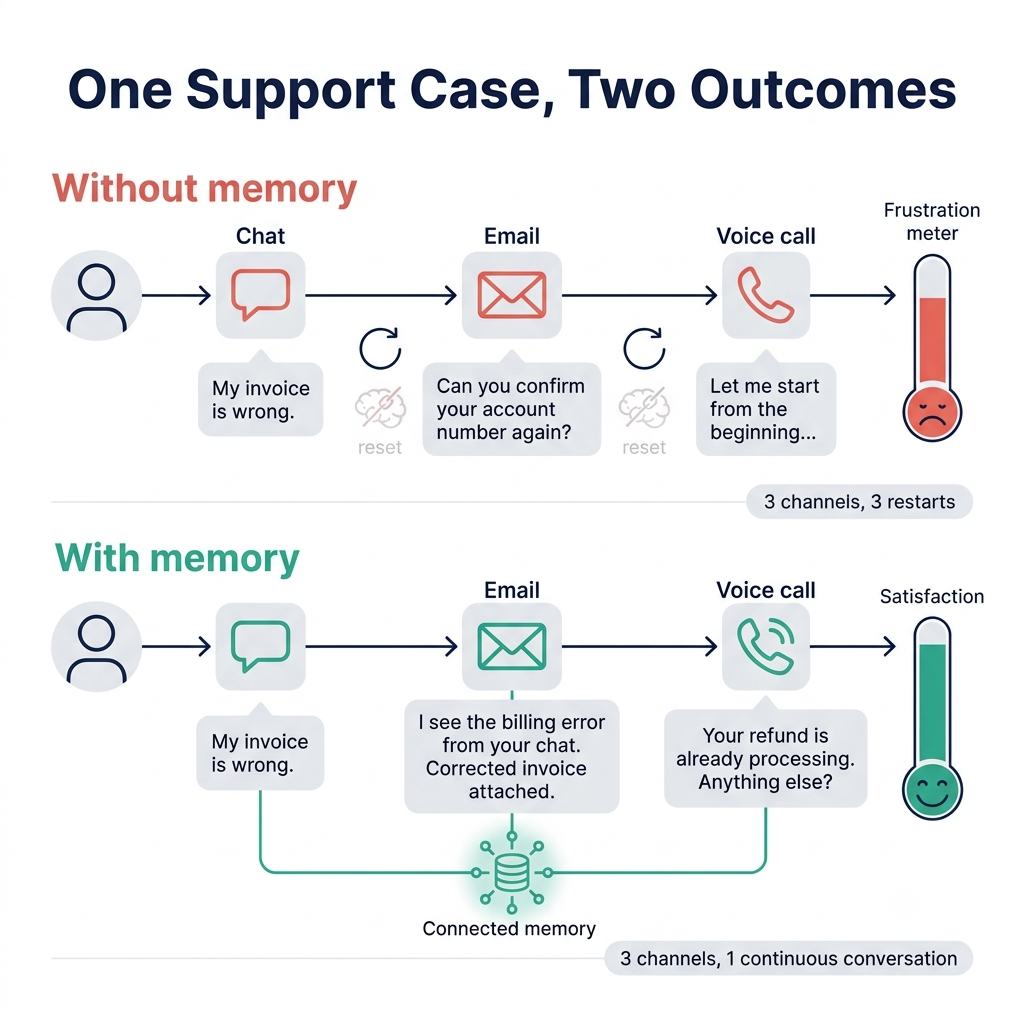
Memory design decisions for enterprise teams
Before picking tools, answer six design questions. They matter more than any vendor comparison.
What to remember. User preferences, entity facts, task state, approvals, exceptions, and learned procedures.
What not to remember. Raw sensitive data, transient scratchpad content, duplicate facts, and unverified inferences. If the agent guessed it, don’t store it as truth.
Where to store it. Decide by sensitivity, structure, query pattern, retention requirement, and jurisdiction.
When to retrieve it. At task start, during entity lookups, on escalation, for personalization, and during audit review.
When to update it. When there’s new evidence, a user correction, a change in the system of record, or a policy update.
When to forget it. On retention expiry, a deletion request, consent withdrawal, or a business-rule purge.
If you can answer those six clearly, you’ve done the hardest part of the design.
Security, privacy, and governance
Treat this as a core part of the architecture, not a final checklist item. Agent memory quickly becomes a high-risk data asset. It can hold personal data, confidential business information, credentials, and decisions with compliance consequences.
Here’s what to cover:
- Tenant isolation. Separate memory namespaces by customer, business unit, user, agent, and environment.
- Access control. Role-based permissions for read, write, update, delete, and export.
- Data minimization. Store distilled facts and references rather than unnecessary raw sensitive content.
- PII and PHI handling. Classification, redaction, tokenization, encryption, and controlled de-identification.
- Retention and deletion. TTLs, legal holds, retention schedules, and right-to-erasure workflows.
- Auditability. Immutable logs of reads, writes, updates, deletions, retrieval scope, and agent actions.
- Provenance. For every memory, record the source system, timestamp, author, confidence, and approval status.
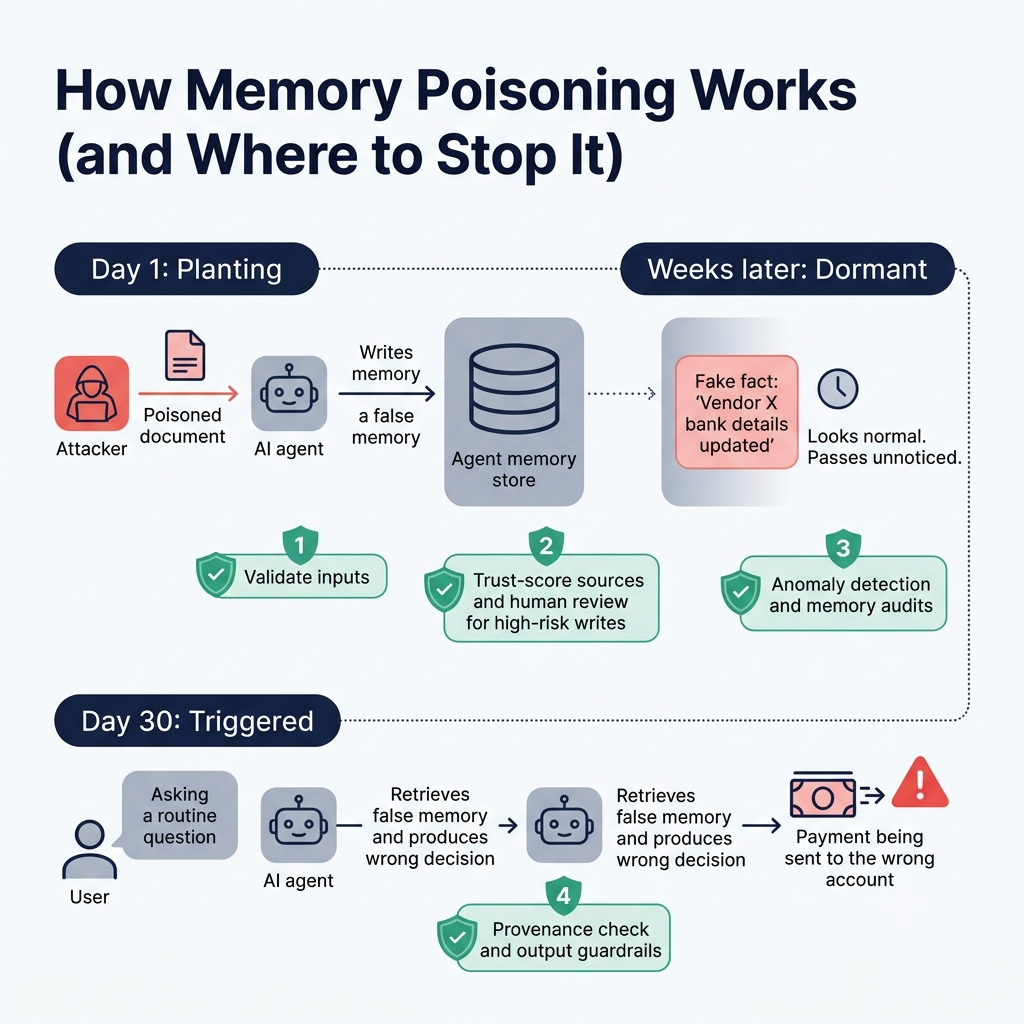
- Prompt injection and memory poisoning. Input validation, trust scoring, anomaly detection, and output guardrails. If an attacker can plant a false memory, they can steer the agent later.
On compliance: memory stores that hold personal data can fall within GDPR scope. That means rights of access, correction, and erasure apply to what the agent remembers. Practical controls include scoped namespaces, role-based access, sensitive-data screening, expiration, and full operation logging. For SOC 2, the relevant areas are access control, change management, monitoring, and audit evidence.
Minimum viable governance controls
- Per-tenant and per-user memory isolation
- Encryption in transit and at rest
- Role-based access control
- Sensitive-data detection before memory writes
- Retention policies and deletion workflows
- Complete read/write audit logs
- Memory provenance and confidence metadata
- Human review for high-risk writes or automated decisions
- Periodic access reviews and memory-quality audits
Enterprise memory patterns and anti-patterns
Patterns that work
- Session memory combined with long-term semantic memory
- Vector retrieval paired with graph-based relationship reasoning
- Integration with systems of record through a governed context layer
- Tenant-scoped memory with centralized policy enforcement
- Human-approved memory updates for high-stakes decisions
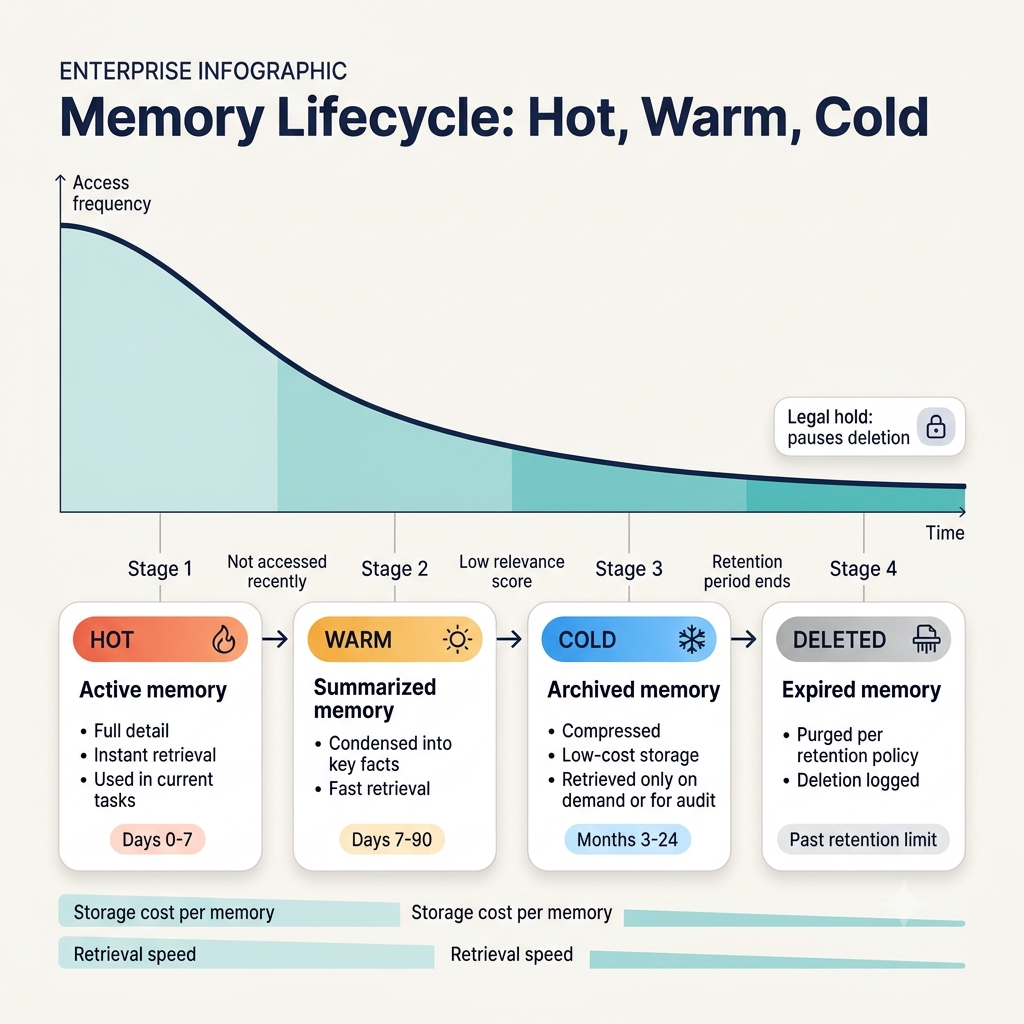
- Memory decay, summarization, and archival to keep things manageable at scale
Anti-patterns to avoid
- Storing everything “just in case”
- Giving every agent unrestricted access to a shared memory store
- Treating a vector database as your entire enterprise knowledge system
- Persisting raw PII or credentials in embeddings
- Letting agents write unreviewed facts into authoritative memory
- Running memory without retention, provenance, or audit controls
Industry use cases at a high level
The architecture above applies everywhere, but each industry stresses it differently. Here’s a short look at four, with links to full articles.
Financial services and banking
Financial agents need durable, auditable context across accounts, transactions, risk profiles, regulatory obligations, and client relationships. The memory architecture has to emphasize provenance, immutable audit trails, access segregation, and explainable retrieval.
Read more: Stateful AI Agent Memory in Financial Services: Fraud Detection & Automated Wealth Management
Healthcare and life sciences
Healthcare agents must hold longitudinal patient context while enforcing strict privacy, purpose limitation, and minimum-necessary access. The challenge is combining episodic clinical events with governed semantic knowledge without exposing identifiable data any more than necessary.
Read more: AI Agent Memory in Healthcare: HIPAA-Compliant Patient Context Retention & Clinical Workflows
Enterprise support and contact centers
Support agents need continuity across email, chat, voice, CRM records, and prior tickets. Good memory means fewer repeated questions, better intent prediction, and more consistent resolutions across channels and handoffs.
Read more: Scaling Customer Experience: How Long-Term Memory Transforms AI Support Agents
Supply chain and ERP
Supply chain and ERP agents have to retain evolving operational state across demand signals, inventory, suppliers, purchase orders, exceptions, and multi-agent workflows. Memory here must support temporal facts, dependencies, and coordination between specialized agents.
Read more: Autonomous Supply Chains: Using AI Agent Memory for Predictive Inventory & Vendor Ops
How to choose a memory architecture
Start with these seven questions:
- Does the agent need continuity beyond one session?
- Does it need semantic recall, relationship reasoning, or authoritative system state?
- Is the memory user-specific, tenant-specific, or organization-wide?
- What data classification and jurisdictional constraints apply?
- What retention, deletion, and audit obligations exist?
- Which agent or human is allowed to write each memory type?
- How will you measure retrieval quality, drift, and business impact?
Then use this matrix as a starting point:
| Requirement | Recommended memory approach |
|---|---|
| Single-session task | Context window plus session buffer |
| Personalized recall across sessions | Episodic/vector memory |
| Relationship and entity reasoning | Knowledge graph or hybrid graph-vector memory |
| Authoritative operational state | Relational store or system-of-record integration |
| Cross-agent coordination | Shared, permissioned state layer |
| Regulated or multi-tenant deployment | Governed memory layer with isolation, audit, and retention controls |
Implementation roadmap
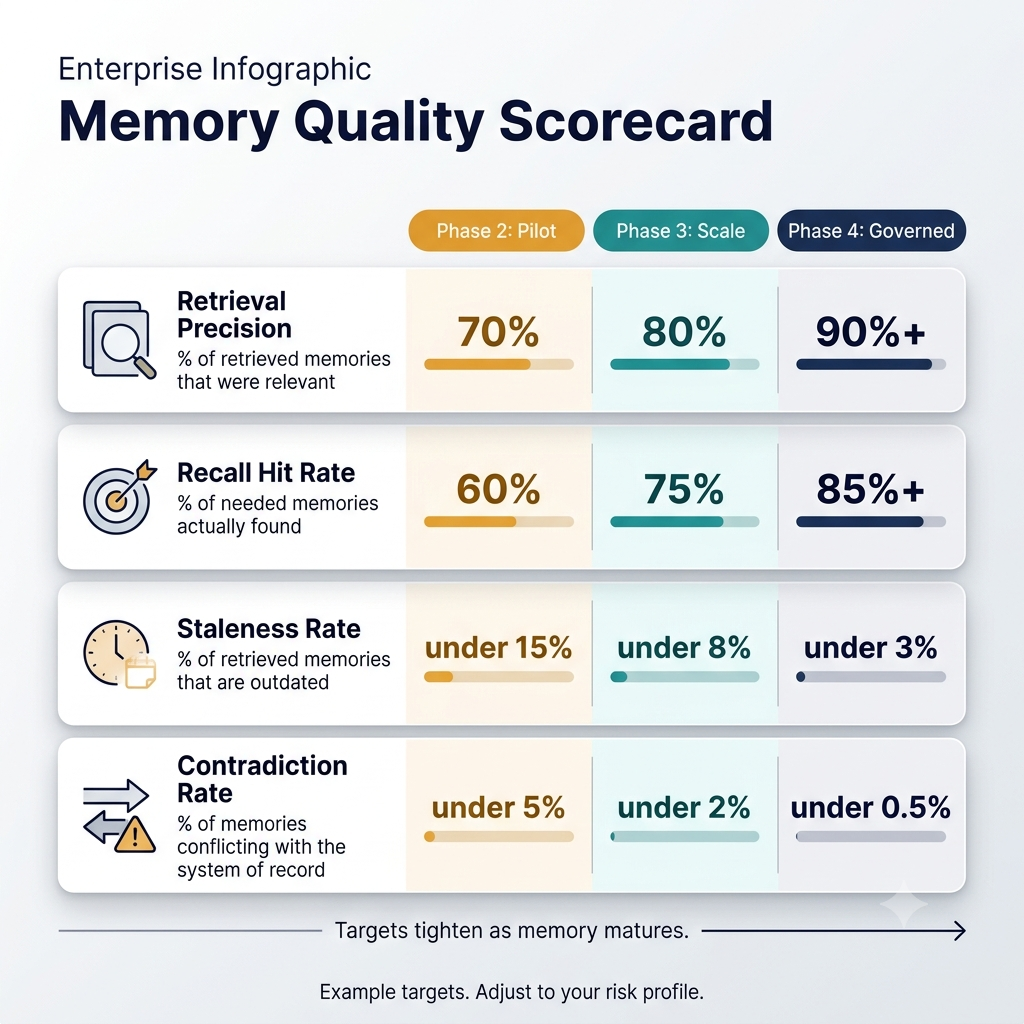
Don’t try to build everything at once. A phased approach keeps you from overbuilding.
Phase 1: Establish foundations
- Define memory scopes, data classifications, retention rules, and access boundaries
- Integrate the agent with systems of record and identity
- Put audit logging and tenant isolation in place
Phase 2: Add selective long-term memory
- Start with high-value episodic and semantic memories
- Evaluate retrieval quality before expanding scope
- Add provenance, confidence, and human-review workflows
Phase 3: Scale to multi-agent operations
- Introduce shared task state and governed organizational context
- Add graph-based relationships where multi-hop reasoning is needed
- Implement monitoring, drift detection, and lifecycle automation
Phase 4: Operationalize governance
- Automate retention, deletion, access review, and compliance reporting
- Continuously evaluate memory quality, retrieval precision, and agent outcomes
- Maintain incident-response and rollback procedures
FAQ
What is enterprise AI agent memory?
It’s the system that lets an AI agent capture, store, retrieve, update, and expire information beyond a single prompt or session, with governance and access controls suited to business use.
How is agent memory different from a context window?
The context window is temporary working space the model sees during a task. Agent memory is persistent storage outside the model that supplies relevant information back when needed.
Do AI agents need a vector database?
Not always. Single-session agents don’t. If you need semantic recall across sessions, a vector store is a common choice, but many production systems pair it with graph and relational stores.
When should an enterprise use a knowledge graph for agent memory?
When the agent needs to reason about relationships between entities, follow multi-hop connections, or track how facts change over time.
Can AI agent memory be GDPR compliant?
Yes, with the right controls: a lawful basis for storing data, data minimization, scoped access, the ability to correct and erase remembered information, retention limits, and full logging.
How do you prevent one customer’s data from appearing in another tenant’s agent context?
Use strict tenant-scoped namespaces, enforce permissions at retrieval time (not just at storage time), and test isolation regularly.
What data should an AI agent remember?
Durable, verified, useful information: preferences, entity facts, task state, approvals, and learned procedures. Skip raw sensitive data and unverified guesses.
How do you audit what an AI agent remembers and uses?
Log every memory read, write, update, and deletion, along with the retrieval scope and the actions the agent took. Pair that with provenance metadata on each memory.
What is the difference between episodic and semantic memory?
Episodic memory records specific past events and interactions. Semantic memory holds general facts and knowledge, such as policies and entity attributes.
How do enterprises prevent memory poisoning and prompt injection?
Validate inputs before they’re written to memory, score sources for trust, detect anomalies, require human review for high-risk writes, and apply guardrails on outputs.
Next steps
Enterprise agents don’t become reliable by remembering everything. They become reliable by remembering the right context, under the right permissions, for the right duration, with full traceability.
If you’re starting out, begin with the foundations: scope, classification, isolation, and audit. Add long-term memory selectively, measure it, and expand from there.