

Adding an analytics SDK sounds like a five-minute job. You ask an AI assistant to “add Firebase Analytics,” it hands you a snippet that looks right, and then you lose the next hour to Gradle dependencies, iOS linker flags, config files, build variants, and initialization order.
Firebase’s new agent skills are meant to fix exactly that. Instead of just helping developers read the docs, Google is giving coding agents structured, Firebase-specific instructions so they can do the integration work themselves. A general-purpose assistant starts to look a lot more like a specialist in app telemetry.
The Setup Work Nobody Wants to Own
The first line of code is almost never the hard part. It’s everything wrapped around it.
Say you want to track screen views. How you do that depends on your platform, your project structure, your UI framework, your build system, and whatever Firebase configuration already exists. Android needs the right Gradle declarations. iOS may need the -ObjC linker flag. Modern declarative UI frameworks can require manual screen-view instrumentation because automatic tracking doesn’t cover them.
This is where regular AI help tends to stumble. A model can write code, but it doesn’t necessarily know how your project handles build variants, where your configuration files live, or which platform quirk is about to break your build.
Firebase’s answer isn’t another chat prompt. It’s a packaged playbook.
What Firebase Agent Skills Actually Are
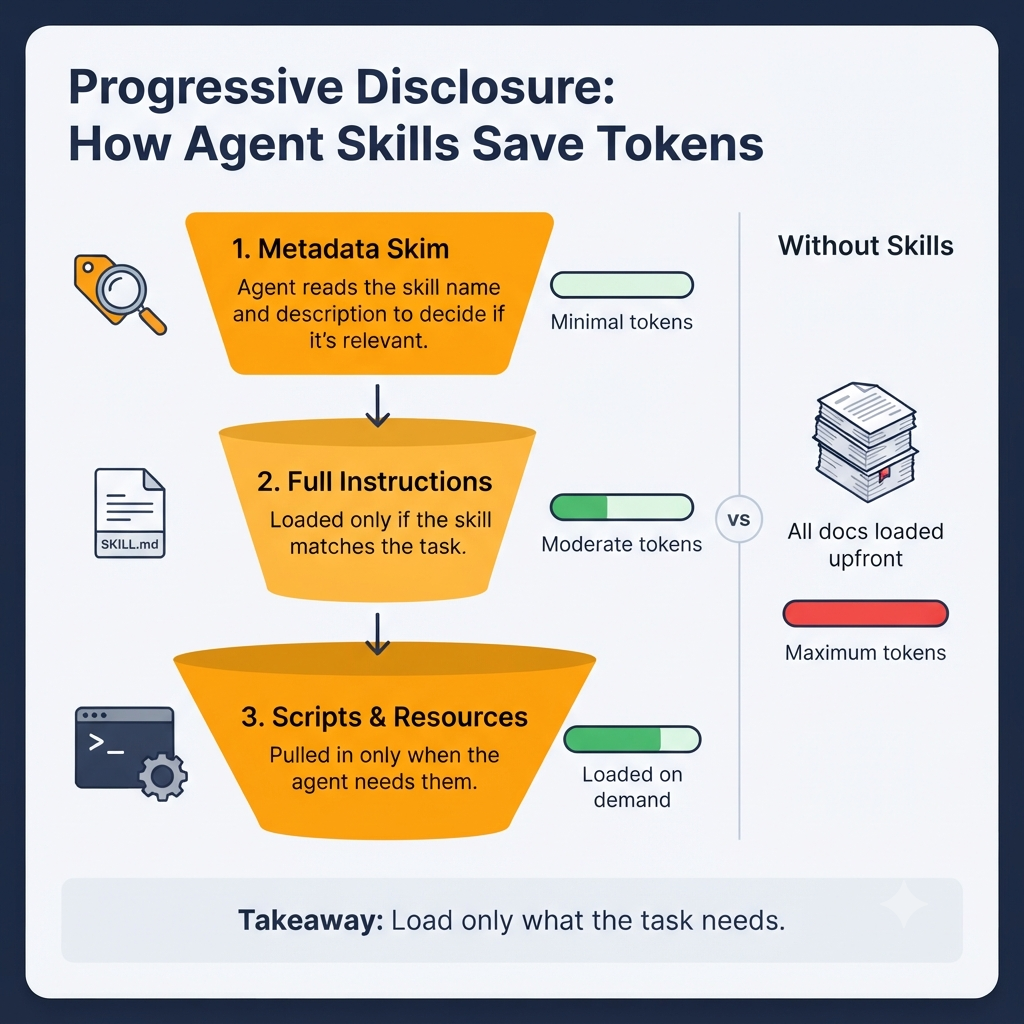
Firebase agent skills are portable, self-contained modules that hold Firebase-specific knowledge, instructions, and workflows. The goal is to help AI assistants follow Firebase best practices, handle complex tasks more accurately, and burn fewer tokens than they would by loading a pile of documentation up front.
Every skill is built around a SKILL.md definition, which can include:
- Specialized instructions for a particular job, like implementing Firebase Authentication or integrating Google Analytics.
- Best practices for security and performance.
- Automation scripts that help an agent set up a local environment or configuration.
The new firebase-analytics skill goes after two high-friction mobile tasks: getting started with Google Analytics for Firebase, and measuring screen views in iOS and Android apps.
So a skill doesn’t just explain what Firebase Analytics is. It tells the agent how to wire it into a real application.
From Documentation Reader to Setup Engineer
What really changes here is the agent’s role.
In the usual workflow, you are the integration engineer. You search the docs, compare versions, copy snippets, edit config files, and debug build errors. The AI might speed up some of that, but you’re still the one filling in the missing context.
With a Firebase skill installed, the work shifts:
| Traditional AI-assisted setup | Firebase skill-driven setup |
|---|---|
| Developer searches docs and assembles steps | Agent receives task-specific Firebase instructions |
| Agent generates generic code | Agent follows a structured integration workflow |
| Developer manually handles project configuration | Agent can work with Firebase tooling and project context |
| Platform quirks are discovered through trial and error | Platform-specific requirements are built into the guidance |
| Verification is largely manual | Agent follows a defined implementation path |
Google says that once an agent has the Analytics skill, you can just ask, “Help me set up my app to use Google Analytics for Firebase.” The agent can connect the app to Firebase if it isn’t already, set up Google Analytics in the Firebase project, and add the required dependencies and initialization code to your actual codebase.
That’s a small-sounding change with big consequences. The agent isn’t only offering suggestions anymore. It’s carrying out a guided integration.
The Prompt Is Short Because the Skill Carries the Context
A prompt could be as simple as this:
Help me set up my app to use Google Analytics for Firebase.
Add the required dependencies and initialization code.
Make sure the setup works for this project's platform and build configuration.
It works because the skill fills in the operational detail you didn’t write. Firebase says its skills help agents get past the “finicky bits”: special setup steps, iOS linker flags, Android Gradle declarations, directory structure, and multiple build variants.
The agent doesn’t have to guess whether your iOS app needs a certain linker setting or whether your Android project needs a particular SDK declaration. The skill already knows.
Firebase calls the underlying approach progressive disclosure. The agent first skims short skill metadata to decide whether the skill is relevant, and only then loads the detailed instructions. That keeps token use down while still giving the agent access to the deeper material when it needs it.
Why Platform Quirks Are the Hard Part
Manual SDK setup is painful because the SDK sits inside a much bigger system.
On Android, you might be dealing with Gradle configuration, application IDs, dependency versions, config file placement, and build variants. On iOS, it’s Xcode project structure, package management, bundle identifiers, linker settings, and initialization timing.
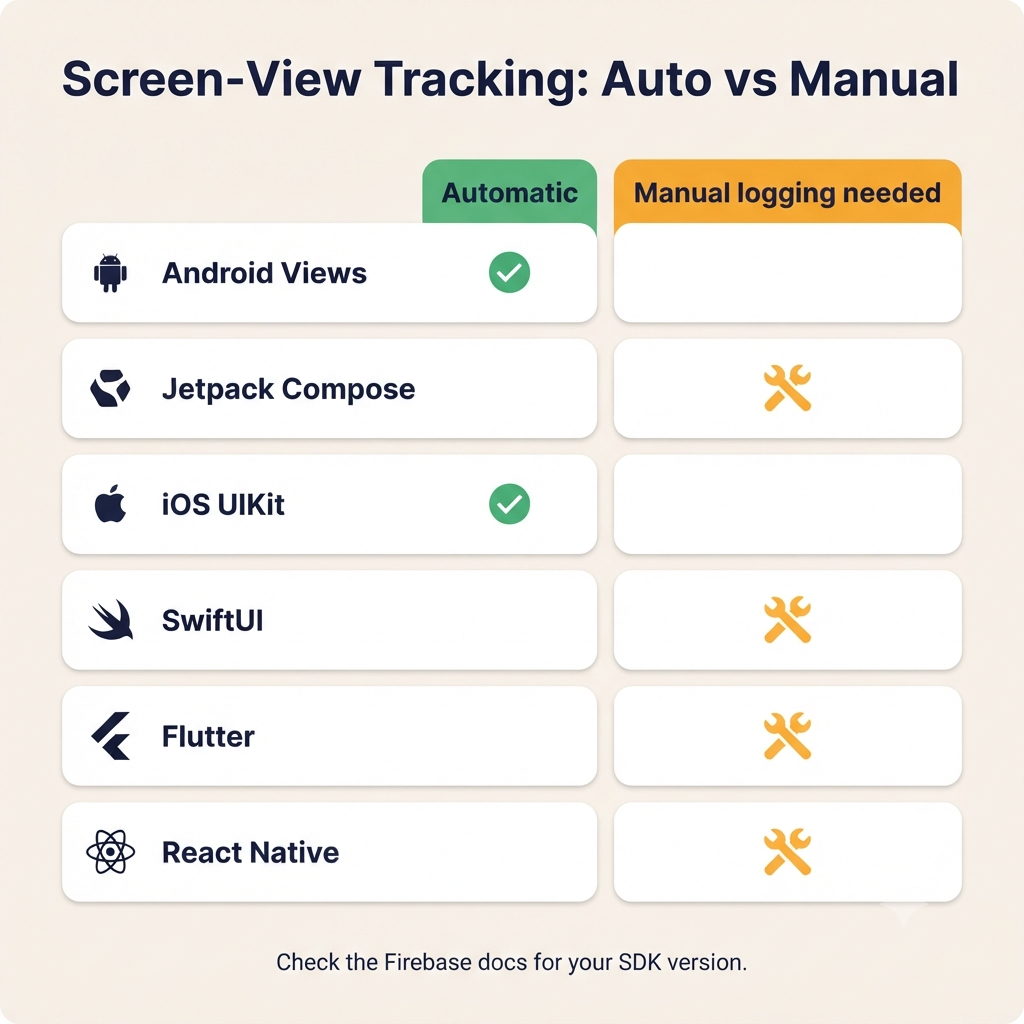
Cross-platform apps pile on more. Firebase specifically names Jetpack Compose, SwiftUI, Flutter, and React Native as places where you may need to log screen views by hand, even though the GA4F SDK handles automatic screen-view logging in a lot of cases.
That’s why “add analytics” isn’t really one task. It’s a chain of decisions:
- Which platform is this app targeting?
- Which UI framework is it using?
- Where should initialization happen?
- Which screens need explicit instrumentation?
- How do you avoid duplicate or missing screen-view events?
- What project-specific build setup could get in the way?
A general-purpose coding agent can reason through these. A skill-equipped agent has a better shot at answering them with a tested, vendor-provided procedure.
A Practical Walkthrough: Adding Screen-View Tracking
Picture a mobile product team that wants to know where users drop off during onboarding and checkout.
The developer might write:
Help me instrument my app to log screenviews using
Google Analytics for Firebase.
Track onboarding, product detail, and checkout screens.
Avoid duplicate events during navigation.
A skill-equipped agent could then:
- Identify the app’s platform and project structure.
- Check whether Firebase and Google Analytics are already configured.
- Add or validate the required SDK dependencies and initialization.
- Apply platform-specific setup requirements.
- Instrument the relevant screens using the right approach for the UI framework.
- Build and validate the implementation.
- Hand the developer a set of changes that’s easy to review.
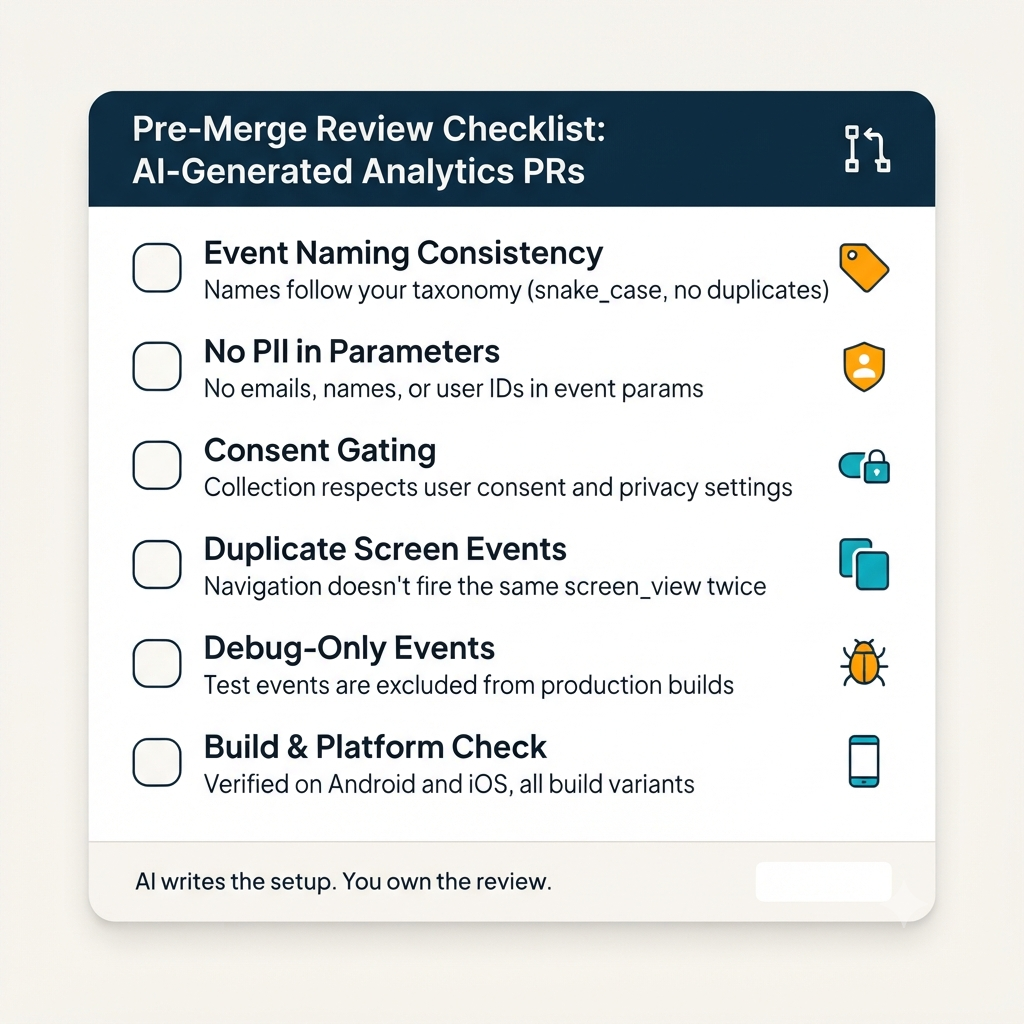
That last step matters. The agent may automate most of the implementation, but a person still has to look over event names, privacy implications, navigation behavior, and production risk.
For now, Firebase is positioning the Analytics skill around initial setup and screen-view instrumentation, with more agentic development workflows expected down the road.
What This Means for Developer Workflow
The bigger takeaway is that SDK vendors are turning into context publishers.
Their product used to be documentation, SDKs, and support channels. Now it also includes machine-readable skills that shape how an AI agent plans and carries out integration work.
For developers, the division of labor shifts a bit:
- Less time on boilerplate. Dependencies, initialization, and platform-specific configuration get more automated.
- More time on measurement strategy. You can spend your energy on which events matter, how they map to user behavior, and what decisions the data should drive.
- More emphasis on review. AI-generated changes still need human eyes, especially around privacy, consent, event taxonomy, and release safety.
- More repeatable integrations. A well-designed skill can cut down the differences between one developer’s setup and the next.
Firebase also suggests using agent skills together with the Firebase MCP server. The MCP server lets an agent interact programmatically with Firebase projects, resources, and data. The skills supply the instructions and best practices that teach the agent how to use tools like the Firebase CLI and the MCP server well.
The Limits of “Autonomous”
Calling this an “autonomous setup engineer” is a handy shorthand, but it deserves an asterisk.
The agent is autonomous inside a bounded task. It can follow a structured workflow, apply platform-specific guidance, and make real changes to your code. It can’t replace product judgment.
Developers still have to decide:
- What should be measured, and why?
- Which events are business-critical?
- How should user consent and privacy requirements be handled?
- Which events belong in production, and which only in debugging?
- Does the generated implementation fit the team’s architecture and coding standards?
The current GA4F skill is also deliberately narrow. It covers initial setup and screen-view measurement, not every analytics scenario you might run into.
So the right mental model isn’t “AI replaces the mobile engineer.” It’s closer to “AI handles the guided setup, and the engineer owns the intent, the governance, and the verification.”
The Bigger Trend: Skills as the New Developer Interface
Firebase’s move points at something larger in developer tooling.
Rather than making developers dig through documentation and translate it into steps, vendors can publish structured skills straight into coding environments. Firebase says its agent skills work with AI assistants that support skills, including Antigravity, Claude Code, Codex, and Cursor.
Installation is meant to be painless. For most agents, Google gives you one command:
npx skills add firebase/agent-skillsFor Claude Code, it’s:
claude plugin marketplace add firebase/agent-skills
claude plugin install firebase@firebase
And for Cursor, you can install the plugin from the Cursor Marketplace or run:
npx skills add firebase/agent-skills --agent=cursorWhat you end up with is a new layer in the stack:
Developer intent
      ↓
AI coding agent
      ↓
Vendor-provided skill
      ↓
Platform-specific implementation
      ↓
Reviewable code and configuration
The prompt becomes the integration ticket, the skill is the runbook, and the agent is the one doing the work.
The Prompt Is the New Integration Ticket
Firebase agent skills are about more than making Google Analytics a bit easier. They hint at a different way of delivering complex integrations.
The next generation of developer experience might not start with “search the docs.” It might start like this:
Install the Firebase skill.
Add screen-view tracking.
Make it production-ready.
If this model catches on, expect other complicated integrations, like authentication, payments, push notifications, crash reporting, feature flags, and observability, to show up as structured agent playbooks too.
The winners probably won’t be the vendors with the best docs alone. They’ll be the ones who can turn their operational knowledge into reliable, secure, platform-aware instructions that an AI agent can actually execute.
For mobile developers, that may mean the most valuable skill is no longer remembering every SDK setup step. It’s knowing how to define the right outcome, review what the agent did, and make sure the telemetry answers the product questions that matter.