
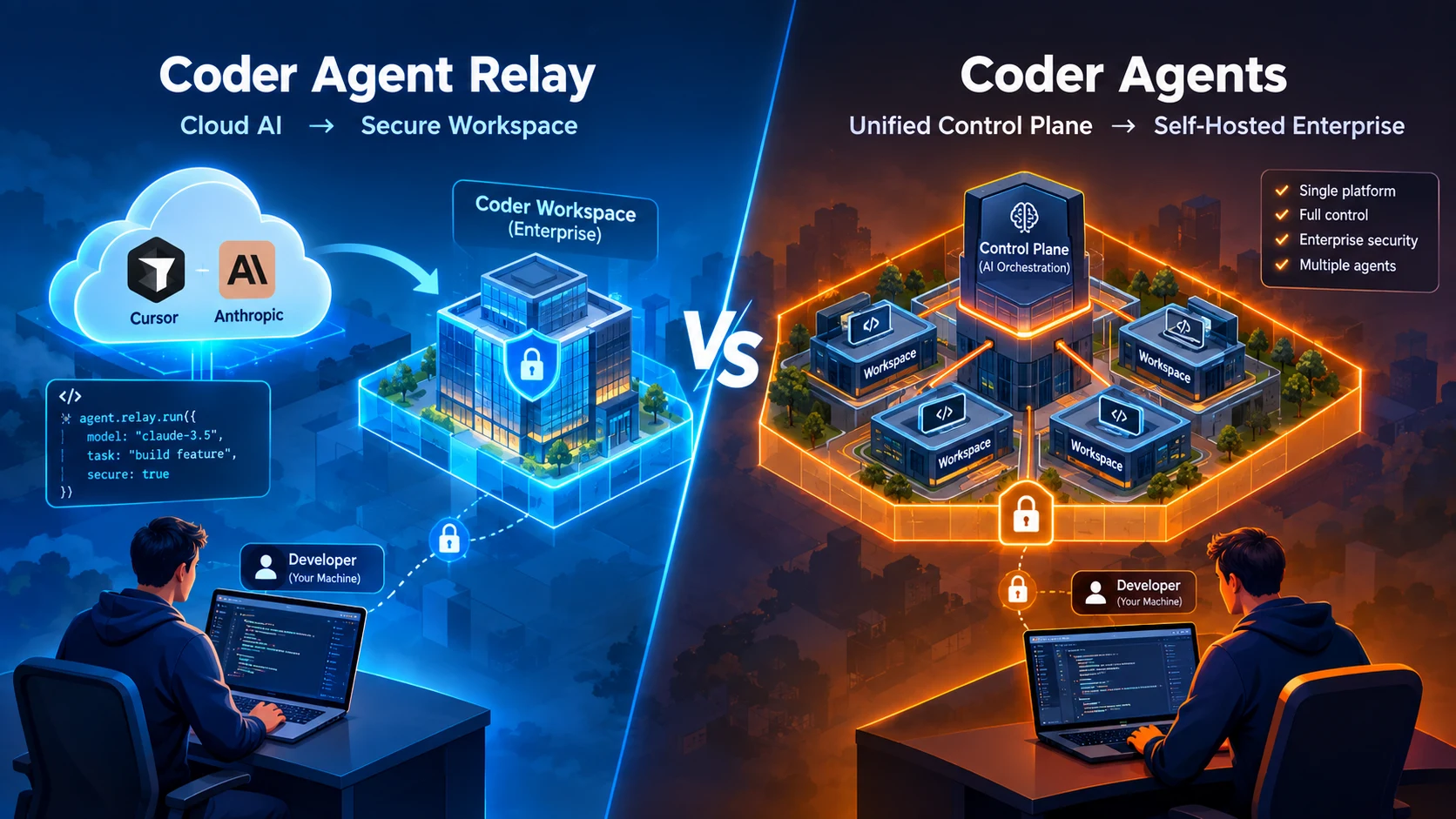
That is where the difference between Coder Agent Relay vs Coder Agents becomes interesting.
Coder’s Agent Relay connects cloud-hosted coding agents such as Cursor Cloud Agents to self-hosted Coder workspaces. Coder Agents, meanwhile, runs the agent loop directly inside the Coder control plane.
In simple terms, think of Agent Relay as bringing the agent’s hands into your building, while Coder Agents puts both the brain and the hands under your control plane.
So which approach is right for your team? Let’s break down the differences.
Coder Agent Relay vs Coder Agents: What’s the Difference?
The easiest way to understand the two architectures is to look at who controls the reasoning loop and who controls execution.
| Area | Agent Relay | Coder Agents |
|---|---|---|
| Agent reasoning loop | Cloud agent provider | Coder control plane |
| Code execution | Self-hosted Coder workspace | Coder workspace |
| Infrastructure | Execution is customer-controlled | Agent infrastructure is customer-controlled |
| Developer experience | Keeps supported cloud-agent workflow | Coder-native agent workflow |
| Model control | Primarily controlled by cloud agent | Admin-configured providers/models |
| Main advantage | Keep existing cloud agent + self-host execution | Greater control over the complete agent architecture |
Agent Relay vs Directly Installing Claude Code or Codex
There is an important distinction here.
With an ordinary local coding-agent setup, developers can run tools such as Claude Code or Codex in their development environment. The developer typically controls the workspace and chooses how the agent is configured.
Agent Relay takes a different approach.
Instead of simply installing an agent locally, it connects a supported cloud-hosted agent to a Coder workspace. For example, with Cursor, the developer continues using the Cursor experience while the agent’s tool calls execute inside the Coder workspace.
That makes Agent Relay particularly interesting when a company wants to keep an existing cloud-agent workflow but move execution onto infrastructure it controls.
Agent Relay vs IDE-Based Coding Agents
Traditional IDE-based coding agents are often optimized around individual developer productivity.
Cursor, for example, provides both local IDE workflows and cloud agents. Its cloud agents can run tasks remotely in dedicated virtual machines, allowing developers to close their laptops while work continues.
Agent Relay adds another architectural option:
Cloud agent → Agent Relay → customer’s Coder workspace
Instead of:
Cloud agent → vendor-managed execution environment
This distinction matters when the execution environment contains sensitive source code, credentials, internal services or other enterprise resources.
Who Controls the Reasoning Loop?
This is probably the most important difference between Agent Relay and Coder Agents.
With Agent Relay for Cursor, Cursor continues to run the agent orchestration and AI inference in its cloud. Coder provides the workspace where the agent’s tool calls execute.
With Coder Agents, the agent loop runs inside the Coder control plane. The control plane sends prompts to the configured LLM provider, receives responses and executes the resulting tool calls through the Coder workspace connection.
Agent Relay: the cloud provider controls the reasoning loop; your infrastructure controls execution.
Coder Agents: Coder controls the agent loop; your infrastructure controls execution.
So the architectural difference is significant.
Who Controls the Execution Environment?
Both approaches can put execution inside Coder workspaces.
For Agent Relay, Cursor Cloud Agents connect to Coder and execute tool calls inside a Coder workspace rather than a Cursor-managed environment.
Coder Agents follows a similar execution model, but its workspace is connected directly to the Coder control plane running the agent loop. The workspace itself does not need AI-specific software or LLM API keys.
This separation is useful because the execution environment becomes a controlled infrastructure layer rather than simply a developer’s laptop.
Infrastructure Ownership
The difference becomes clearer when we look at infrastructure ownership.
Agent Relay
- Coder workspace and execution infrastructure are customer-controlled.
- Cloud-agent orchestration remains with the supported agent provider.
- Cursor remains responsible for its agent orchestration and inference.
- Agent Relay connects the cloud session to the appropriate Coder workspace.
Coder Agents
- The agent loop runs in the Coder control plane.
- Workspaces remain standard compute environments.
- LLM providers are configured by administrators.
- Provider credentials can remain in the control plane instead of being exposed to workspaces.
Data Control: Where Does Your Code and AI Traffic Go?
This is where enterprises need to look beyond the phrase “self-hosted.”
Agent Relay does not mean that the entire AI process becomes self-hosted.
With Cursor’s Agent Relay integration, execution happens in the customer’s Coder workspace, but Cursor’s orchestration and inference remain cloud-hosted. Coder says it does not proxy or observe the model inference.
Coder Agents gives the organization more control over the agent runtime. However, model requests still go to whichever LLM provider the organization configures.
So the right question isn’t simply:
“Is it self-hosted?”
Instead ask:
“Which parts are self-hosted, and which parts still communicate with an external model provider?”
Security and Governance Differences
This distinction becomes especially important for enterprises.
With Agent Relay, the execution environment can be brought under the organization’s infrastructure while developers retain their existing cloud-agent experience.
With Coder Agents, administrators can centrally configure providers and models. Coder also keeps provider credentials in its control plane rather than exposing them to workspaces.
That creates a different governance model.
For organizations that need centralized control over models, providers, credentials and agent execution, Coder Agents provides the more comprehensive control-plane architecture.
Developer Experience: Which Feels Better?
Agent Relay has a straightforward advantage: developers can keep using the cloud-agent workflow they already know.
For example, Coder’s Cursor integration allows developers to continue using the Cursor client while execution is redirected into Coder workspaces.
Coder Agents introduces a Coder-native workflow instead.
That can mean more change for developers, but it gives platform teams more centralized control over how agents are configured and which models they can use.
Agent Relay: “Keep my favorite agent, change where it works.”
Coder Agents: “Control the agent platform and where it works.”
Background-Agent Use Cases
Background agents are particularly useful for tasks that can continue without the developer sitting in front of the computer.
Cursor’s cloud agents, for example, can work on features, bugs and tests remotely and continue running after the developer closes their laptop.
Agent Relay becomes interesting when an organization wants that cloud-agent experience while having execution occur inside its own Coder infrastructure.
Coder Agents also supports background and headless workloads. Coder says its API can be used to delegate long-running coding tasks and run multiple agents in parallel.
Enterprise Deployment Considerations
For enterprise teams, the decision is less about which agent writes better code and more about control, infrastructure and governance.
Agent Relay makes more sense when:
- Your developers already rely on a supported cloud coding agent.
- You want to keep that developer experience.
- You specifically want agent execution inside infrastructure you control.
- You don’t need to move the cloud provider’s reasoning loop into your own control plane.
Coder Agents makes more sense when:
- You want the agent loop inside your Coder control plane.
- Platform teams need centralized provider and model configuration.
- You need greater control over credentials and model access.
- Your organization wants a self-hosted agent architecture rather than simply self-hosted execution.
Regulated-Industry Use Cases
For healthcare, finance, government and other highly controlled environments, the architectural distinction becomes even more important.
Agent Relay can help organizations move agent execution into infrastructure they control while retaining the cloud-agent experience.
But if the requirement is to control the agent runtime itself, Coder Agents is the stronger architectural fit because its reasoning loop runs in the Coder control plane.
The exact compliance outcome will still depend on the organization’s infrastructure, configured model provider, data flows and internal policies.
When Is a Traditional IDE Coding Agent Enough?
Not every developer team needs an enterprise agent architecture.
For a small team working on prototypes, side projects or ordinary software development, a traditional IDE or terminal-based coding agent may be perfectly sufficient.
If developers primarily want fast coding assistance and don’t need centralized infrastructure governance, adding another control layer may simply create unnecessary complexity.
Limitations and Trade-Offs
Agent Relay
- Currently focused on supported cloud-agent integrations.
- Cursor’s orchestration and inference remain cloud-hosted.
- It does not provide the same level of control over the agent loop as Coder Agents.
- Agent Relay for Cursor is currently described as an early-access, closed-preview feature.
Coder Agents
- Requires organizations to adopt and configure the Coder agent architecture.
- Platform teams need to configure providers and models.
- Developers may need to adapt to the Coder-native experience.
- Although the agent loop is self-hosted, model inference still depends on the configured LLM provider unless an appropriate self-hosted endpoint is used.
Traditional IDE Agents
- Usually provide a simpler developer experience.
- Can be excellent for individual productivity.
- Organizations may need additional controls when they require centralized governance across many developers.
Supported Providers and Ecosystem Considerations
Coder Agents currently supports a broad range of provider options, including:
- Anthropic
- OpenAI
- Azure OpenAI
- AWS Bedrock
- OpenAI-compatible endpoints
- OpenRouter
- Vercel AI Gateway
This means organizations can configure different models and providers through the Coder environment rather than tying the entire deployment to one model vendor.
Agent Relay, on the other hand, depends on integrations with supported cloud agents. Its current Cursor integration is the clearest example.
The Bottom Line
There isn’t one universal winner in the Coder Agent Relay vs Coder Agents debate.
The choice comes down to what you want to control.
| If your priority is… | Consider |
|---|---|
| Keeping an existing cloud-agent experience | Agent Relay |
| Moving agent execution into your infrastructure | Agent Relay |
| Controlling the agent reasoning loop | Coder Agents |
| Centralized model/provider configuration | Coder Agents |
| Maximum individual developer simplicity | Traditional IDE agent |
| Enterprise-wide agent governance | Coder Agents |
The simplest way to remember the difference is:
Agent Relay changes where the agent works. Coder Agents changes who controls the agent runtime.
That distinction is likely to become increasingly important as AI coding agents move from developer assistants into systems capable of performing substantial software-development work on their own.